
Secondary KPIs
Average buy-in, Play time, Spins/h, ROI and Profit/hour: the other KPIs in the Stats tab of the Dashboard.

Gandalf
Co-founder of Poker Sciences

If you head to the Stats tab of your Dashboard, you should see 5 KPIs we haven't talked about yet: Average buy-in, Play time, Spins/h, ROI and Profit/hour.
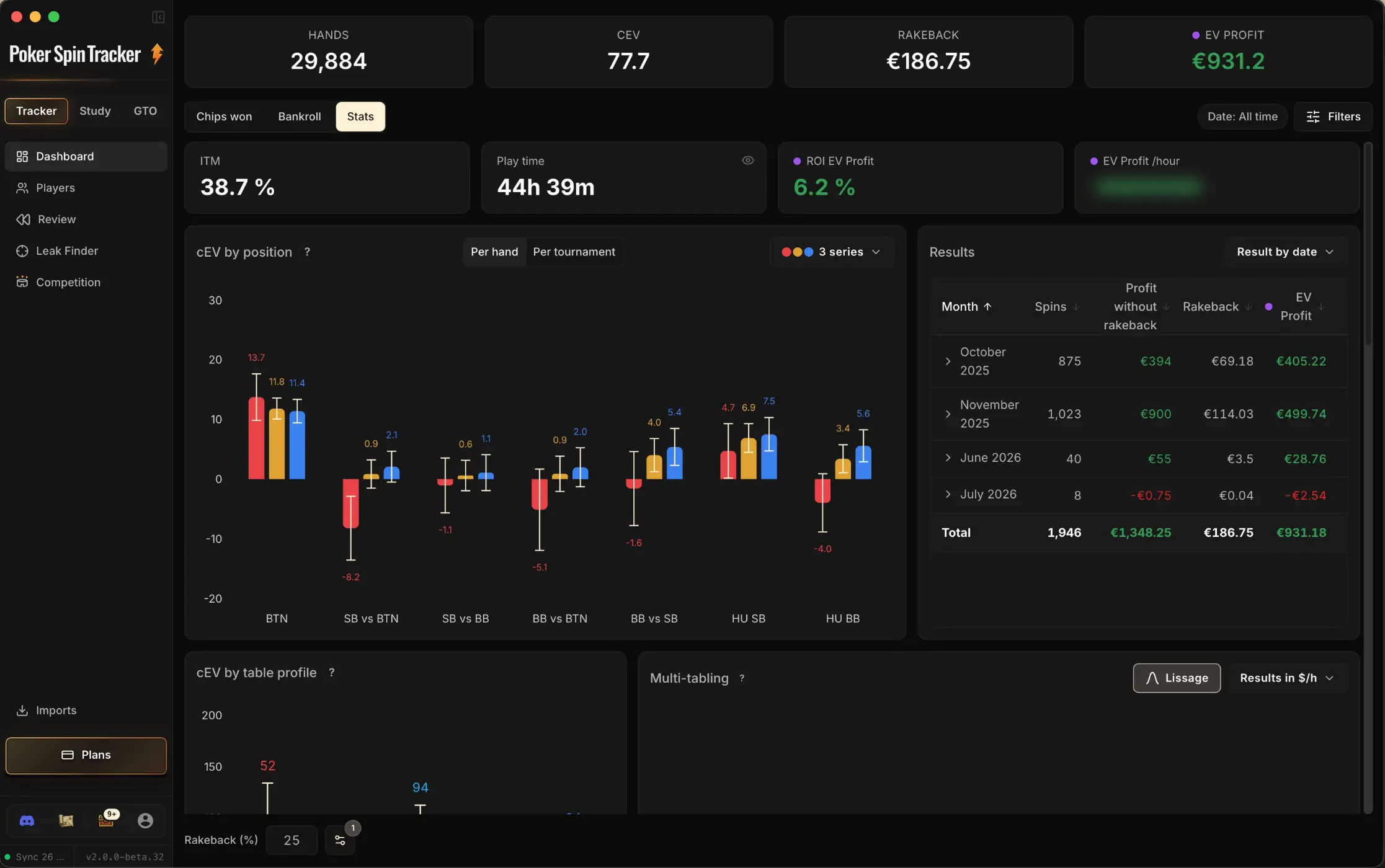
These indicators don't carry the same weight as CEV or Profit, but they provide useful context to frame your activity.

Quick reminder before reading on. In the image above, you can see a small colored dot to the left of ROI and Profit/hour.
This dot indicates the profit mode currently selected (the same one as the main Profit KPI) among the four covered in chapter 2.2 "The 4 profit modes": Profit, Effective EV Profit, EV Profit or EV Multi Profit.
This changes everything: read in Profit mode, ROI and Profit/hour describe what actually happened on your sample, i.e. raw results, affected by variance.
Switched to Effective EV Profit, however, they become true performance indicators, because they neutralize multiplier luck. We'll come back to this section by section.
Reminder: to change the profit mode, simply click on the Profit KPI (top right of the Dashboard). ROI and Profit/hour then automatically switch with it.
1. Average buy-in: the stakes you actually play

The Average buy-in (often shortened to ABI) divides the sum of every buy-in paid over the period by the number of Spins played. 1,000 Spins for €4,700 of buy-ins, and the KPI reads €4.70.
The amount used is the full buy-in, rake included: what actually left your bankroll for each game. It is also, to the cent, the figure used as the denominator of the ROI further down this chapter.
Like every Dashboard KPI, it follows the active filters. Change the period, the room or the buy-in range, and it recomputes on that selection.
2. Play time: your real time at the tables

The Play time KPI shows the total duration during which you were actually at the tables, over the selected period. And the key word here is "actually".
Click the card and it switches to Play time per day: the same duration, averaged over a day. A day played, to be precise: days in the period where you did not fire a single Spin are left out of the divisor. The figure therefore describes the length of one of your actual grind days, not a diluted calendar-month average.
3. Spins/h: your playing pace

The Spins/h KPI counts how many Spins you finish per hour of play. Its denominator is exactly the Play time we just covered: real time at the tables, breaks removed.
All tables combined. Play 4 tables at once for an hour and those 4 Spins count towards that single hour: the KPI rises with multi-tabling, by design.
Click the card and it switches to Spins/h per table: the same throughput, brought back to a single table. This second reading no longer depends on how many tables you have open. It describes the pace of one isolated table, which is, seen the other way around, the average length of a Spin.
The ratio between the two values is your average number of open tables. 60 Spins/h in total and 15 Spins/h per table? You were running 4 tables in parallel over that period.
The two readings answer different questions. Spins/h measures the volume pillar: the lever you pull by opening one more table, or by trimming the dead time between games. Spins/h per table measures the intrinsic speed of the format and the room: it barely moves from one session to the next, which is exactly what makes it useful to compare two rooms.
Keep the decomposition in mind, it comes up constantly: your Profit/hour = average profit per Spin × Spins/h. Opening one more table raises Spins/h, but it often lowers profit per Spin, because the quality of your decisions degrades. The right question is never "how many tables can I open?", but "at which table does the product of the two start going down?".
4. ROI: what fraction of the buy-in you win

ROI (Return On Investment) is the ratio between your profit and the sum of all the buy-ins paid over the period. It's a simple way to know "for every €100 wagered, how much was left for me?"
Concrete example. Over 2,000 Spins at €5, you paid €10,000 in buy-ins. If your final profit is +€300 (rakeback included), your ROI is 300 / 10,000 = 3%. In other words, for every €5 buy-in, you walk away with €5.15 on average.
Like the Profit KPI, ROI follows the active profit mode: Profit, Effective EV Profit, EV Profit or EV Multi Profit. You therefore get 4 different ROIs depending on how you want to read your earnings (again, see chapter 2.2 on the 4 profit modes).
Honestly, ROI in Profit mode is of little use: it describes a result you already know (Profit in euros). It becomes a bit more interesting when you switch to Effective EV Profit: you then get the ROI you should have had on your sample, without multiplier variance.

5. Profit/hour: your true hourly rate

Profit/hour is arguably the most useful of the 5 secondary KPIs. It divides your profit by the play time seen above, to give your average earnings per hour actually spent at the tables.
This point is worth emphasizing: the denominator really is the effective play time, not the session time in the broad sense. In a 2-hour session, if you took two 15-minute breaks to reply to messages or grab a coffee, the tracker only counted 1h30 of play time. Your Profit/hour is therefore computed over those 1h30.
Consequence: the Profit/hour shown by Poker Spin Tracker is slightly higher than what you would get by dividing your profit by the total duration of your sessions (breaks included).
Like ROI, Profit/hour follows the active profit mode and offers 4 variants. And as with ROI, it's by switching to Effective EV Profit that the indicator truly comes into its own: you get the €/h you should have made on your sample, neutralizing multiplier luck.
Behind this technical wording lies, in reality, the most important metric in the whole tracker. Every Spin player, from beginner to pro, spends their time trying to optimize this single number. And to optimize it, there are only three levers, the three pillars of the Spin player covered at the very start of module 1:
- Pillar 1 · volume: play more hours at the tables, or more tables in parallel. That is precisely what Play time and Spins/h measure above.
- Pillar 2 · table quality: choose your rooms, your buy-ins and your time slots based on the fish/reg ratio.
- Pillar 3 · skill: improve technically, reduce your leaks, gain precision both preflop and postflop.
So if there really is one absolute metric to monitor in the tracker, it's your Profit/hour in Effective EV Profit mode.
As a Spin player, you'll aim to push this number from 0 to €30, €40, maybe €50/h as you progress. Reaching €50/h in Effective EV Profit would be a huge achievement.
Key takeaways
The Stats tab complements the 4 main KPIs with 5 other indicators. Four of them (Average buy-in, Play time, Spins/h, ROI) mostly provide context: they tell you at what stakes, for how long and at what pace you played. The fifth, Profit/hour in Effective EV Profit, is quite simply the most important metric in the tracker for a Spin player.
• Average buy-in: total buy-ins divided by the number of Spins, i.e. the stakes you actually played over the period.
• Play time: real time at the tables, computed by cutting out breaks longer than 1 minute between 2 Spins. One click gives the average per day played.
• Spins/h: your pace, all tables combined. One click gives the pace of a single table. The ratio between the two is your average number of open tables.
• ROI: average fraction of the buy-in won. An indicator, nothing more.
• Profit/hour in Effective EV Profit: THE metric to watch. It's what every Spin player tries to maximize, via the three pillars (volume, table quality, skill).