The Global EV tab
The most powerful tab in the tracker. Take your time, we'll go step by step.

Gandalf
Co-founder of Poker Sciences
The Preflop tab gives you a direct comparison between what you did and what you should have done. The Postflop tab gives you clues about your deviations through the vs Reg comparison. The Global EV tab, for its part, tells you how much each hand earns you, in every situation.
That's where the name Global EV comes from: this tab is there to study your EV globally, hand by hand, situation by situation. It's the most powerful tab in the tracker, and the densest one conceptually.
You may not understand everything in a single read, and that's normal. This is real long-term work. You'll have to come back to it, try things out with your own data, test, and so on.
A quick word on vocabulary: the EV shown in this Global EV tab is the CEV you already know from the Chips won tab of the Dashboard . Except that here it's displayed in bb per hand.
The difference is that the Global EV tab doesn't show it as one global curve: it breaks it down hand by hand, in every situation.
The classic mistake in Spin is staying glued to the EV (chips) curve (which, as a reminder, is what your CEV is computed from): it tells you whether you're winning or losing over time, but neither where, nor why.
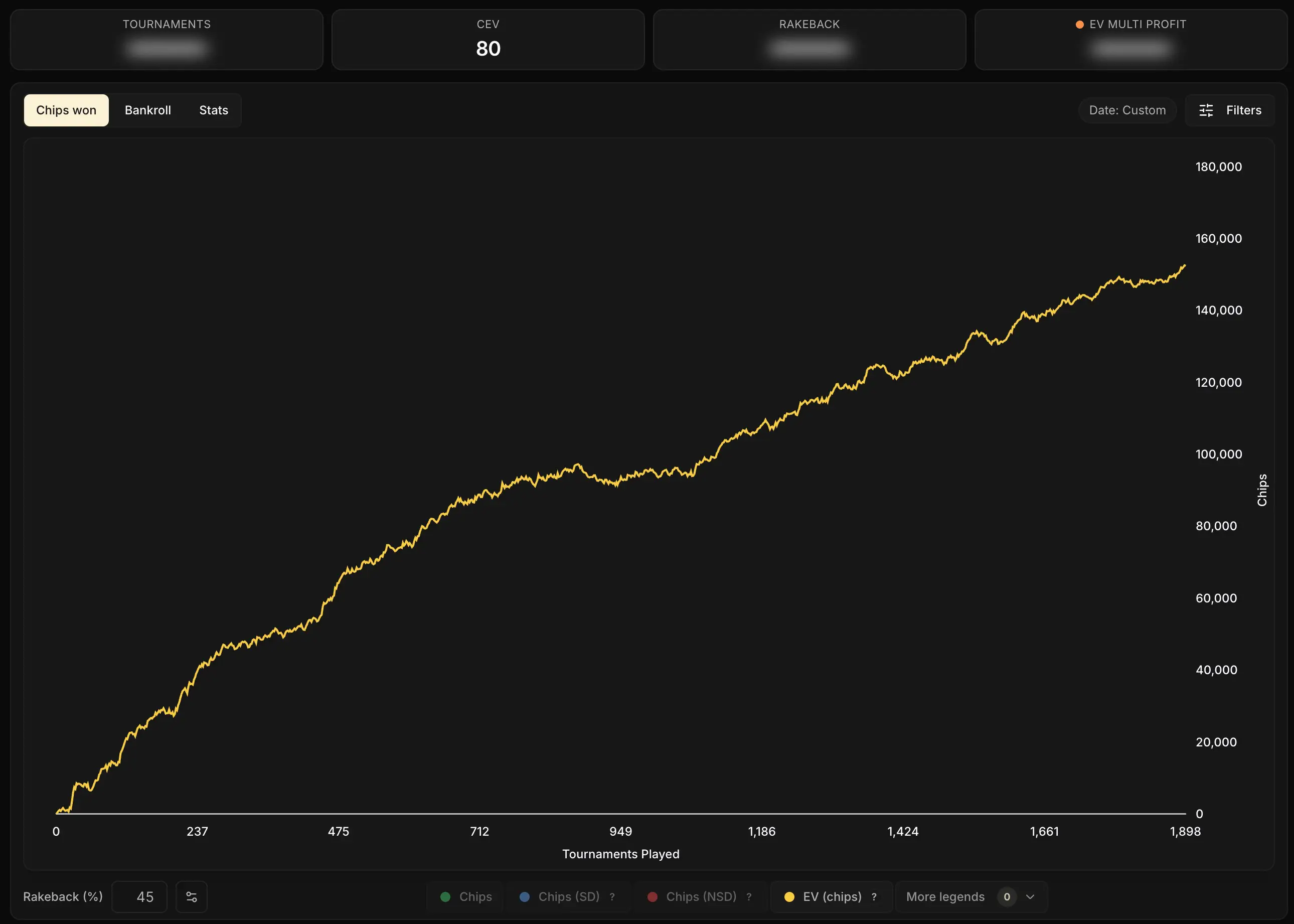
The real work starts by breaking down your EV situation by situation, to see exactly where you generate it, where you let it slip away, and to isolate the leaks.
That's precisely what this Global EV tab allows, and what the global curve never will.
To carry out that breakdown, the tab puts four complementary tools at your disposal, and each one deserves a thorough explanation:
- the standard grid, what you see when you land on the tab
- the vs GTO comparison
- the Compare Actions mode
- the Best Action mode
We're going to go through all of it in detail. Hang on.

1. The standard grid: your raw EV per hand
When you land on the Global EV tab for the first time, no mode is enabled. The grid directly displays your average EV in bb per hand for every combo you played.
Anyone used to solvers will recognize the format: those tools often display the theoretical EV of each hand in a given situation. The Global EV tab, for its part, displays your average real EV.
By real EV, we simply mean the EV you actually made at the tables.
Here's an example on the 3-max BTN, 20 bb+ situation:
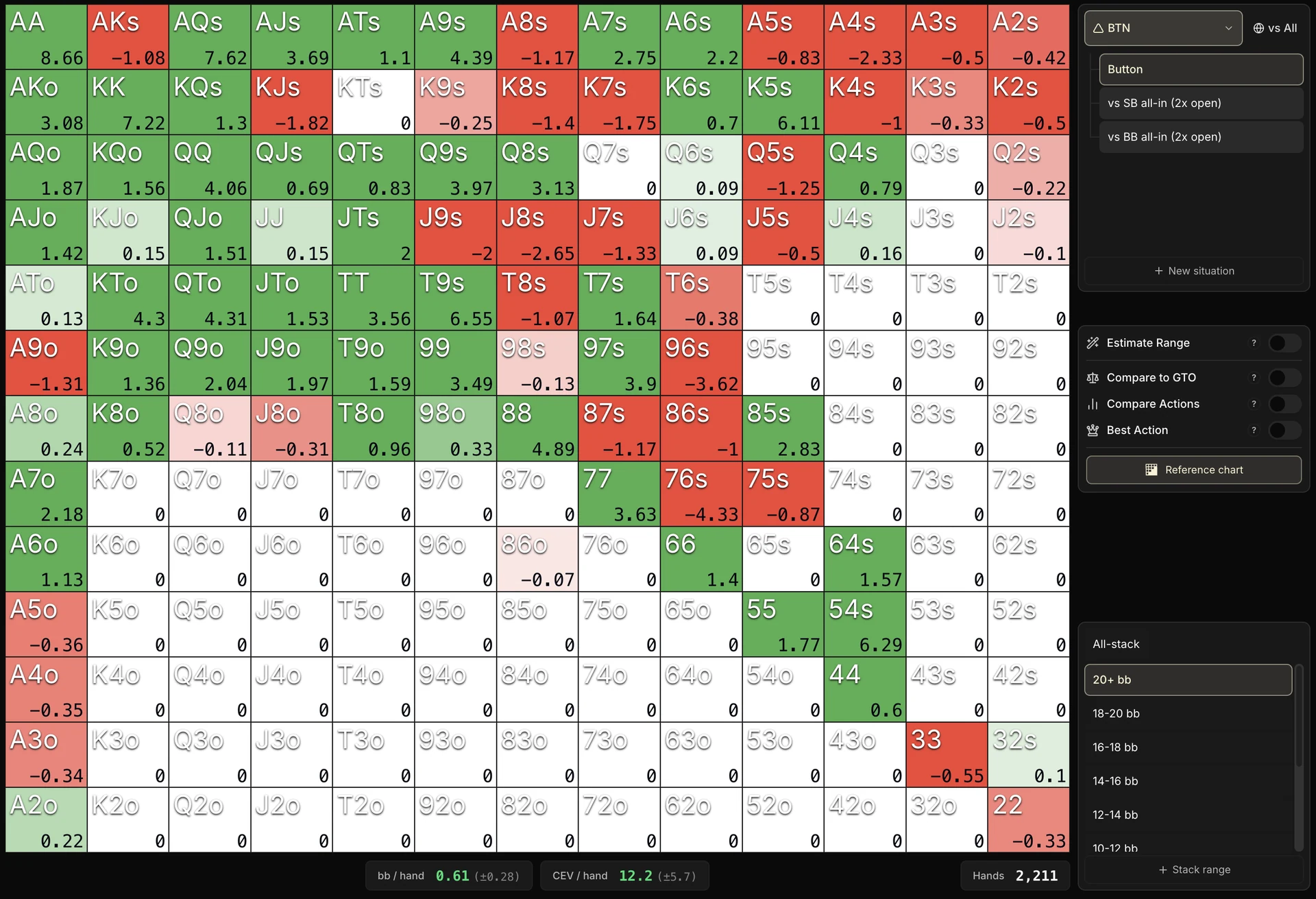
How to read it: from the image above, we can conclude that on average at BTN, at 20+ bb, you win 0.52 bb every time you're dealt K8o.
You'll notice a gradient running from red to white to green. What does all that mean?
| Cell appearance | Meaning |
|---|---|
| Saturated green (≥ +0.5 bb/hand) | Very profitable combo. You win on average at least half a big blind every time you play this hand. |
| White (~0) | Break-even combo. You neither win nor lose EV on average on this hand. |
| Saturated red (≤ -0.5 bb/hand) | Very costly combo. You lose on average at least half a big blind every time. |
| Gray | No data. You have never played this combo in this situation, and the Estimate Range mode isn't enabled. |
| Marked "≈" | Purely estimated data. The combo has never been played, but the tool estimates its value from the nearest neighboring combos if you ticked Estimate Range |
Each value is compared to the fold
I lied to you a little, to keep things simple. The number in each cell isn't the absolute EV of the hand. It's the EV of playing it, compared to the EV of folding it.
That makes the grid very simple to read:
- Green: you win more by playing this hand than by folding it.
- White: you'd make as much EV folding as playing it.
- Red: you'd simply be better off folding this hand.
This mechanic makes reading simple and universal, whatever the position.
At BTN, folding costs 0, so the number = the real EV. In SB and BB, folding already costs 0.5 bb and 1 bb, but the grid sets those aside: if it showed them, every cell would shift toward red, and you could no longer judge a decision at a glance.
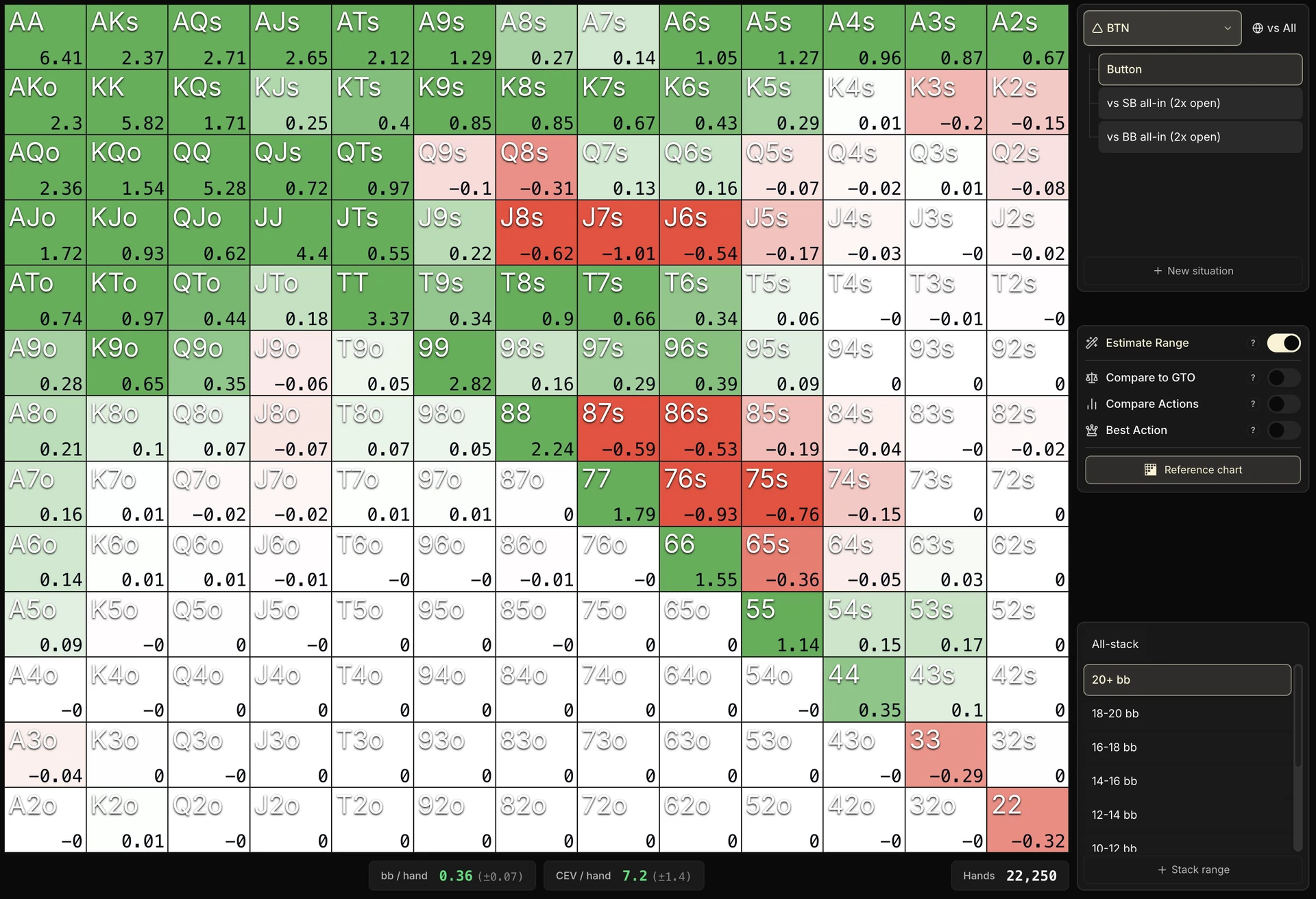
On this grid, still at BTN 20 bb+ but with many more hands, you start to seriously wonder whether this player has a leak with his low suited connectors and his low J suited: the pattern persists despite the volume.
For now these are only hypotheses, but they deserve to be dug into. Good news: as we'll see, the tool knows how to answer that.
The KPIs at the foot of the grid
At the bottom of the grid, you'll find a few very important pieces of information:
- bb / hand: your average profitability, weighted by your volume across all combos. On the screenshot below, with 2,211 hands, the player makes +0.61 bb/hand at BTN 20 bb+.
- CEV / hand: that average EV translated into net chips.
Watch out for the trap: this is the net chip winnings, invested blinds included (unlike bb/hand just above). In SB for example, if you fold 100% of the time, your CEV/hand will be -0.5 bb while your EV in bb/hand stays at 0, as explained earlier.
bb/hand vs CEV/hand
bb / hand therefore only measures your decisions (folding = 0). CEV / hand counts the whole hand, to stay consistent with the CEV
- Hands: the total number of hands aggregated in the grid.
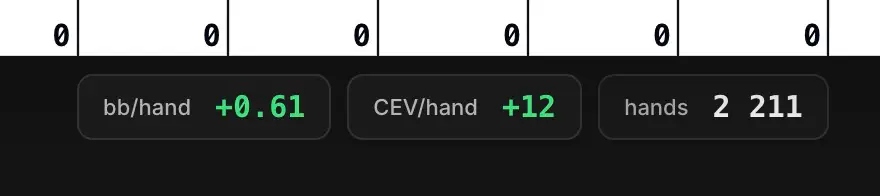
- Uncertainty: the statistical margin of error on your data, at 90% confidence. The bigger the sample, the smaller it gets.
The total uncertainty is displayed in parentheses (±) right next to the bb / hand and CEV / hand KPIs. The uncertainty of each cell, for its part, is displayed when you hover over the cell.

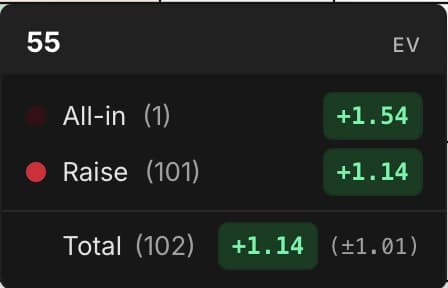
This information is very important. It directly answers the question we asked ourselves earlier:
Is this a real leak, or just variance?
How do you use it concretely? You compare the uncertainty with the value displayed in each cell.
On the 22,250-hand sample, the typical uncertainty of a cell is around ±0.75 bb. That means the true EV of the cell sits, with 90% confidence, within a band of ±0.75 bb around the displayed value.
A few concrete examples
- A cell displayed at -2 bb with ±0.75 of uncertainty: the true EV probably sits between -2.75 and -1.25 bb, so still negative. The signal is solid.
- A cell displayed at -0.5 bb with ±0.75 of uncertainty: the true EV could very well be positive (between -1.25 and +0.25). That's far too close to conclude anything.
Now look at the red zones we suspect of being a leak. Even if some individual cells sit close to the uncertainty, the cluster of negative-EV cells in one coherent spot changes everything: the odds that all those cells are simultaneously negative by chance are very low.
Where an isolated red cell could be a coincidence, a cluster almost never is.
Conclusion on this sample: either consider folding these hands, or go and analyze the spots involved in more depth to understand what's going wrong.
A tip to gain volume
You can always add a neighboring stack size in the sidebar to pool the hands and shrink the uncertainty.
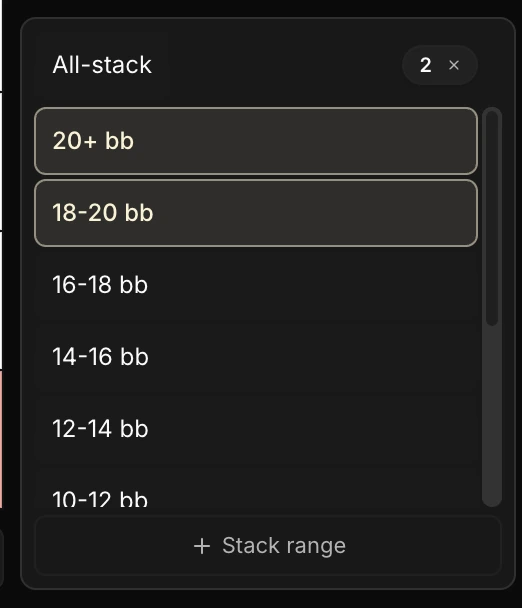
Note that the uncertainty shrinks with the square root of the sample: to halve it, you have to multiply your volume by four.
That's why the Global EV tab only really becomes usable from several thousand hands per situation onward, and why some rarer situations stay volatile for a long time.
The Estimate Range toggle
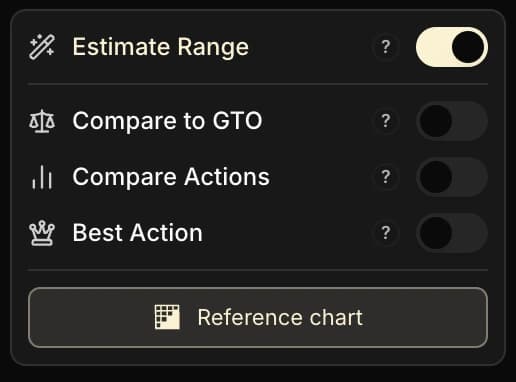
You may have noticed an Estimate Range toggle in the sidebar. It creates a smoothed version of your grid from the hands you actually played: cells with no data are estimated from the nearest neighboring combos.
Enabled, you see a full grid: the combos you have never played are marked with a "≈", their value is entirely estimated. Disabled, you only see your real data.
Well worth enabling to make the grid easier to read, but worth switching off from time to time to get a proper sense of your real data. As always with this kind of tool, keep in mind that these are estimates.
The limits of this default grid
This grid looks nice, but it is in fact indicative only and won't be very useful to you as it stands.
Why? Because apart from this question:
Would I be better off folding some combos?
... the grid won't give you many answers.
Let's take a concrete example. If you over-fold considerably in HU SB vs BB (which is often the case with beginners), the HU SB vs Fish grid will give you white cells (EV = 0) for every combo you folded.
You won't know that you have a leak, nor how much EV you're leaving on the table.
And it's the same everywhere: nothing in this mode tells you whether you're winning "enough", "not enough", or on the contrary whether you're crushing your field in the situation you're studying. You only get access to your raw data.
It's a bit like analyzing your chips won curve on the Dashboard : over the long run you know whether you're winning or losing, but the analysis hardly goes further.
It's that limit which justifies introducing the Compare to GTO mode. But before that, let's take a moment to present the situations covered by the Global EV tab.

2. The 8 situations covered
Global EV is organized around 8 parent positions.
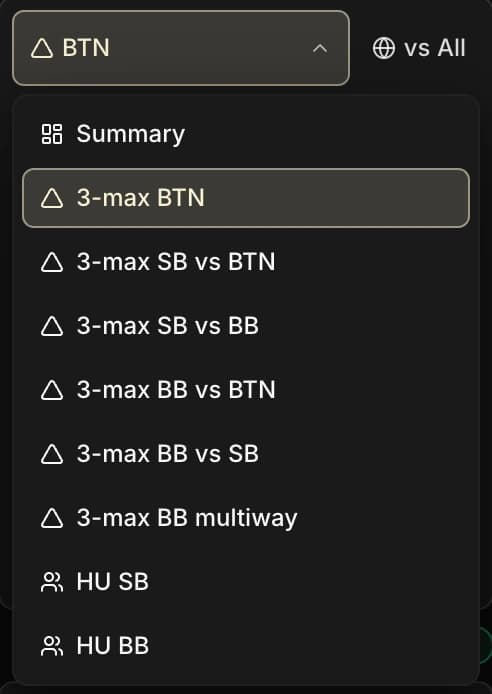
Parent situations in 3-max
- Button: every time it's on you to open at BTN.
- SB facing the Button: every time the BTN has entered the pot and it's on you to act in SB.
- SB facing the BB: every time the BTN has folded and it's on you to open in SB.
- BB facing the Button: every time the BTN has entered the pot and it's on you to defend in BB, whatever the SB does.
- BB facing the SB: every time the BTN has folded, the SB has acted, and it's on you to respond in BB.
- BB multiway: every time the BTN and the SB have both entered the pot, and it's on you to act in BB.
Parent situations in Heads-Up
- SB: every hand where you're in SB.
- BB: every hand where you're in BB, whatever the SB does (including when it folds and you win the blind).
Several of these parent situations break down into more precise child situations.
For example, by clicking on SB facing the Button, you can see the total EV of your hands for every time the BTN entered the pot, then break it down by what he did: vs limp, vs open 2x, vs all-in.
That way you can analyze your EV more precisely in the SB vs BTN open 2x situation, for example.
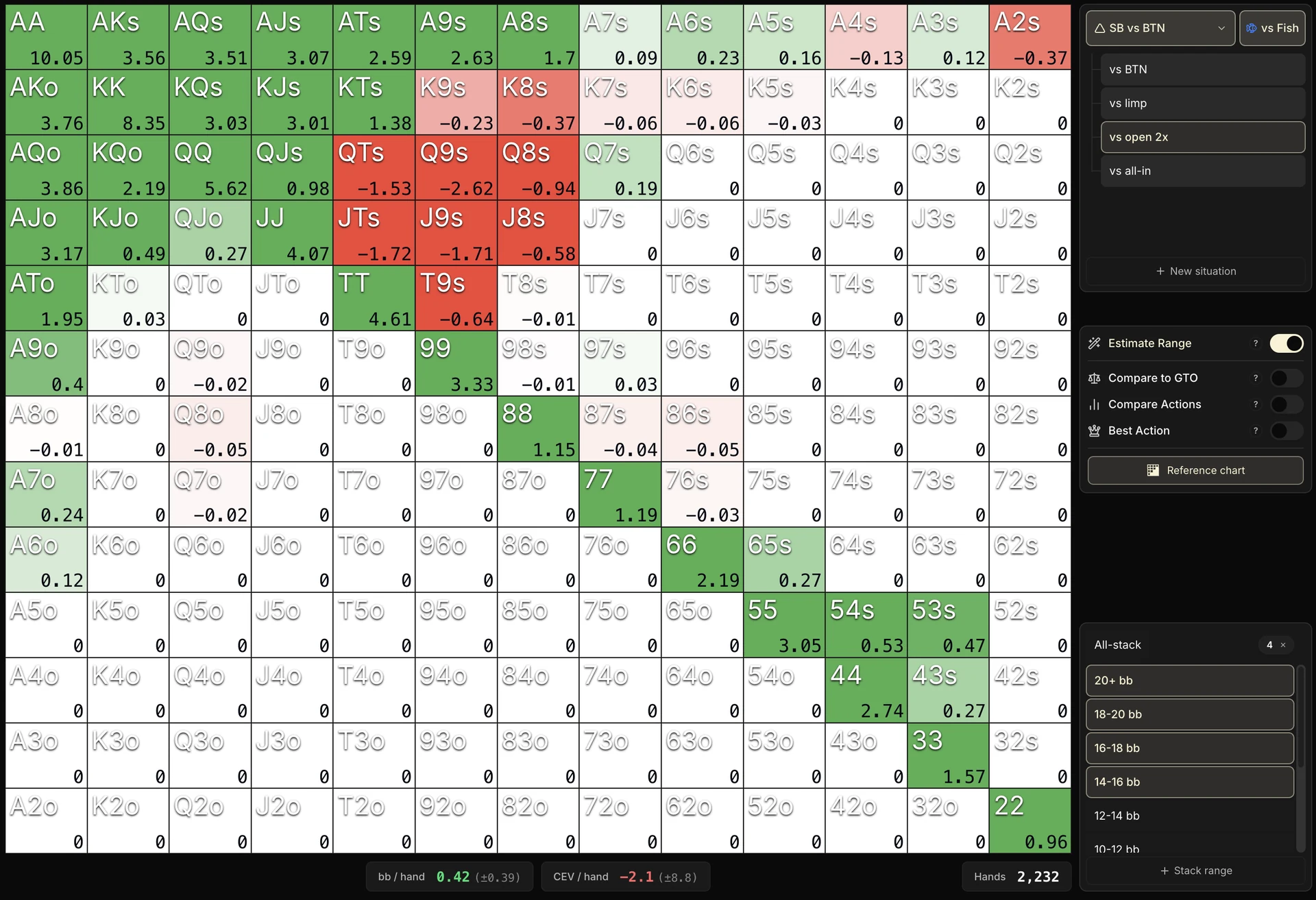
In this example in SB facing a 2x open from the BTN (Fish), the grid is mostly green: the player is doing rather well in this child situation. A few red cells remain on some broadway-type suited hands (QTs, Q9s, JTs, J9s).
But with such a thin sample (2,232 hands) and a huge uncertainty (the total CEV, -2.1, is displayed at ±8.8), it's impossible to see anything but noise for now.
With more volume, if those red cells persisted, you could wonder whether the action or the sizing chosen are really suited to recreational players. Good news again: we'll see a bit further on how to settle it.
Now we're going to tackle the three advanced modes: Compare to GTO, Compare Actions and Best Action.
Hang on tight, this is going to get technical, but it's really worth it.
3. Compare to GTO: measuring your gap to equilibrium
Before we get into this mode, we need to lay a few foundations.
This part is a bit theoretical, but it's essential to understand what comes next, and to really get value out of the tool.
A starting point: poker is a zero-sum game
If you play a Spin against 2 opponents at your level, you'll win 0 chips per Spin in the long run.
And that holds whatever the player type: 3 fish among themselves will make 0 CEV exactly like 3 regs among themselves.
3 players of equal skill playing only against each other will always have a CEV of 0 in the long run.
So in Spin, when you look at your CEV, you're unknowingly comparing it to a baseline worth 0. Having +50 CEV means you exploit your opponents to the tune of 50 chips per Spin.
Without ever meaning to, all this time you've been comparing your results to an equilibrium of 0 to measure your edge.
But a situation or a hand is not worth 0 EV
Let's go further. If playing against opponents at your level gives you 0 CEV overall, that does not at all mean that every one of your actions in every situation is worth 0.
It's the sum of all your actions across all your situations that will be worth 0.
That 0 is the sum of thousands of different cases: the times you had AA and won big, the times you stole the blinds on the BTN, the times you lost a small pot in the BB, the times you called an all-in with 22 against 66 and lost, etc., etc., etc.
That leads to two important points:
- Each poker situation (BTN, SB vs BB, BB vs BTN, HU SB...) is not supposed to make 0 EV in the long run, even against opponents at your level. The total is, the situations taken one by one aren't.
- Each hand within a given situation isn't supposed to make 0 EV either. Strong hands earn, weak hands lose.
Structural EV: your reference for each situation
That brings in a key concept: structural EV.
It's the EV you're supposed to make in a given situation if you play against 2 opponents at your level.
Your total structural CEV is 0 (equilibrium is 0, as we just said). But on the BTN, your structural CEV might be +20. In the SB maybe +4. In the BB maybe -24.
The total does come to 0, but you are supposed to win 20 on the BTN, 4 in the SB, and lose 24 in the BB (careful, these numbers are only examples).
What is it good for, concretely?
For pinpointing your leaks with precision.
Imagine you make +10 CEV on the BTN, +10 in the SB, and -5 in the BB. At first glance, you might think you're solid on the BTN and in the SB, but not in the BB.
But look at the structural EV: you're exploiting your opponents in the SB (+10 vs +4 expected) and in the BB (-5 vs -24 expected), but you're being exploited on the BTN (+10 vs +20 expected).
So it is on the BTN that you need to dig to find your room for improvement, whereas the raw reading would have suggested the opposite.
The right benchmark is not zero
It is not your raw result that counts, but its gap to what the position is expected to yield. Here, the BTN's +10 hides a leak, and the BB's −5 hides your biggest exploit.
The numbers given here are examples. There is no single structural CEV value for each position: it changes with the starting stack and the blind duration, among other things.
How do we know this structural EV? Thanks to solvers.
They have computed the theoretical EV in every situation for every combo, and let us know exactly the expected EV in each case.
The Compare to GTO mode
Now that these concepts are in place, we can talk about the Compare to GTO mode.
We could also call it:
Compare my EV to the GTO equilibrium
or...
Compare my EV to what is expected of me
So, concretely, what does this mode do? It no longer shows your raw EV: it displays the gap between your EV and the EV expected in GTO.
In other words, your winnings compared to those expected in a balanced environment.
That is, how much you win (or lose) compared to the EV a GTO solver would have made on the same combo, at the same stack depth, against a GTO opponent as well.
The tool calibrates the comparison by stack depth (whole stack by whole stack: 9 bb, 10 bb, 11 bb...), then takes an average weighted by the volume you played at each depth.
It's an “apples to apples” comparison: your EV at 10 bb is not compared to the GTO EV at 20 bb.
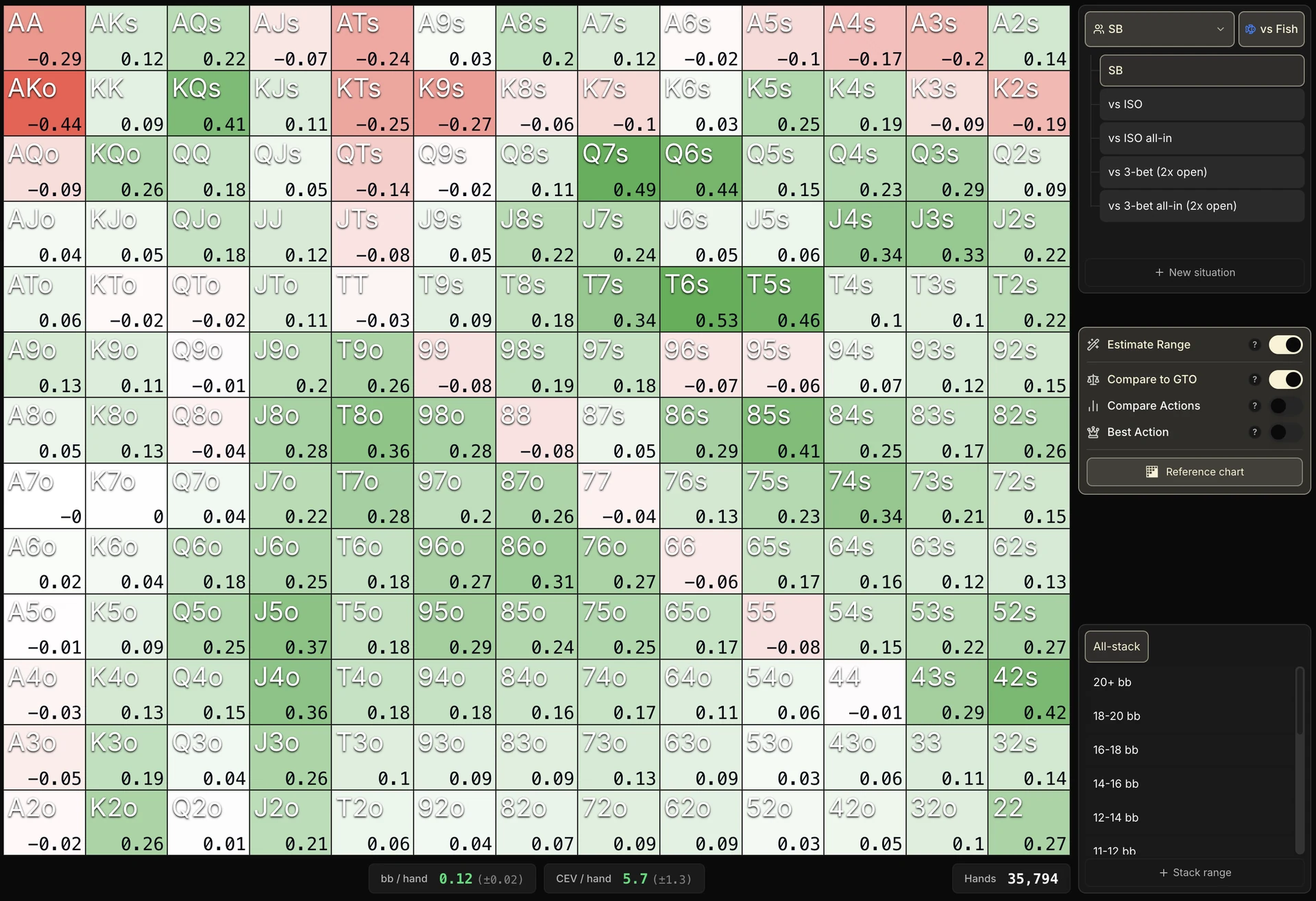
Don't worry if this isn't perfectly clear yet, we're going to take an example where we have plenty of data: HU SB All-stack vs Fish, with the Compare to GTO mode turned on.
It's often the situation with the largest cumulative volume, so the uncertainty drops very low and we can start reading the grid with confidence.
Reading the colors
| Color | Meaning |
|---|---|
| White | You win as much as GTO theory does. In practice, that often means your opponents play as well as you do, or that with these combos in this situation you haven't found an exploit against them. |
| Green | You are exploiting your opponents. Your EV is above the EV you are actually supposed to make on the same combo in that same situation. |
| Red | You are being exploited. Your EV is below that of an environment at equilibrium. Big warning: we will see further on that this does not at all mean you play the spot badly, nor that you absolutely have to change something. Read what follows carefully to understand it all. |
What colors would the cells of the grid mostly be for a player who played exactly GTO against Fish?
The big difference with the default grid is that without the Compare to GTO mode, red = you're losing money.
Here, red = you may be winning money (or not), but less than theory would win against GTO opponents.
And green = you may be losing money (or not), but you lose less than GTO would lose vs GTO.
Reading benchmarks by stake level
- Low stakes: your grid should be mostly green. The pool makes a lot of mistakes, and every mistake you avoid turns into a positive delta vs GTO. A white grid at low stakes is a bad signal: it means you are exploiting nothing. Once again, we will come back to the special cases, so read all the way to the end.
- High stakes: you naturally get closer to white. The game is harder, opponents' mistakes are rarer. But to beat the rake and stay a winner, your overall average still has to lean slightly toward green.
Three traps to avoid
Trap 1: don't fixate on combo-by-combo values
Let's go back to our HU SB All-stack vs Fish grid. You can see that your biggest hands (AA, AKo) and a few suited broadways (ATs, KTs) show up red, while the rest of the grid is overwhelmingly green.
The uncertainty on each cell, ±0.33 bb, is still high, but a trend in that direction is taking shape.
If you have followed along so far, you might tell yourself:
The fish are exploiting us with our best hands.
It's tempting, because we don't win as much as GTO would win in an environment at equilibrium.
But careful: we are technically “exploited” on these combos relative to theory, yet that does not at all mean there is a leak.
What is really going on?
The most likely hypothesis is that recreational players in the BB don't ISO much, and more broadly stay fairly passive postflop, letting you realize your equity.
Too passive means you will less often have to pay off their ISO followed by multi-barrels, or their ISO all-in while you hold AA.
Conversely, you will more often see flops with hands like J3o, J2o, T3o.
The fish exploit you without meaning to when you have very strong hands (theory would have won more with those same hands because it would have faced more aggressive opponents), but they get exploited far more when you have trash.
Another warning
This does not mean you should change the way you play your strong hands in this example.
It simply means you win less than theory on these combos. Maybe you are already winning the maximum possible against a fish opponent, and that is perfectly fine.
What really matters
Without diving into combo-by-combo detail (which mostly serves to understand EV dynamics and the way the pool plays), what matters is checking whether your range as a whole makes more EV overall than theory.
If it does, you have an edge in this situation. If not, you are losing there.
And as always, look at the total uncertainty to make sure your read isn't noise.
On our HU SB All-stack vs Fish screenshot, we read +0.12 bb/hand with a total uncertainty of ±0.02 bb.
The delta is far larger than the uncertainty: we can conclude with confidence that this player really is exploiting their pool in HU SB, despite the red cells on certain combos.
Trap 2: don't isolate a child situation
The second trap is even sneakier. You will inevitably run into it as soon as you drill down into a child situation (HU BB vs SB all-in, vs SB open, vs SB limp, etc.).
Let's take an example by looking at our EV in HU BB vs SB all-in (Fish), All-stack:
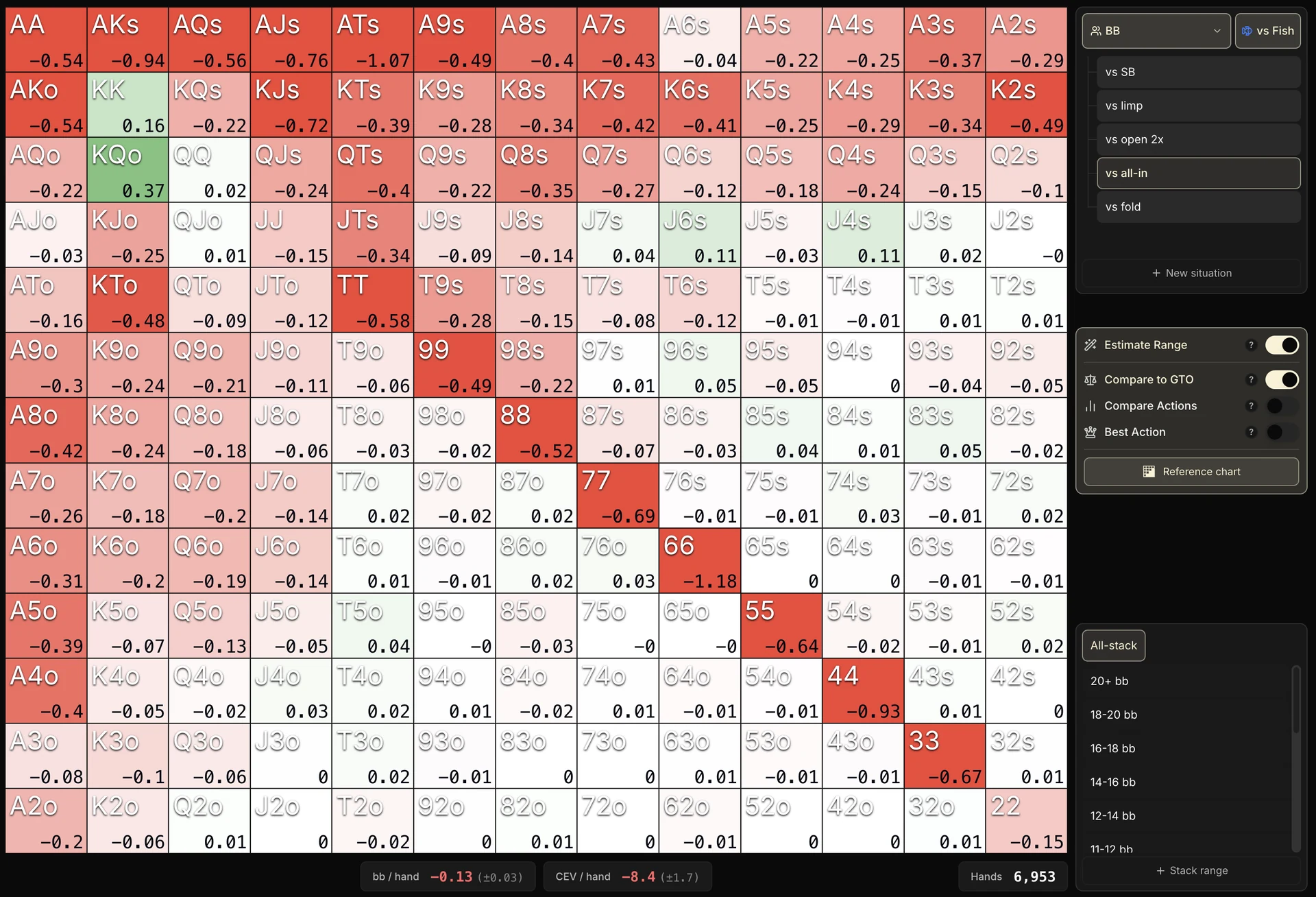
Looking at this grid, at first glance you might think it is a disaster:
The fish completely exploit us when they go all-in, because we win way less than GTO!
But not so fast.
What is really going on? We can assume that recreational players don't open-shove enough across the whole range of stack sizes.
The consequence of that lack of OS is that your strong hands don't get to call an opponent holding a dominated hand very often. So that kind of strong hand will make less EV than theory would have made against a competent player who would often OS with dominated hands.
Should you call less? Absolutely not.
Yes, you are being exploited by the fish in this specific situation, but that does not mean there is a leak: you are simply winning less than theory would have won in a more aggressive environment.
So where does the missing EV go?
If the fish rarely OS and we make less EV than expected on the vs all-in child situation, and we know that on the HU BB parent situation we exploit our opponents, then it means we win even more in other child situations.
And that is exactly what happens. Let's now look at the vs SB limp child situation:
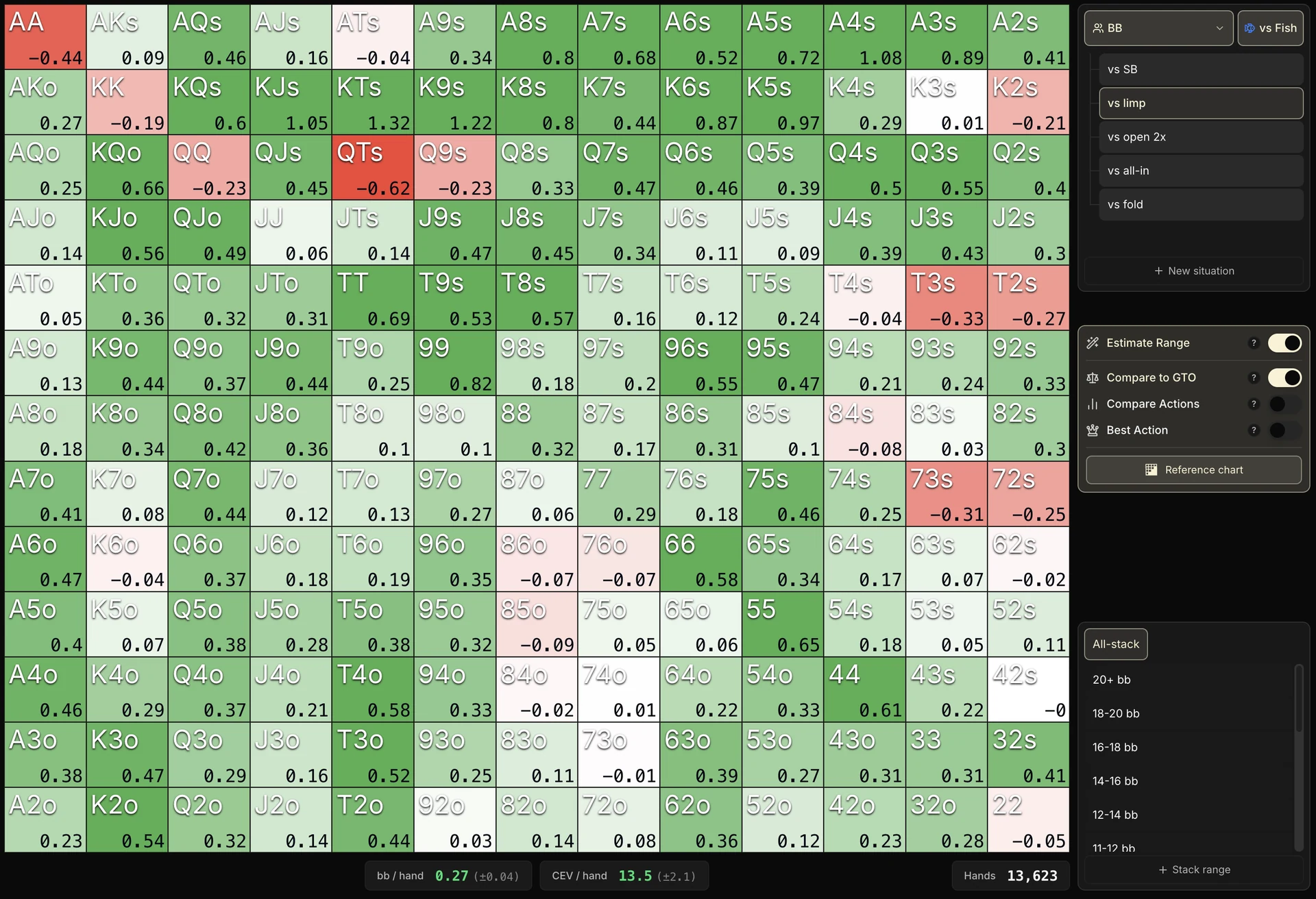
We win a lot of money vs fish in this situation. Why? For the opposite reason: if the fish don't OS enough, that also means they limp too much.
And if they limp too much, they let you realize your equity more often than expected, so you win more than theory would win against a decent player who would have limped less.
This is nothing but an EV transfer between child situations.
The apparent loss on the shove range is largely offset (and even outweighed) by the gain on the limp range. Overall, on the HU BB parent situation, you really are exploiting your opponent.
The trap is drawing a conclusion from the EV of a child situation in isolation. What measures your real edge is the cumulative EV on the parent situation.
A child situation can look catastrophic while, in the wider frame, you are heavily exploiting your opponent. Always zoom out before concluding.
So what is combo-by-combo and child-situation analysis good for?
You may legitimately wonder why you would drill down into combo-by-combo detail (trap 1) or into child situations (trap 2) if those reads can be misleading.
The answer: this level of analysis is above all there to understand the pool's dynamics, and sometimes even to directly deduce your opponents' leaks (the fish who don't ISO enough, who limp too much, who don't call enough, etc.).
To find your own leaks, two complementary approaches:
- Look at the total EV of the parent situations. That is what tells you, at your scale, where you really win and where you lose.
Note: the Summary view of this tab, which we will see at the end of the chapter, does exactly that recap of each parent situation vs Fish and vs Reg, so you can read it at a glance. - Apply critical thinking to the red cells. Ask yourself whether they match a pattern consistent with your opponents' leaks (in which case there is probably no leak on your side, just an EV transfer), or whether on the contrary they form a suspicious cluster independent of the pool's known dynamics, which would then be worth digging into.
Trap 3: variance
This is the same issue as on every tab, but even more so here. Global EV really needs a lot of data to produce reliable signals.
Always remember to read the uncertainty at the bottom of the grid, next to the bb / hand and CEV / hand KPIs and to lean on it before drawing the slightest conclusion.
Ignore isolated red cells. A lone red cell in the middle of green ones is almost always statistical noise. On a limited sample, the EV of a single combo can swing hard because of one big hand lost. Do not overreact.
Look for zones, not cells. A cluster of connected red cells (all the middle pairs, say, or all the low Axs) is the sign of real information, not statistical noise.
Then it remains to be interpreted (traps 1 and 2 above): an opponent's leak, an EV transfer between child situations, or a genuine leak of your own. That structure is what you should hunt for, not individual outliers.
One last thing to note: on some atypical situations (Button limps, multiway spots, certain 3-bets), no GTO reference exists and this mode is disabled.
So if you can't turn this mode on, it is not a bug: it is simply that no reference exists to compare against.

4. Compare Actions: what if I had played something else?
Now let's move on to the Compare Actions mode, another very powerful EV tool.
The Compare Actions mode answers a question no other tool addresses so directly:
In a given situation, which action would have earned you the most?
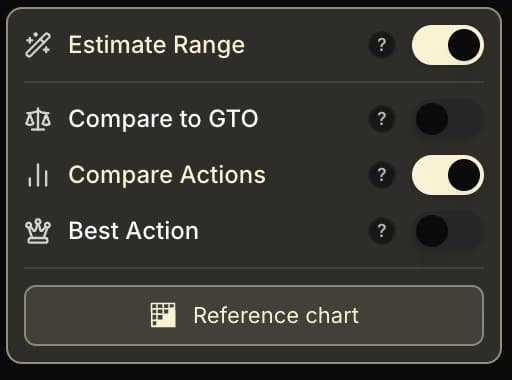
To turn it on, click the Compare Actions toggle in the sidebar. It changes the color of the cells and opens a floating panel (draggable): Action 1 on top, Action 2 below, separated by a "VS".
There you tick the actions to compare on each side. The raise sizings appear as sub-rows: so you can also compare, for example, a Raise 2x with a Raise 2.5x+.
A concrete example
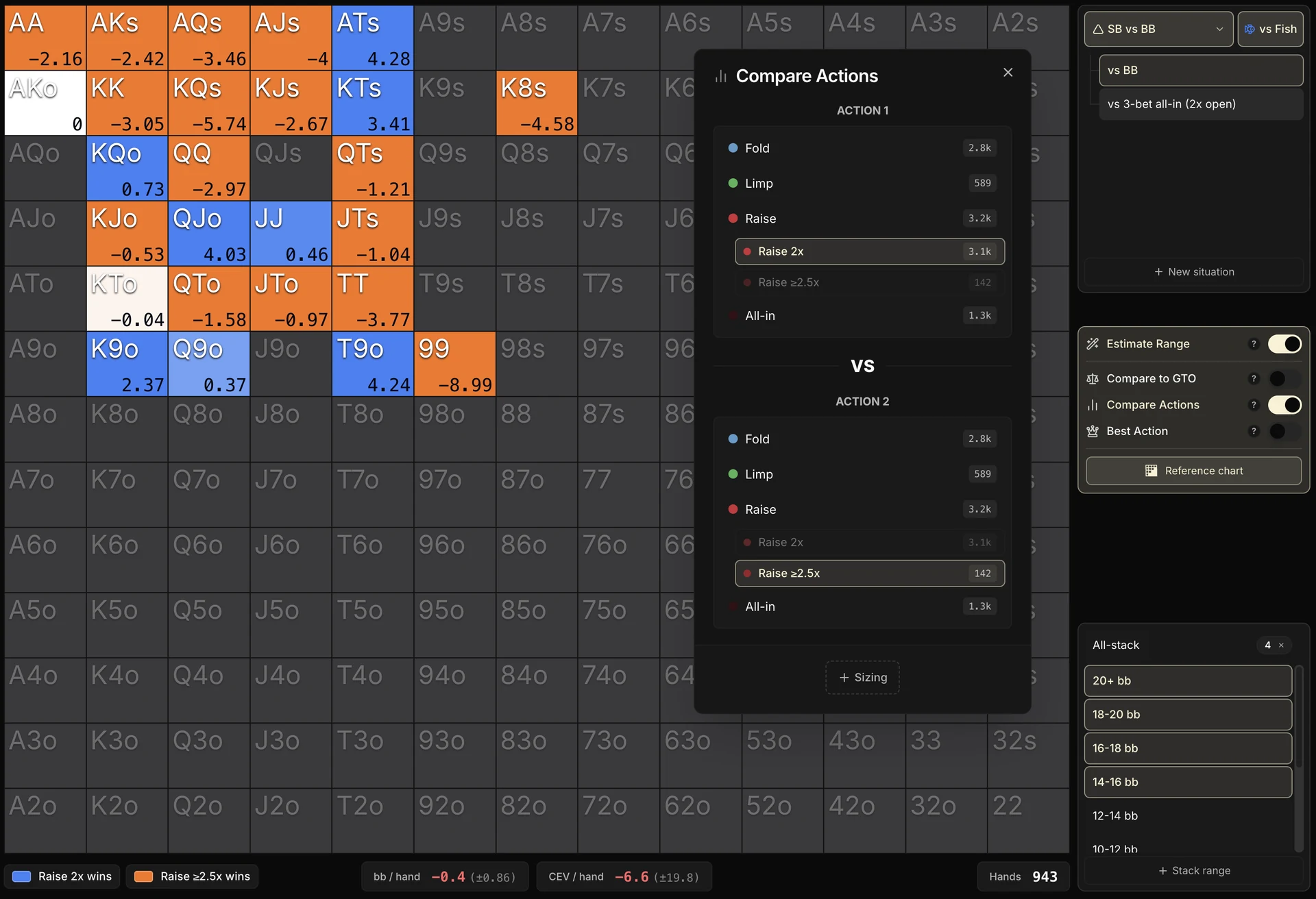
Take the 3-max SB vs BB situation. You might wonder: between Raise 2x and Raise 2.5x+, which open sizing earns the most against Fish?
So we select 3-max SB vs BB vs Fish in the right-hand panel, tick the 14 bb+ stacks to get as much data as possible, then in the panel we set Raise 2x as Action 1 and Raise 2.5x+ as Action 2.
How is each cell calculated?
The difference between your average EV with Action 1 and your average EV with Action 2, on that combo. That's all there is to it.
In practice, the tool takes every time you played Action 1 on that combo, averages the EV you got, does the same for Action 2, then displays the difference.
If Action 1 earned more, the delta is positive and the cell is blue. If Action 2 is the one that earned more, the delta is negative and the cell is orange.
Two reading scales. When you hover a cell, a panel details the EV of each action on that combo: you see right away which one comes out on top.
And across the whole grid, the bb / hand KPI in the footer runs the same calculation, averaged over your volume: it's your overall EV(Action 1) − EV(Action 2).

The legend card, below the grid, sums it all up in one sentence: for example "Call earns +0.35 bb/hand more than Raise" on that sample.
Reading the screenshot
In our example, the summary below the grid shows -0.4 bb/hand: overall, Raise 2.5x+ would have been slightly more profitable than Raise 2x on that sample.
Looking at the individual cells, we find an intuitive consistency: the biggest hands (AA, KK, QQ, AKs, AQs) lean toward the big sizing (orange, Raise 2.5x+), while several hands like ATs, KQo, QJo or K9o prefer the small sizing (blue, Raise 2x).
Consistent with the idea that you extract more value with a big sizing on the top of your range against a fish.
But look at the uncertainty. Here, the total uncertainty (±0.86 bb) is even bigger than the delta (-0.4 bb): impossible to conclude. And no wonder: the Raise 2.5x+ only has 142 occurrences against more than 3,000 for the Raise 2x, so its average is extremely volatile.
That said, the fact that most of the big hands come out orange isn't necessarily an accident: it's a consistent pattern that would be worth digging into with more volume.
As we've already said, always read the uncertainty before turning something into a rule of play, but also think in terms of patterns.
Multi-selection
You can tick several actions per side. For example: "Fold + Call" as Action 1, "Raise + All-in" as Action 2.
That's useful to compare strategic aggregates (passive vs aggressive, for instance) rather than atomic actions.
Concretely, on each side, the tool merges the ticked actions into a single group and computes the group's average EV, weighted by the volume of each action.
If on AKs you played 80 times Call (+0.6 bb of average EV) and 40 times Fold (which is worth 0 EV in bb/hand by the grid's convention, as seen in section 1), the average EV of the "Fold + Call" group becomes:
It's this group EV that is then compared with Action 2's.
A quick word on the bb/hand convention. In SB or BB, folding costs you the blind you already put in (0.5 bb in SB, 1 bb in BB).
To keep fold = 0 as the reference, the EV displayed for Call, Raise or All-in is their EV in chips plus the blind already committed.
The blind is therefore absorbed mechanically in the display: whatever the position, 0 = as good as folding, and everything else is measured relative to that starting point.
The traps of the Compare Actions mode
The Compare Actions mode is a very powerful tool, but it has one essential built-in limit.
It doesn't say that a given action is theoretically better: it says that on your sample, a given action worked better.
Between the two, there are four big traps to know about.
1. Selection bias
Imagine you call your KJo at 20 bb deep mostly against very aggressive fish who seem to open-shove one hand out of two, and you fold that same combo against the tighter fish.
Your sample of "Call with KJo at 20 bb" is then a biased selection: it only contains the spots where calling already made sense (the opponent's range is so wide that KJo is profitable).
Selection bias in action vs villain open-shove
The tool compares two samples, but they do not contain the same opponent contexts. The verdict is not wrong, it is misleading.
The Compare Actions mode will show you "Call worked better than Fold", but it isn't Call in absolute terms that is better, it's Call in the specific spots you picked (against those ultra-aggressive fish).
How do you know whether that bias weighs heavily in your case?
Keep a critical eye and ask yourself how far your decisions on that combo depend on the profile.
If you always play the same range vs Fish without really adapting to the profile, the question doesn't arise: your sample does reflect your overall strategy.
But if you adapt a lot (which is often the case), the "Call worked better" is only a snapshot of your choices in specific spots, not a truth you can apply everywhere.
2. Variance
We say it in almost every chapter, but here too you have to watch the number of occurrences of the actions you compare.
If one of the two actions has very few hands, its average is extremely volatile and the delta displayed can be completely misleading.
Imagine you played AKs 10 times Raise and 1,000 times Call. Over 10 hands, the Raise's average EV is extremely volatile: a single big pot won or lost is enough to swing the average one way or the other.
The Compare Actions mode can then display "Raise is better" when it's purely variance on the small sample.
Conversely, over 1,000 hands of Call, the average is solid.
3. The trap of silence
If you have always played a single action on a combo (100 times Call and 0 times Raise, for instance), the Compare Actions mode has nothing to compare and the cell stays empty.
But that silence is not a validation of your choice: it simply means no alternative was ever tested. The absence of a comparison says nothing about the quality of your decision, it just says it can't be measured.
And it's even trickier when three actions or more are possible. Imagine that in HU SB you can limp, open 2x or all-in, and that you never use the 2x (only limp or all-in, depending on the day).
The Compare Actions mode may tell you that all-in is better than limp, but you will never know that open 2x was perhaps by far the best option.
The tool only compares the actions you took: it is blind to everything else.
4. The postflop play trap
The Compare Actions mode doesn't compare theoretical strategies: it compares your real EV on each of the actions. That EV includes everything that happens after preflop: flop, turn, river.
If you play your raises very well but play your limps badly postflop, it will display "Raise is better than Limp". That is not a theoretical truth: it just means you don't play the limp as well.
In theory, with optimal postflop play, the limp could even be the most profitable option.
Worth keeping in mind: the result of the Compare Actions mode depends as much on your postflop style as on the preflop choice itself.
Read it as a signal, not a truth. The Compare Actions mode opens questions ("what if I raised my AKs more?"), it doesn't give the answer.
To confirm a hypothesis you first need a big enough volume, but also a critical eye to avoid falling into the pitfalls above.
5. Best Action: which action earned you the most?
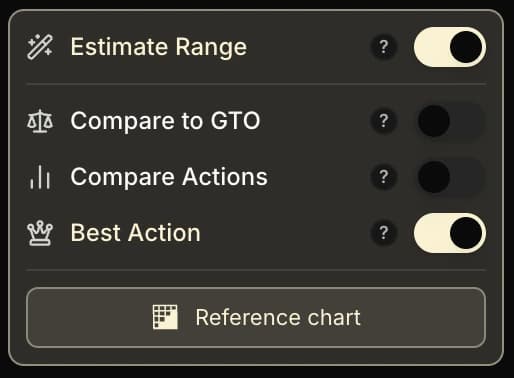
To finish, the Best Action mode extends the logic of Compare Actions to every available action.
For each combo, the tool picks the action that earned you the highest average EV, among those you actually played.
Cell display
The color of the cell matches the winning action:
| Action | Color |
|---|---|
| Fold | Blue |
| Call | Green |
| Check | Dark green |
| Raise | Red |
| All-in | Very dark red |
The number in the bottom right of the cell shows the average EV of the best action (in bb/hand).
The higher that number, the more that action earned you on average on the combo.
Example: 0.35 means the winning action earned you 0.35 bb/hand on average on that combo.
When the two best actions are nearly equivalent in EV (a gap below 0.1 bb), the cell is split vertically into two colors to signal that neither really stands out.
And what if all your actions were losing ones? When every action you took on the combo would have a negative EV, the cell switches to blue on Fold at 0: folding would have been the best option.
The action you actually played becomes the second best and stays visible when you hover the cell, in the panel detailing the EV and the number of occurrences of each action.
A first example: HU SB 16 bb+ vs Fish
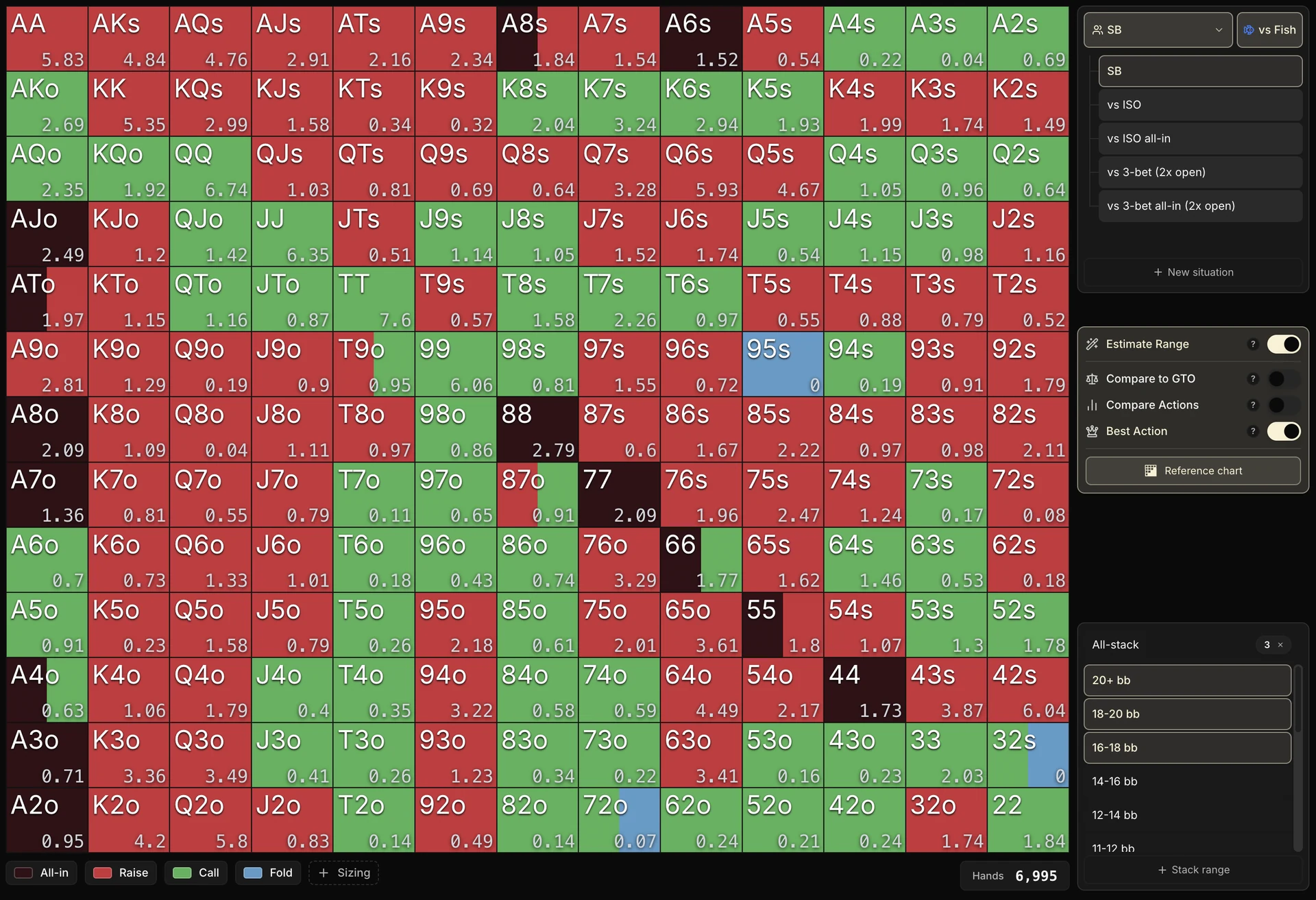
You can read the strategy at a glance on this grid:
- A large share of the playable combos comes out red (Raise): these are your opening hands, the most profitable with an open.
- Many combos come out green (Call, meaning limp/complete), and a few very dark cells come out All-in.
- Finally, a few blue cells (Fold at 0) appear where every action tried would have been losing.
In HU SB folding is always legal, so the tool can always switch to Fold = 0 when everything else would be losing.
A second example: 3-max BB vs SB limp (Fish)
Now let's turn on the Best Action mode on the 3-max BB vs SB limp (Fish) situation, over 16 bb+ to build up volume.
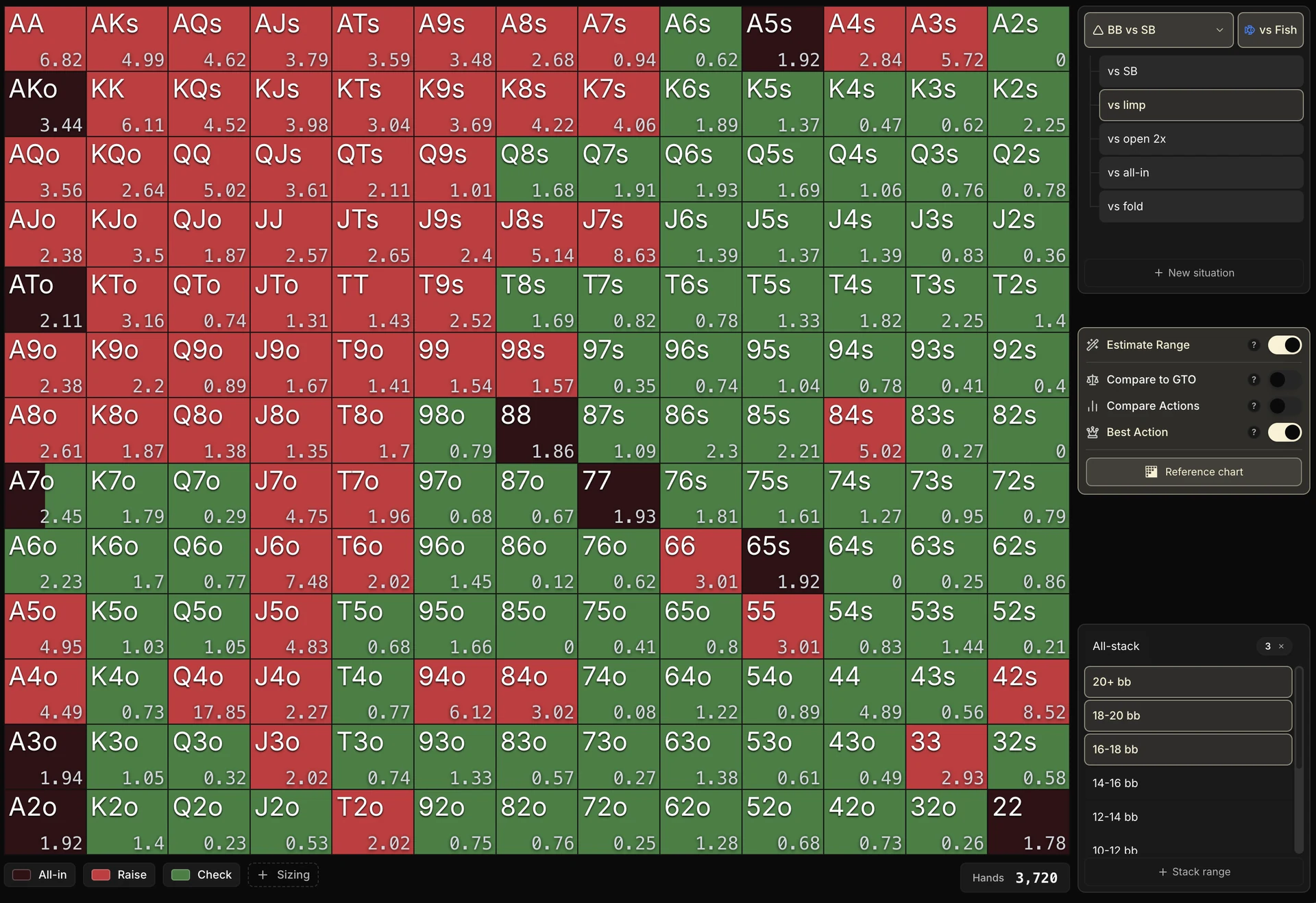
What can we take from it?
The top of range comes out red (Raise/ISO), sometimes with very high EVs on the big pairs and the broadways. A few very dark All-in cells show up too.
The bottom of range stays dark green (Check).
No cell switches to blue here: in BB facing a limp, folding is not a legal action (you can check for zero), so the tool never offers Fold = 0 as an alternative.
The per-cell uncertainty stays very high, even though the total uncertainty is reasonable.
At this stage, you can form hypotheses: your non all-in ISOs look very profitable compared with the check, which suggests that widening your ISO range a little could pay off. As always, it still has to be confirmed with volume before you commit.
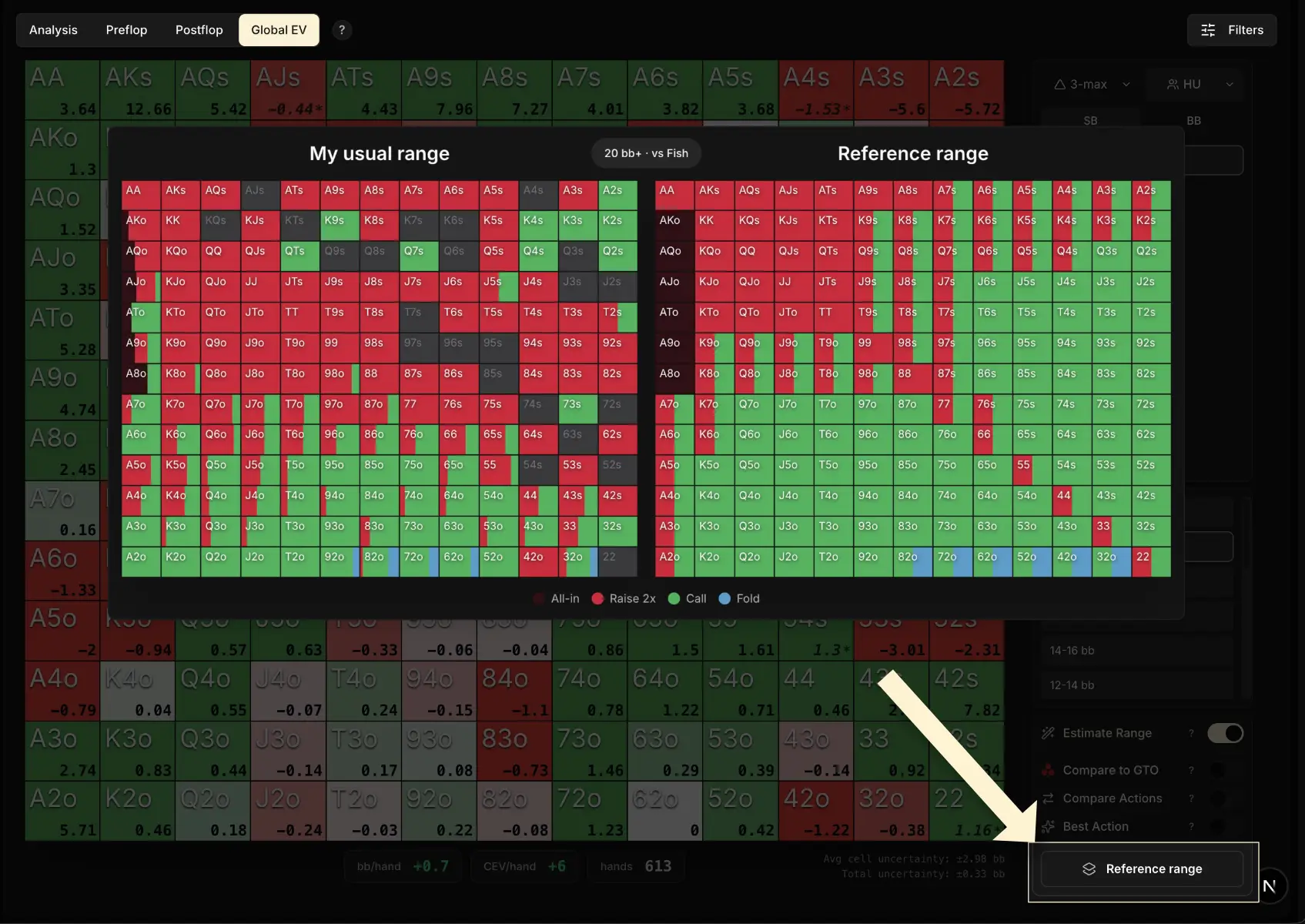
If you own the Study Pack, the Reference chart button, at the bottom of the sidebar, lets you view side by side your own range and the situation's reference range.
That lets you visually compare the best action displayed with the action you normally take in game.
Important warnings
Every trap identified for the Compare Actions mode (selection bias, variance, the silence of a missing action, your own postflop play) applies in full to the Best Action mode.
So the Best Action mode gives you two useful kinds of information:
- A map of your past: on which combos you got the best results with which actions, over your whole history.
- Hypotheses to test: if Fold comes out as the winner on combos you were tempted to play, that's a lead worth digging into.
6. The Summary view: your exploitation position by position
After these four tools, there's one last piece left to discover: the Summary view, the first entry in the sidebar, above the list of situations.
It condenses the 7 parent situations into a single table, building directly on the notion of structural EV seen in section 3.
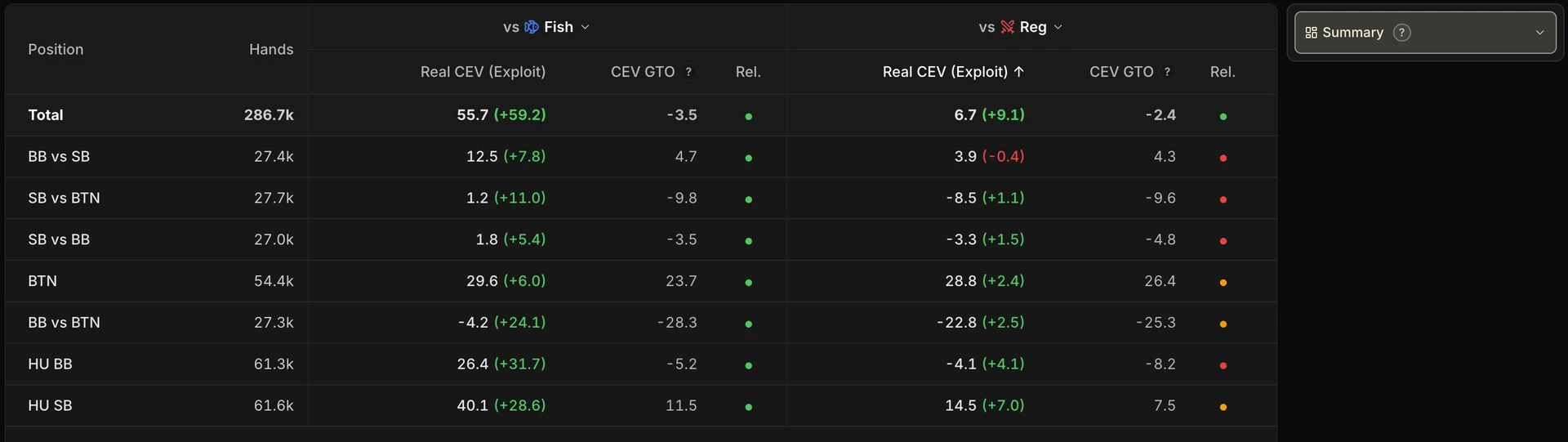
A Total row at the top, then for each parent situation:
- Hands: your volume.
- Two column groups, vs Fish and vs Reg , each containing:
Real CEV (your result, with your gap to GTO in parentheses), CEV GTO (the structural benchmark) and Rel. (the statistical reliability of the measurement).
The CEV GTO column: your benchmark for each position
The CEV GTO column shows the structural CEV of each position: what a GTO solver would theoretically get, for example a clearly positive BTN and a clearly negative BB vs BTN.
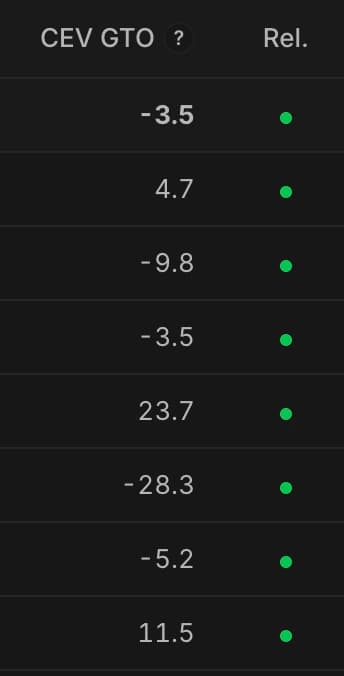
The column just to its right, with its colored badge, is the reliability indicator of the measurement: green when the gap is clear-cut, orange then red when it stays in the noise.
And every Real CEV cell shows two numbers: your CEV (average chips won or lost per tournament), then in parentheses your gap versus GTO.
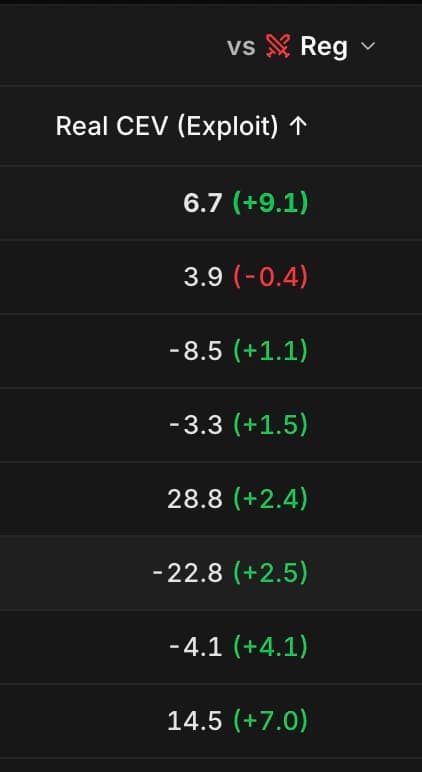
Example: on the BTN row, 28.8 (+2.4) vs Reg means you won 28.8 chips per tournament against Regs, that is 2.4 more than a GTO solver on the same sample.
Reading it in two steps
Every cell reads like this: the absolute value tells you your raw result (not very useful on its own), and the delta in parentheses tells you how you play compared to GTO (exploit or leak).
Two typical readings:
- At the BTN (a structurally winning position): being above the CEV GTO on both cohorts is a clear exploit on the profitable position.
- In BB vs BTN (a structurally losing position, negative CEV GTO): losing less than GTO, or even turning the position into near break-even vs Fish, is a massive exploit, even if the absolute value stays negative.
Here's the diagram from earlier again
Once again, the numbers here are only examples.
Why the 7 rows don't add up to 0
GTO against GTO, the total is 0. So why, in my real spots against Fish, does this column show a negative total?
It all comes down to what this column looks at, and above all to what it does not look at. It sees your situation, your cards, your stack. It never sees your opponent's cards.
It sees that the Button entered. It does not see with what. So it prices your hand at a perfect Button's rate, even when the guy across the table just came in with 72o.
But Fish enter at the Button far more often than GTO does. And if they can enter that often, it is necessarily with hands a perfect player would have folded: the good hands enter in every world, the "extra" entries are made with the rest.
So every extra entry is seen twice, by two judges who do not look at the same thing:
- The CEV GTO column sees one more defense spot, priced at the perfect Button's rate: the benchmark drops.
- Your table, on the other hand, sees the trash hand that was used to enter: your result benefits from it.
The same entry, seen by two judges

The CEV GTO sees that you are playing the BB against the Button: an unfavorable spot, so your CEV GTO drops. But in game, since your opponent holds a trash hand, you turn a profit. The CEV GTO does not see your opponent's cards, and that is what changes everything.
This CEV GTO is not the Dashboard's
The Dashboard offers a GTO benchmark of its own: the EV GTO curve in the Chips won tab. It is not the same one, and the two numbers will not look alike.
The reason is simple: they do not answer the same question.
| The benchmark | The question it answers |
|---|---|
| EV GTO curve of the Dashboard | "How much would GTO win playing whole Spins, against GTO opponents?" |
| CEV GTO column of the Summary | "How much would GTO win in the exact spots my opponents actually forced on me?" |
In the first case, everyone plays GTO from start to finish. Some players' gains offset the others' losses, so the curve stays close to 0 over time, whatever your pool does. It is a stable horizon line.
In the second, it is your pool that decides which branches you play. And since it sends you into the tough situations more often (we have just seen it), the benchmark drops below 0.
Two benchmarks, two uses: the one from the Dashboard gives you a stable bearing to place your curve against, the one from the Summary measures your gap in the exact spots you really face.
The Rel. column: the first statistical filter
The Rel. badge grades each measurement: Reliable, Indicative or Insufficient, depending on whether your gap vs GTO exceeds its uncertainty or not.
It does the first sorting for you: no need to panic over a negative delta marked Insufficient.
When you hover the Rel. badge, a panel gives you the essentials straight away: your observed gap vs GTO with its uncertainty (± in CEV) and the verdict (Reliable, Indicative or Insufficient). No more comparing the loss to the uncertainty by hand, the badge does it for you.
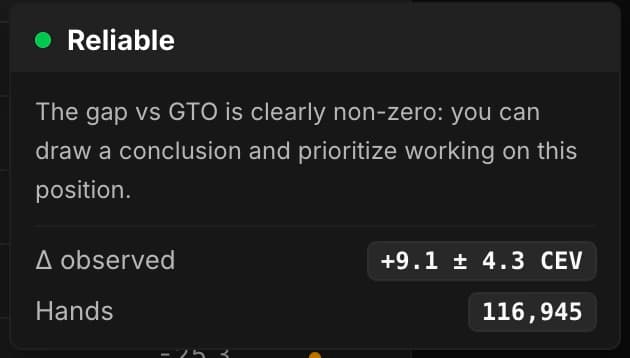
To dig into a position, you can always click the row: it opens the parent situation in the grid, where you find the combo-by-combo detail and the total uncertainty at the bottom.
One last detail: the vs Fish and vs Reg headers are dropdown menus. You can retarget each column group on any of your opponent tags, to measure for example how well you exploit a specific archetype.
The Summary view answers the central question of this tab: in which positions do you really exploit your pool, and against whom? Every Global EV analysis session should start (or end) there.
7. Key takeaways
If you're reading these lines, well done: you didn't give up, and you were right not to! Global EV really is a very powerful tab for those who take the time to tame it.
So take your time. Don't feel you have to understand everything on the first pass. Have fun using the tool and, little by little, the analyses will become clearer and clearer to you.
To sum up: Global EV breaks down your EV hand by hand and situation by situation, through four complementary tools.
It is the richest tab in the tracker, but also the most demanding to interpret: you have to know what to read, and above all what not to conclude too quickly.
• Start with the Summary view: it shows you, position by position, where you gain or lose EV compared to GTO.
• The grid then lets you dig deeper: it breaks your EV down by combo and by situation, with fold = 0 as the reference point.
• A red zone is a lead, not proof of a leak. Use Compare to GTO, Compare Actions and Best Action to understand where it comes from.
• Always check the volume and the uncertainty before drawing a conclusion.
In the next chapter, we discover the last tab of the Leak Finder: the Overview tab, the dashboard that displays a player's complete playing profile, yours as well as that of any profile in the pool.