The Overview tab
Comb through your own game, or the pool's, with a fully customizable dashboard.

Gandalf
Co-founder of Poker Sciences

To wrap up this tour of the Leak Finder, head to its fourth and last tab: Overview. Its mission: display a player's complete playing profile on a single dashboard: their general stats (VPIP, PFR, c-bet...), their precise stats, all of it compared to your references and colored according to the gap.
And when we say “a player”, that doesn't only mean you: the table can switch in one click to the Fish, the Regs, any of your tags, or one specific player.
It's the ideal tool for taking a profile's temperature: yours as much as the pool's.
This tab, directly inspired by Hand2Note, is mostly aimed at advanced players. If you're a beginner or an intermediate player, don't dwell on it too much for now: just keep in mind what it can do, and come back to it when you need deeper analysis.
If you knew the old Analysis tab: it's gone in that form. Its three summary panels now live as close as possible to each tool, in the Summary view of the Preflop, Postflop and Global EV tabs, presented in the previous chapters.
The Overview tab is a different tool, the one we're discovering in this chapter.
1. A tour of the tab
The tab is organized into two areas: the main area on the left, and the sidebar on the right.
What shows up in the main area depends on what you pick in the sidebar's Situation and opponents menu:
- The first entry, Summary, opens the dashboard. It's the heart of the tab, and the bulk of this chapter.
- The entries below it open per-situation views: a preflop position shows its grid by stack range, a postflop situation shows its frequencies by pot type. We'll get to them at the end of the chapter.
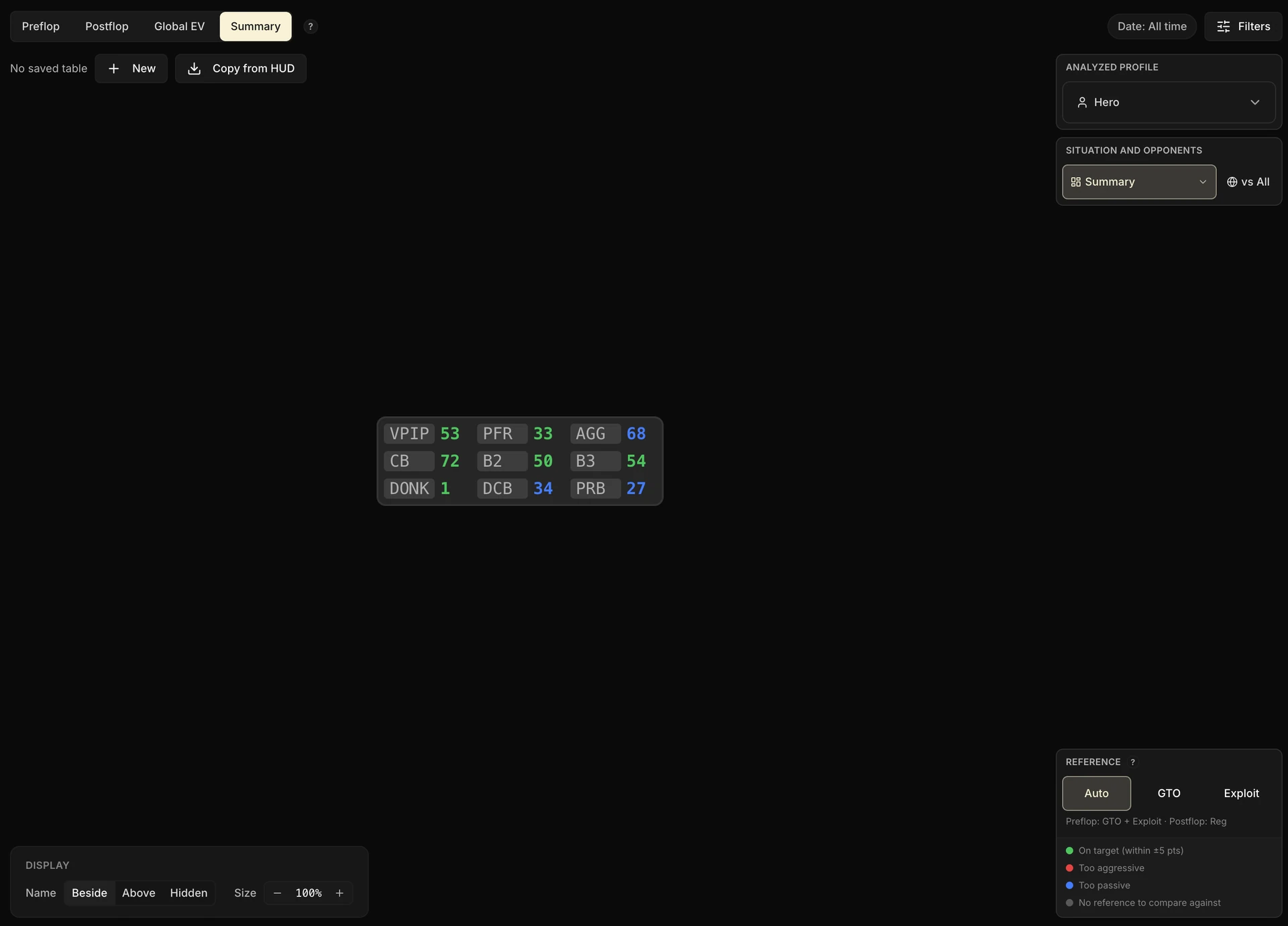
The sidebar, from top to bottom:
- Analyzed profile: the player whose stats the table displays. You by default, but also Fish, Reg, a custom tag or one specific player.
- Situation and opponents: the view selector we just talked about, along with the Vs filter (the type of opponent faced, as in the other tabs).
- The Preflop / Postflop toggle, used by the per-situation views (it disappears on the Summary view).
- Right at the bottom, the Reference card, which we'll come back to: it's what drives the colors.
The first time you open it, the tab doesn't show the Summary but a preflop grid (the BTN one). Select Summary in the Situation and opponents menu to open the dashboard.
2. The Overview tab recaps your Preflop and Postflop tabs
Before going any further, one essential point to really understand this tab: Overview computes nothing of its own.
All it does is re-read what the Preflop and Postflop tabs already expose, then lay it out again as a dashboard.
Everything you set up in those two tabs flows automatically into Overview. There's nothing to redo here.
Postflop: your custom situations
The Situation and opponents menu picks up exactly the same sections as the Postflop tab (3-max BTN vs BB, 3-max BTN multiway, HU SB...), Poker Sciences situations and your custom situations included.
Create a situation in the Postflop tab, and you'll find it here, with its frequencies already compared to the Regs.
Preflop: your situations, your stack ranges, your sizings
The preflop grids read your stack ranges and your sizings, exactly as you defined them in the Preflop tab.
Slice your stacks differently: the grid's rows follow. Add an open sizing: it becomes one more column.
And your custom preflop situations come up too. They file themselves automatically under the right parent position, based on the actions that precede your decision: if the Button has folded, your situation goes under “BB vs SB”; if it entered the hand, under “BB vs BTN”.
Your situations can overlap, and that's not a problem. If you create “BB facing the Button” without specifying the size of the open, it will hold the same hands as the Poker Sciences situation “BB vs BTN open 2x”.
The two simply show up side by side, each with its own hand count and its own reference. Nothing is added up: these are two readings of the same population, not a total.
Above all, remember this: the more carefully you tend your Preflop and Postflop tabs, the richer Overview gets. The two work together.
3. The Summary view: your profile on a dashboard
The Summary is a table of cells: each cell shows a stat's name and its value, colored according to the gap to the reference.
By default, the table offers a grid of 9 essential stats:
- VPIP, PFR, Postflop aggression: the preflop skeleton and overall aggressiveness.
- C-bet flop, 2-barrel, 3-barrel: postflop aggression, street by street.
- Donk bet, Delay c-bet, Probe bet: the less standard postflop lines.
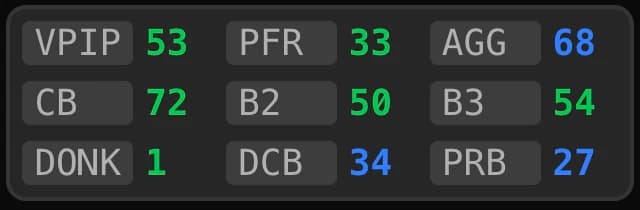
At a glance: your key frequencies, and whether they're on target.
The same engine as the per-opponent HUD
If you already use the per-opponent HUD (set up in the Players tab), you're on familiar ground: the Summary uses exactly the same system of panels, sections and cells, with the same editing experience.
You can even start straight from your HUD with the Copy from HUD button, which copies its configuration into a new Overview configuration.
One last thing before customizing: this table follows you everywhere. You'll find it in particular in each player's card (Players tab), read-only, with the numbers of the player you're looking at.
4. Customizing the table
The default grid is only a starting point: everything can be changed, directly on the table.
Adding a stat
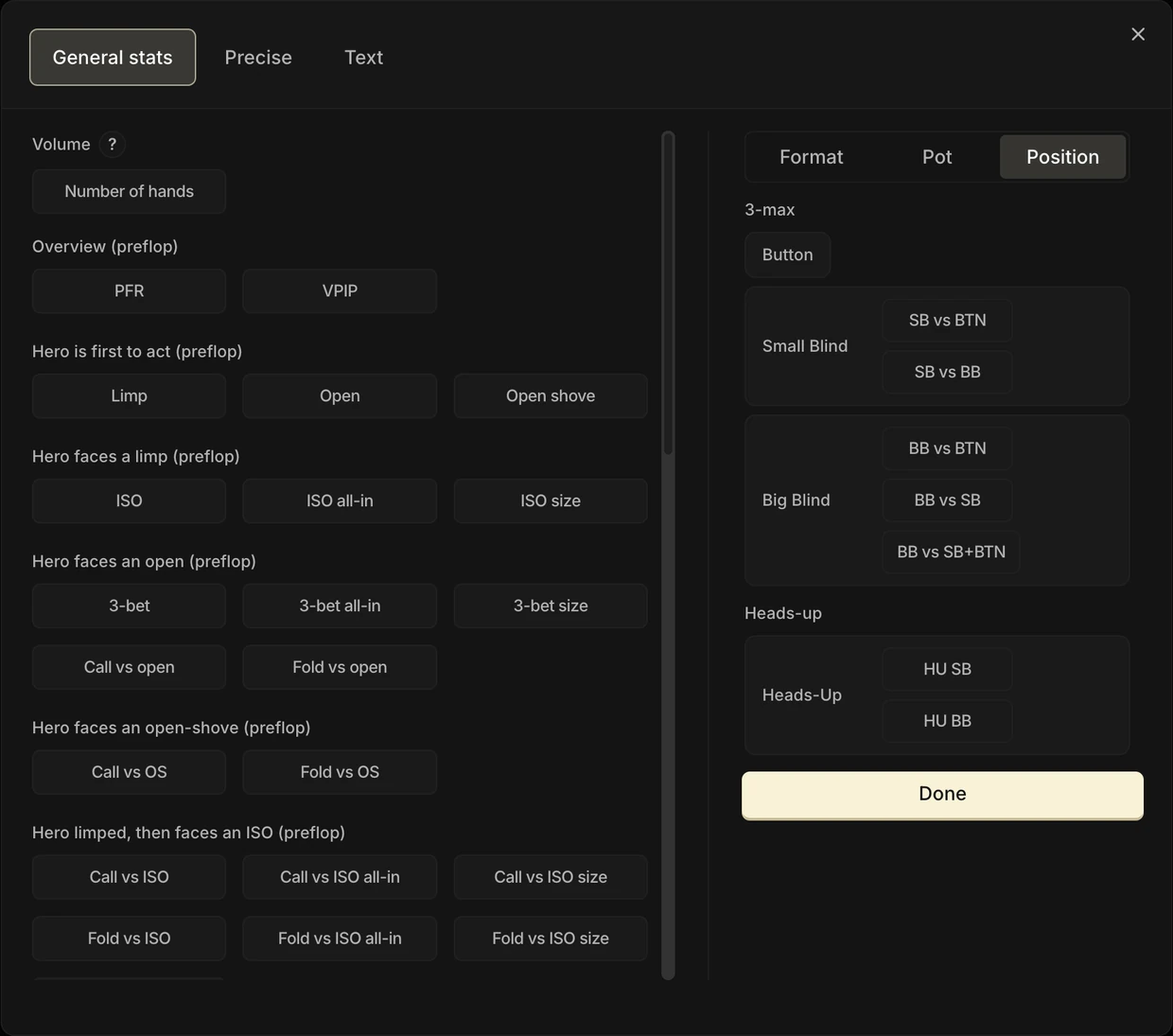
Click the + on an empty cell: the stat catalog opens, organized into three tabs:
| Tab | What you'll find there |
|---|---|
| General stats | All the tracker's stats: VPIP, PFR, c-bet, fold vs bet... They are grouped by decision situation: Overview, Hero is first to act, Hero faces a limp, an open or an open-shove, then postflop aggression and defense. |
| Precise | Tailor-made stats, defined by an exact action line. For example: fold in BB facing a 2x open from the BTN at 20 bb+. It's the same system as the HUD's precise stats. |
| Text | A free text cell. Use it to title an area of the table or leave yourself a note. |
The general stats list opens on a Volume section, which holds a single button: Number of hands. That cell shows the number of hands of the analyzed profile under the page filters, and stays unique per panel.
On the right, the restriction column applies to the stat you're about to place, across three sub-tabs: Format (3-max, Heads-up), Pot (Raise Pot, Limp Pot, ISO Pot, 3-bet Pot) and Position.
A dot flags a sub-tab that restricts something. And the Pot sub-tab grays out as soon as the checked stat is a preflop one: at that point, the pot type is already part of the stat.
The restriction is attached to the cell, not to the stat: nothing stops you from placing C-bet twice, once restricted to 3-max and once to Heads-up.
A click in the list checks the stat, it doesn't place anything right away. The button at the bottom right is the one that confirms and closes the catalog: so you get to see your stat selected, and your restrictions applied to it, before confirming.
Editing, deleting, moving
Clicking a cell selects it: a card appears at the bottom of the screen to change the stat or delete the cell.
To reorganize, it's drag and drop: move a cell into another grid cell, or even onto another section's tab to send it there.
Structure via right-click
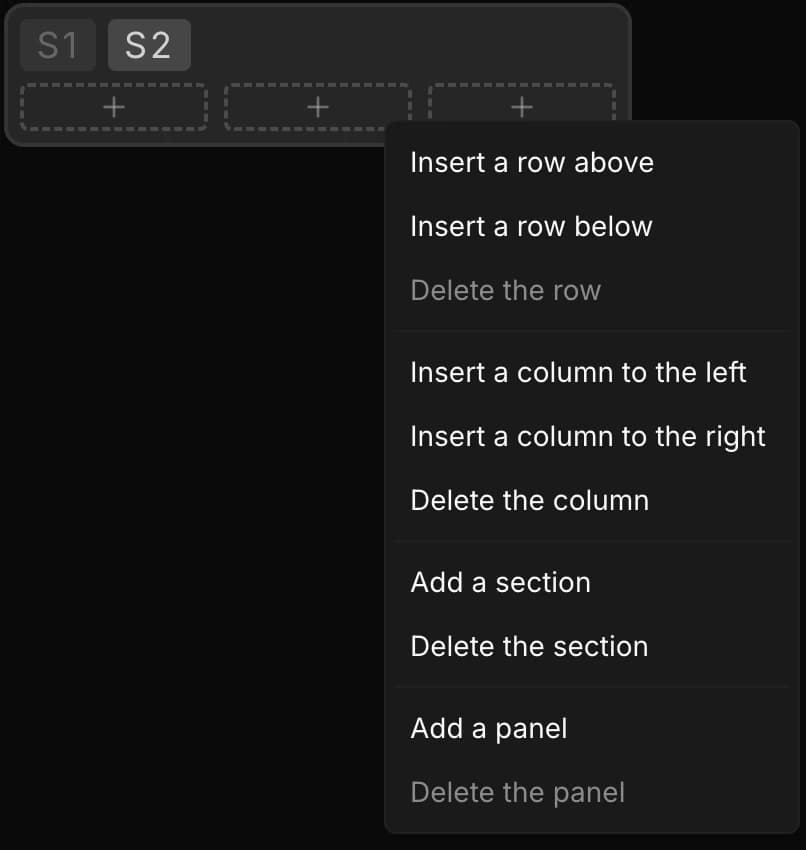
The table's structure (rows, columns, sections, panels) is edited with a right-click:
- on a grid: insert or delete a row or a column;
- on a panel's tabs: add or delete a section (sections are tabs inside a panel);
- on the background of the view: add a new panel.
That's exactly what the tip shown in the tool says: “Right-click different areas of the table blocks to add or remove rows, columns, sections, or blocks.”
Display settings
At the bottom of the screen, the Display card adjusts how the table is presented:
- Name: each stat's name shows Beside the value, Above it, or stays Hidden.
- Size: a zoom from 50 to 200% to fit the table to your screen.
Several saved configurations
Finally, you're not limited to a single layout. The bar above the Summary manages a library of named configurations: New, Copy from HUD, Rename, Duplicate, Delete.
Each entry stores your whole layout: all your panels, their sections and their cells. So it isn't “a table”, but a complete configuration of the Summary view.
You can, for instance, keep a “Big picture” configuration, a “Postflop aggression” configuration and another one dedicated to your current weak spots, then switch from one to the other in a click.

5. The colors: the gap to the reference
A raw value doesn't say much: 22% 3-bet in BB, is that a lot or not enough?
That's why every cell of the Summary is compared to a reference, and colored according to the gap.
The reference is picked in the Reference card, at the bottom of the sidebar: Auto, GTO or Exploit.
- Preflop, the comparison is made against your reference charts: GTO or Exploit, whether they are the Poker Sciences charts or your custom charts. Auto mode picks for you: Exploit against the Fish, GTO against the Regs.
- Postflop, the comparison is always made against the Regs at your stake, exactly as in the Postflop tab.
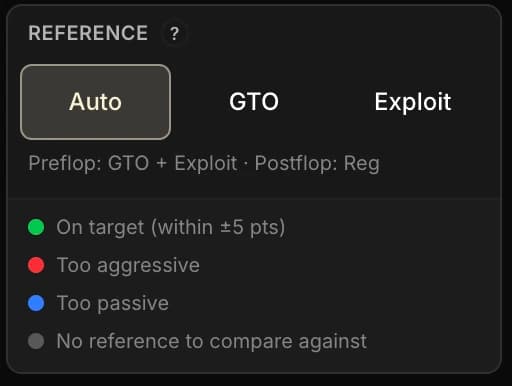
The color code
| Color | How to read it |
|---|---|
| Green | On target: the frequency is within ±5 points of the reference. |
| Red | Too aggressive compared to the reference. |
| Blue | Too passive compared to the reference. |
| Gray / neutral | No reference to compare against, or too small a sample to color. |
Precise cells have their reference too: GTO for a preflop line, Regs for a postflop line. One quirk: their value appears immediately, but the color can arrive with a slight delay, the time it takes to compute the reference.
As everywhere in the Leak Finder, the color is a signal, not a verdict: a gap to the reference you knowingly accept can be a perfectly deliberate exploit.
6. Switching profiles: the pool's temperature
So far, the table has been showing your stats. The Analyzed profile selector at the top of the sidebar changes everything: switch to Fish, Reg, any of your custom tags, or even one specific player, and the whole table recomputes for that profile.
Do the Regs at my stake 3-bet more than I do? And the Fish, how often do they donk bet?
That kind of question gets its answer in two clicks. It's the fastest way to take your pool's temperature, stat by stat.
Two important additions:
- The Vs filter restricts the hands by the opponent faced (vs Fish, vs Reg...), as in the other tabs.
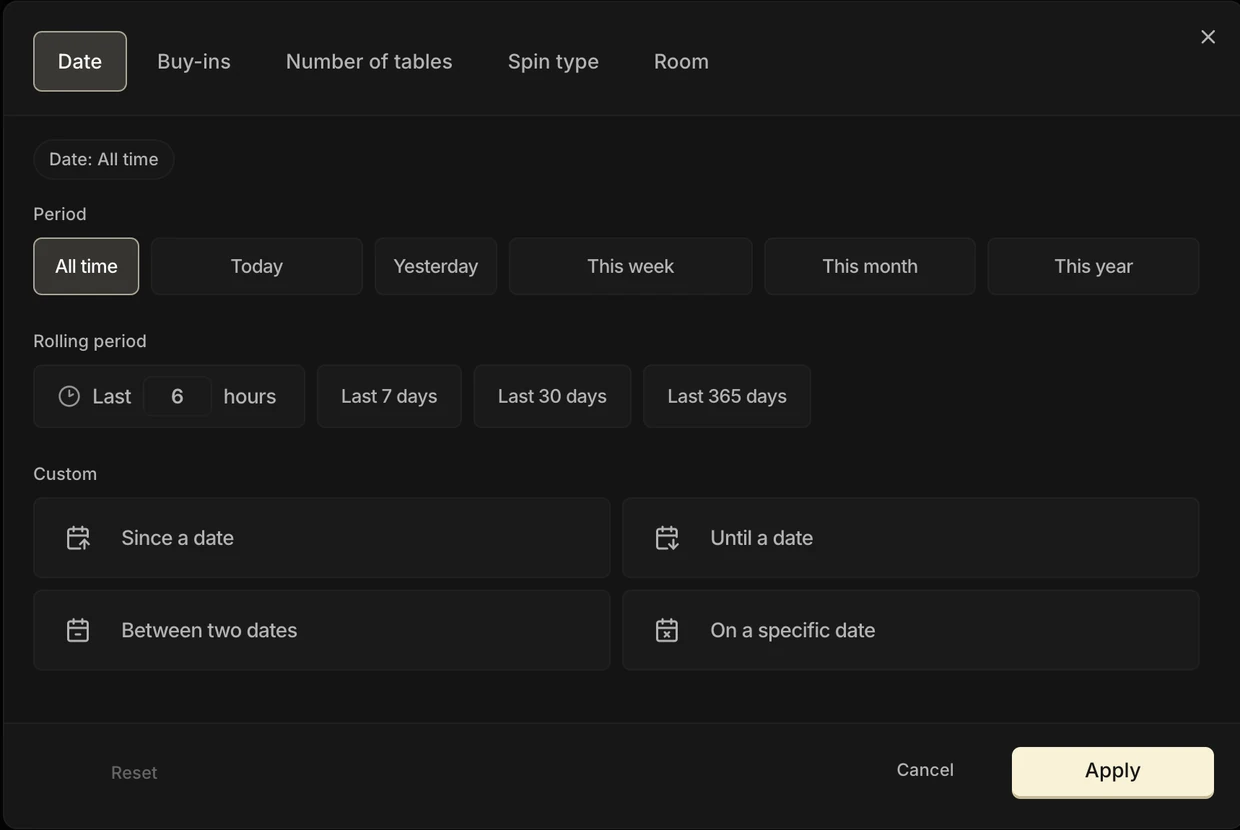
- The page filters (date, room, buy-ins...) apply to every cell of the table, Precise stats included.
Hovers: digging in without leaving the page
Every cell of the Summary hides a second layer of information, reachable on hover:
- A preflop stat shows the matching 13×13 range: the hands that make up the stat, with the range of the measured action.
- A postflop stat shows the hand strength: which hand categories the action is taken with.
- A Precise cell shows the range of the measured action line.
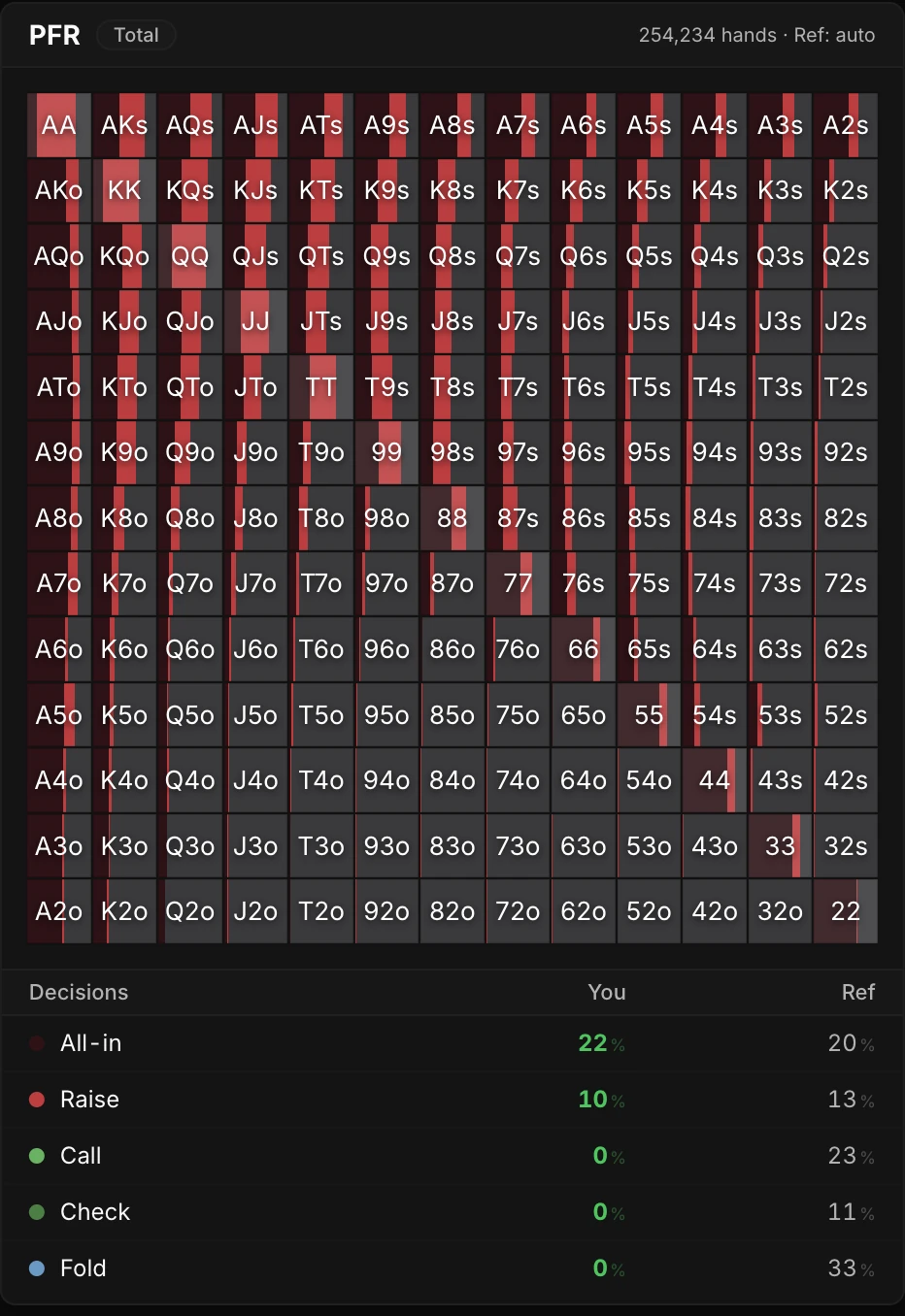
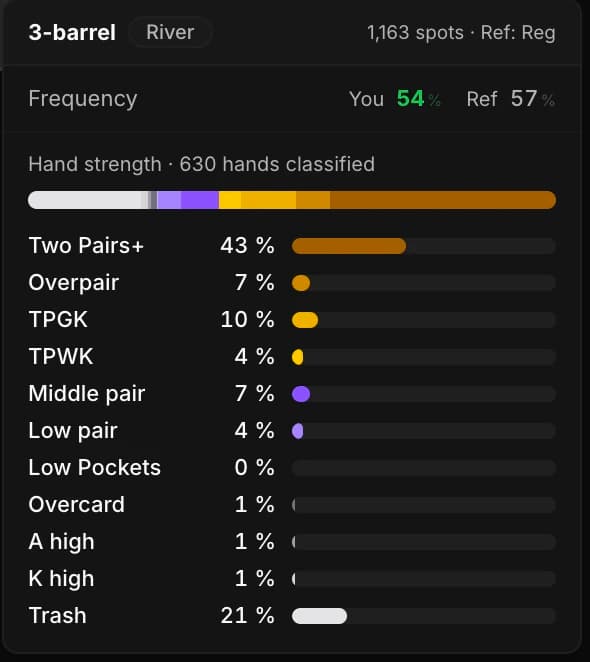
The Summary works like a gateway: the big picture first, then, on hover, the detailed makeup of each stat.
7. The other views: preflop grids and postflop situations
The Situation and opponents menu doesn't only contain the Summary: it also lists every preflop position and the postflop situations.
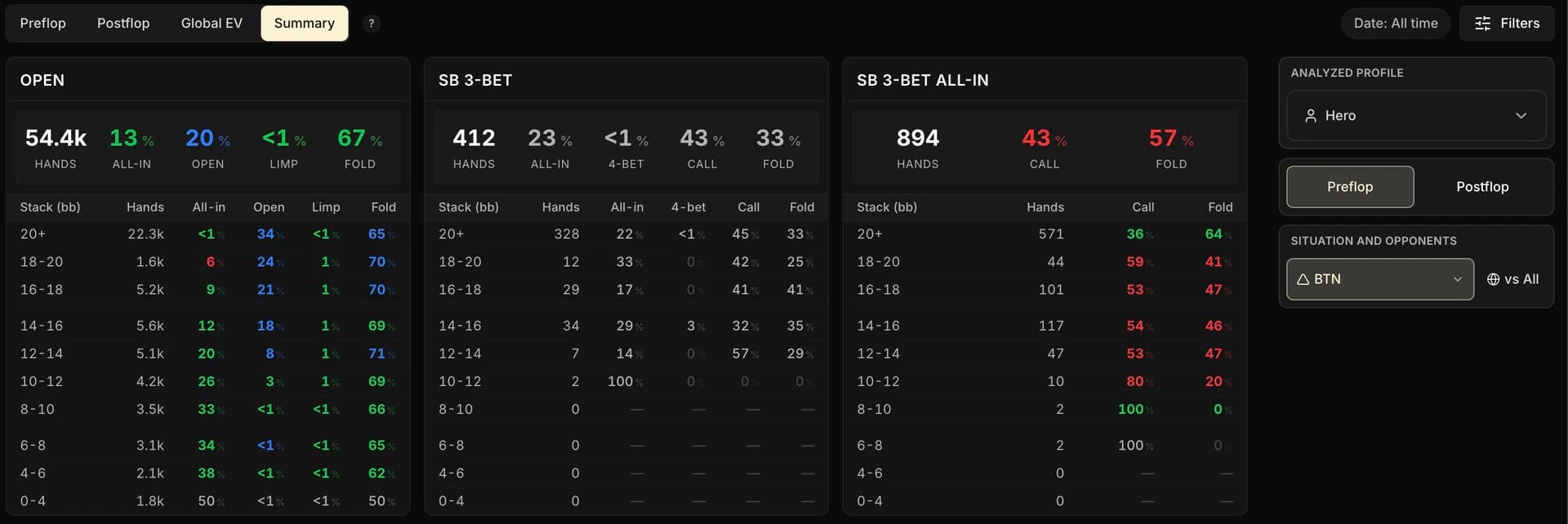
Select a preflop position (BTN, SB vs BTN, SB vs BB, BB vs BTN, BB vs SB, HU SB, HU BB): the main area shows a grid crossing the position's stack ranges with its actions. Every frequency there is colored according to the reference, as in the Summary.
It's the ideal view to spot at what stack depth a frequency drops off.
Select a postflop situation: the main area shows its detailed frequencies by pot type, with the same comparison logic.
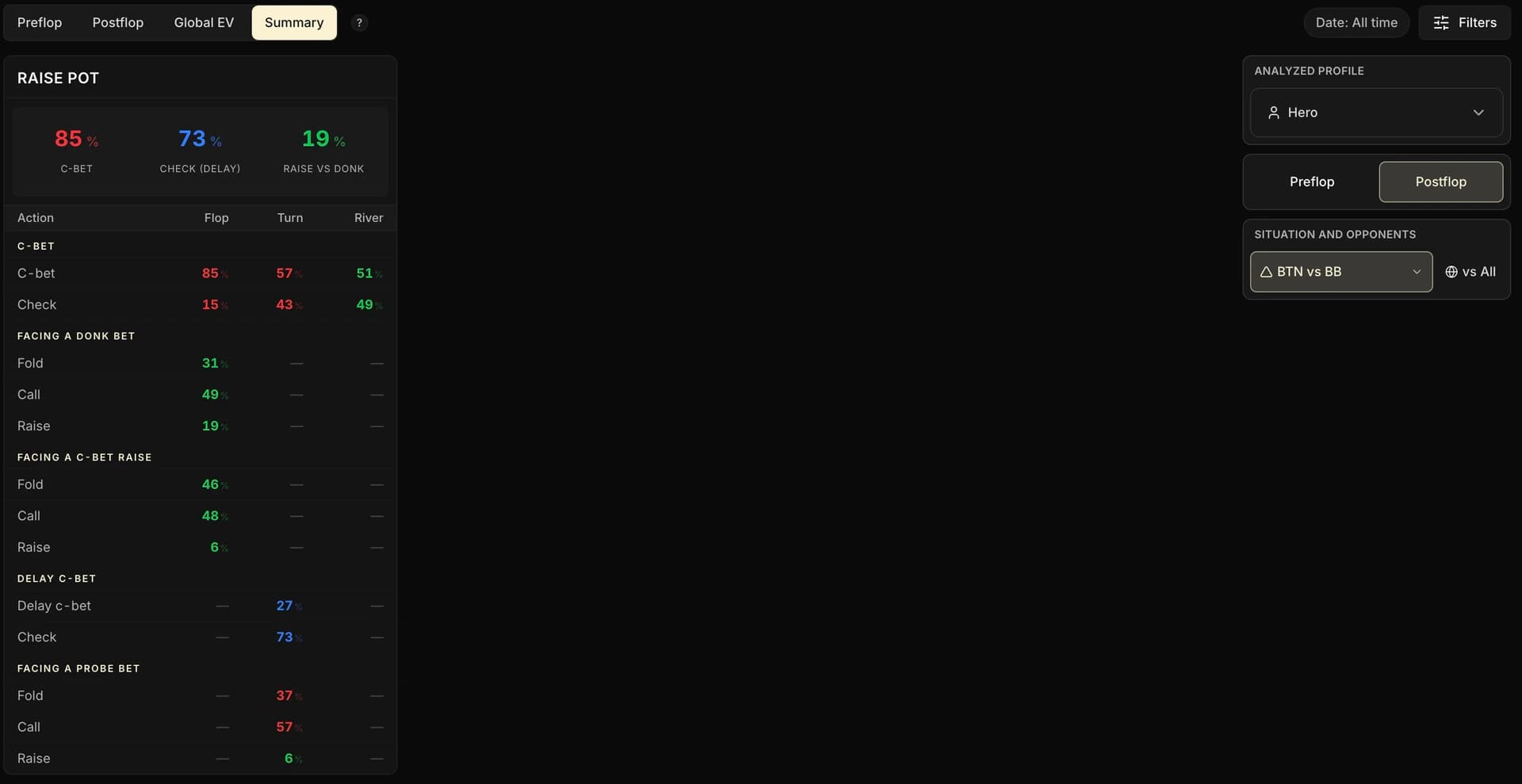
The three views complement each other: the Summary for the big picture of a profile, the preflop grids for the detail by stack depth, the postflop situations for the detail by pot type.
8. Key takeaways
The Overview tab brings together a player's complete playing profile, whether that's you or a profile from the pool, in a dashboard compared to your references.
• Overview computes nothing new: it automatically picks up the configurations of your Preflop and Postflop tabs.
• The Summary view is a customizable dashboard, which you can display for yourself, the Fish, the Regs, a tag or one specific player.
• The colors show the gap to the reference.
- Green: on target
- Red: too aggressive
- Blue: too passive
Your charts serve as the reference preflop, the Regs postflop.
• The preflop grids and the postflop situations let you refine the analysis by stack depth and by pot type.
We've now been all the way around the Leak Finder. In the next chapter, it's time for method: prioritizing your leaks, structuring your work and turning analysis into measurable progress.