The Preflop tab
Understand how you play preflop. And how your opponents play, so you can exploit them better.

Gandalf
Co-founder of Poker Sciences
Welcome to the first tab of the Leak Finder, the Preflop tab. As its name suggests, it's the place where you can easily visualize your preflop ranges (and your opponents') on a 13×13 grid.
If you have the Study Pack, you can also compare your ranges in one click to our charts or to your custom charts, to spot any deviations.
And all of that at any stack size, in every common position, separating play vs Reg from play vs Fish .

1. The grid and the frequencies
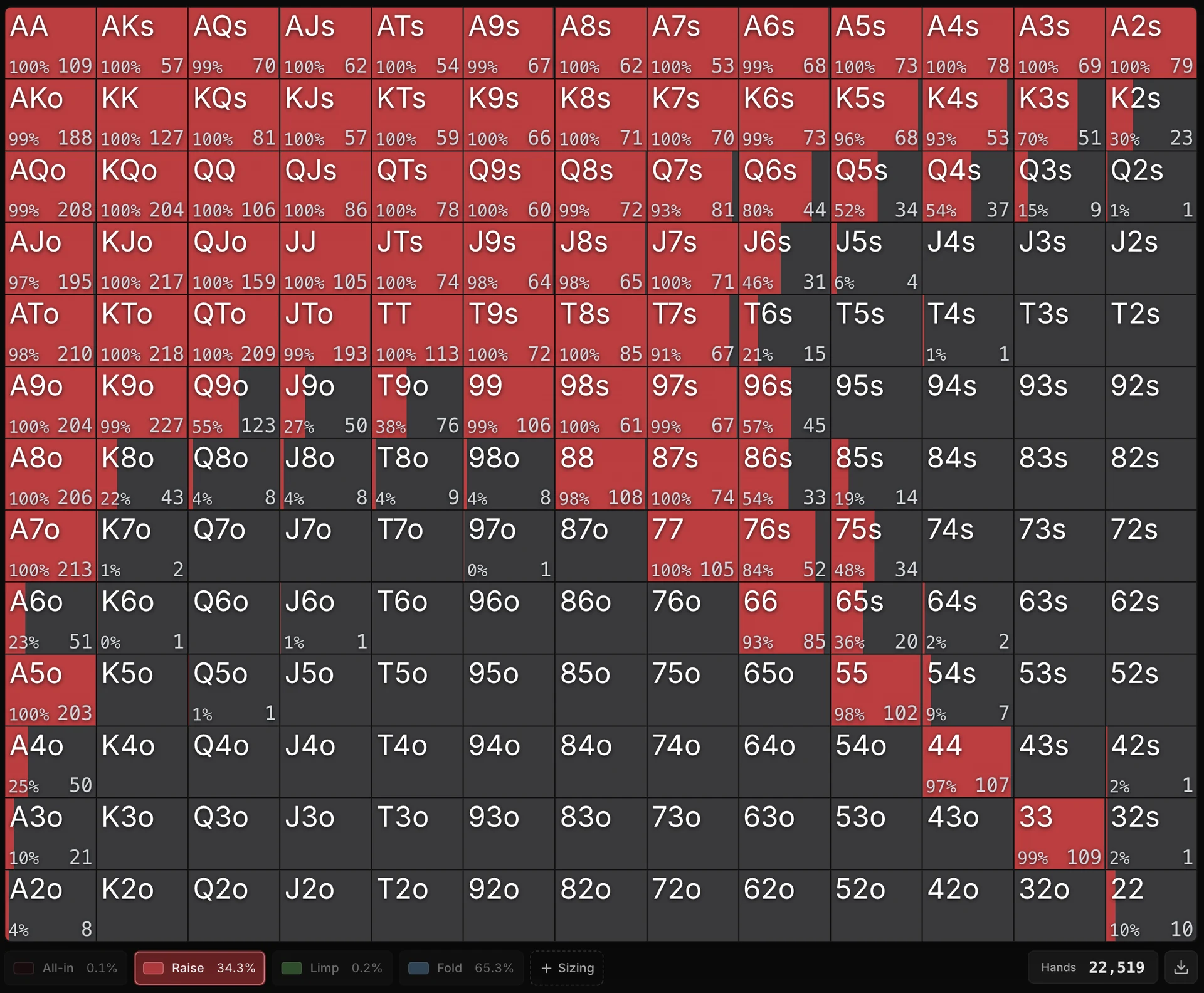
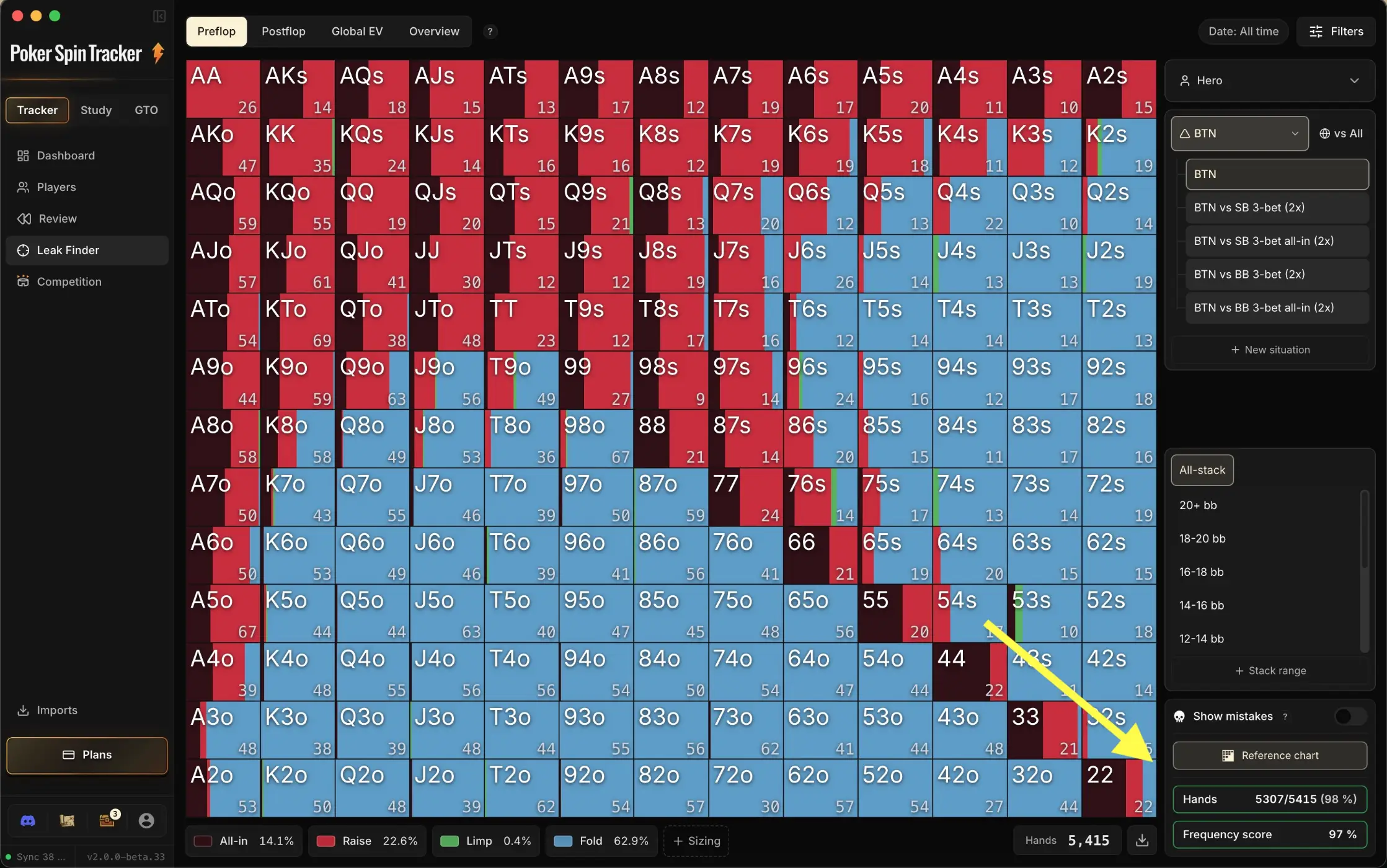
When you land on the tab, you arrive by default on the BTN 20 bb+ situation. At a glance, you see your BTN 20 bb+ range: each cell of the grid shows how you played the matching hand, with one color per action.
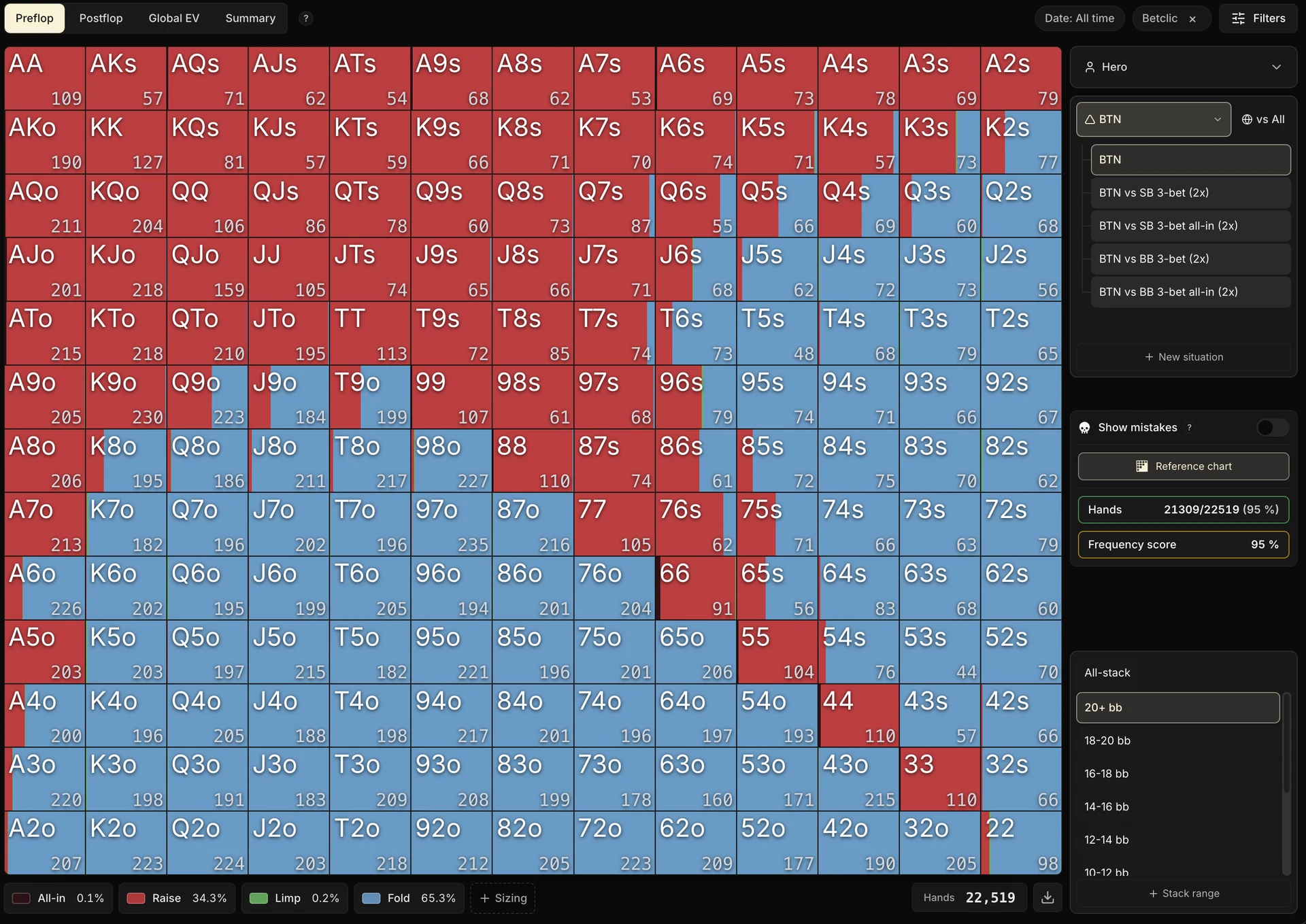
Below the grid, you see the frequency of every action you took in this situation: Raise, Call, Fold, and so on.
Click an action to isolate that single action on the grid (for example, showing only the hands you raised). Each raise sizing also gets its own pill in the legend, and the + Sizing button at the end of the row lets you add one.
One last handy detail: at the bottom right of the grid, the Export chart button copies the displayed chart to the clipboard (one row per action and sizing), handy for pasting it into another tool.
2. Comparing to a reference strategy
This feature (also present in the Global EV tab) is the only one in the Leak Finder that requires the Study Pack, because it directly uses its charts and the whole system behind them.
One of the strengths of this tab is seeing where you deviate from a reference strategy.
Careful, the comparison made here isn't the one from the preflop mistake detector seen in the previous module.
The detector asks a binary question:
Was this action allowed by the reference chart?
If it was, no mistake, whatever its frequency. The Preflop tab asks this question instead:
At what frequency do you play each action, compared to the reference?
Raising a hand every single time, when the reference only raises it half the time, never counts as a mistake for the detector. Here, the gap shows.
The two tools complement each other: the detector gives you the decisions your chart doesn't allow, the Preflop tab fine-tunes the proportions.
This use is especially valuable for players who are still learning their charts: seeing your gaps to the target, hand by hand, is one of the most direct ways to spot the charts where you make the most mistakes.
The reference used depends on the vs filter in the sidebar: vs Reg compares against your GTO chart, vs Fish against your Exploit chart, and vs All against a merge of the two. We'll come back to this filter in the next section.
The comparison tools themselves live in the sidebar.
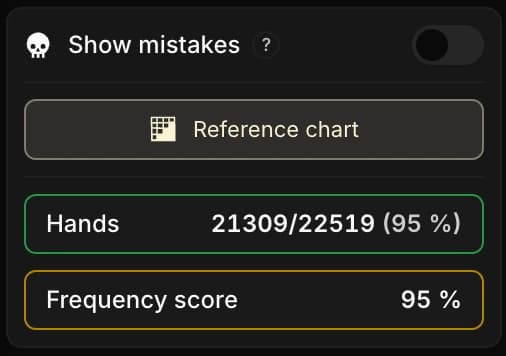
While you hover the Reference chart button, the grid displays the reference chart in place of yours.
By hovering then releasing, you compare at a glance where your range and the reference differ.
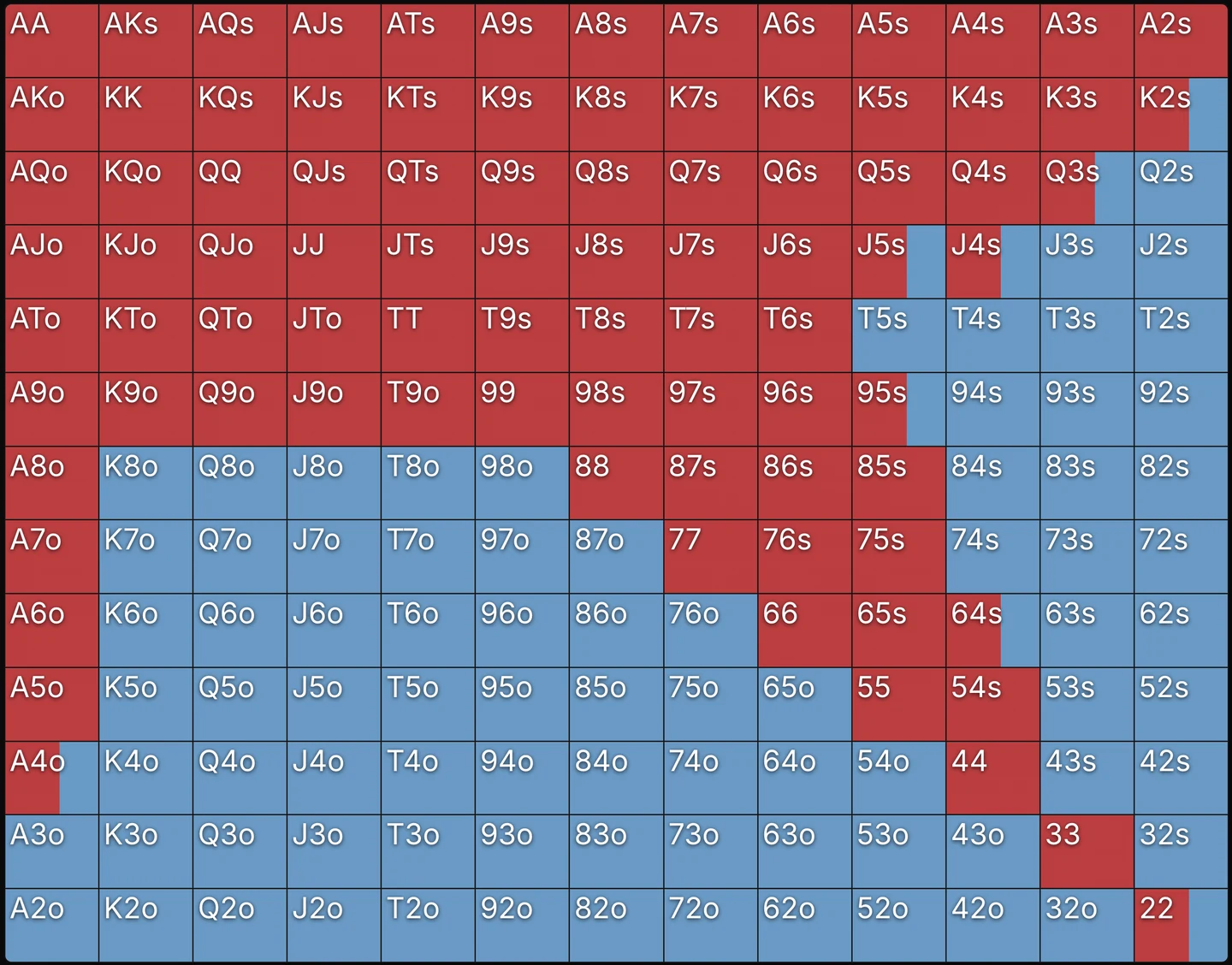
To spot the gaps without playing spot-the-difference, turn on the Show mistakes toggle: it flags with an icon the hands where fewer than 60% of combos match the reference chart.
- Orange icon: error above 40% on that hand.
- Red icon: error above 70%, the gap is major.
- No icon: the gap stays limited.
Example
The reference plays a hand 50% raise / 50% call. You play it 10% raise / 90% fold: only 10% of your combos overlap the reference (the raise share), the 90% of fold appears nowhere in it. The error reaches 90%: the hand is flagged in red (error > 70%).
The icon flags the gap, but it's up to you to judge whether it deserves dedicated work: some gaps are deliberate exploits.
Still at the bottom of the sidebar, one score sums up the gap across the whole range:
Hands: the percentage of hands you played with the action the reference expects. An all-or-nothing read, hand by hand.
The outline of the score is colored according to its quality (green, yellow, orange, red).
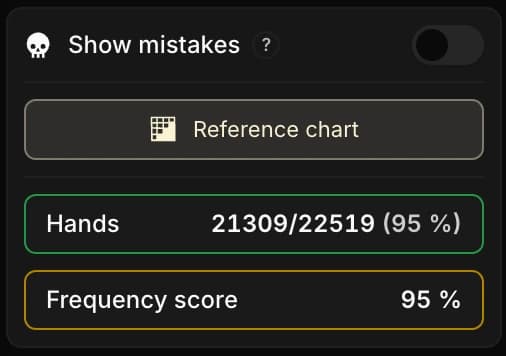
This number is mostly indicative: a quick marker to see whether the situation drifts from the reference overall. To understand where the gap actually sits, you have to look at the 13×13 grid itself.
As we saw in the chapter on preflop mistakes, don't try to reach 100% on the Hands score: some deviations are relevant, even necessary, in game. Aim instead for around 85% on that score, a level that shows your strategy stays broadly close to the reference without erasing the adjustments the context justifies.
3. Table format and opponent profile
Still in the sidebar, you can narrow down the situation to analyze: table format ( 3-max or HU), position, and which opponent you're up against, via the vs filter.
This filter offers vs All (the default), vs Fish, vs Reg, but also any of your custom tags or even a specific player. The grid recomputes to show only the hands you played in that exact context.
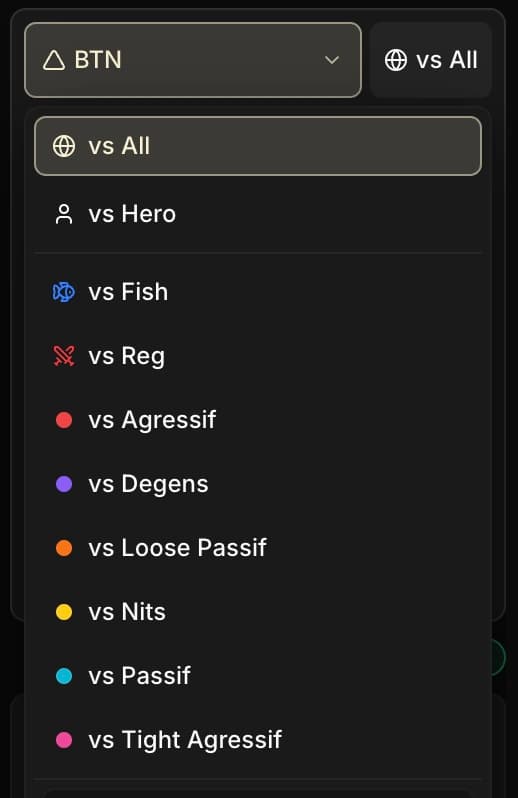
The vs filter is by far the most decisive one. Your ranges against a Fish and against a Reg shouldn't be the same. By default (vs All), the grid aggregates your hands across every profile at once, which makes any comparison to a reference blurry.
Filtering on one or the other is therefore essential to isolate the strategy you really use in that context. And as seen in the previous section, this filter also picks the comparison reference: GTO on vs Reg, Exploit on vs Fish.
This Fish/Reg classification logic works the same way in all four tabs of the Leak Finder. Once you've got it here, it carries over as-is to Postflop, Global EV and Overview.
4. The volume you need
A range displayed on too few hands can be misleading, and above all incomplete: most combos haven't been played yet, and the handful of visible hands isn't enough to describe your real strategy.
Count on around 500 hands per range as the threshold to start having something usable.
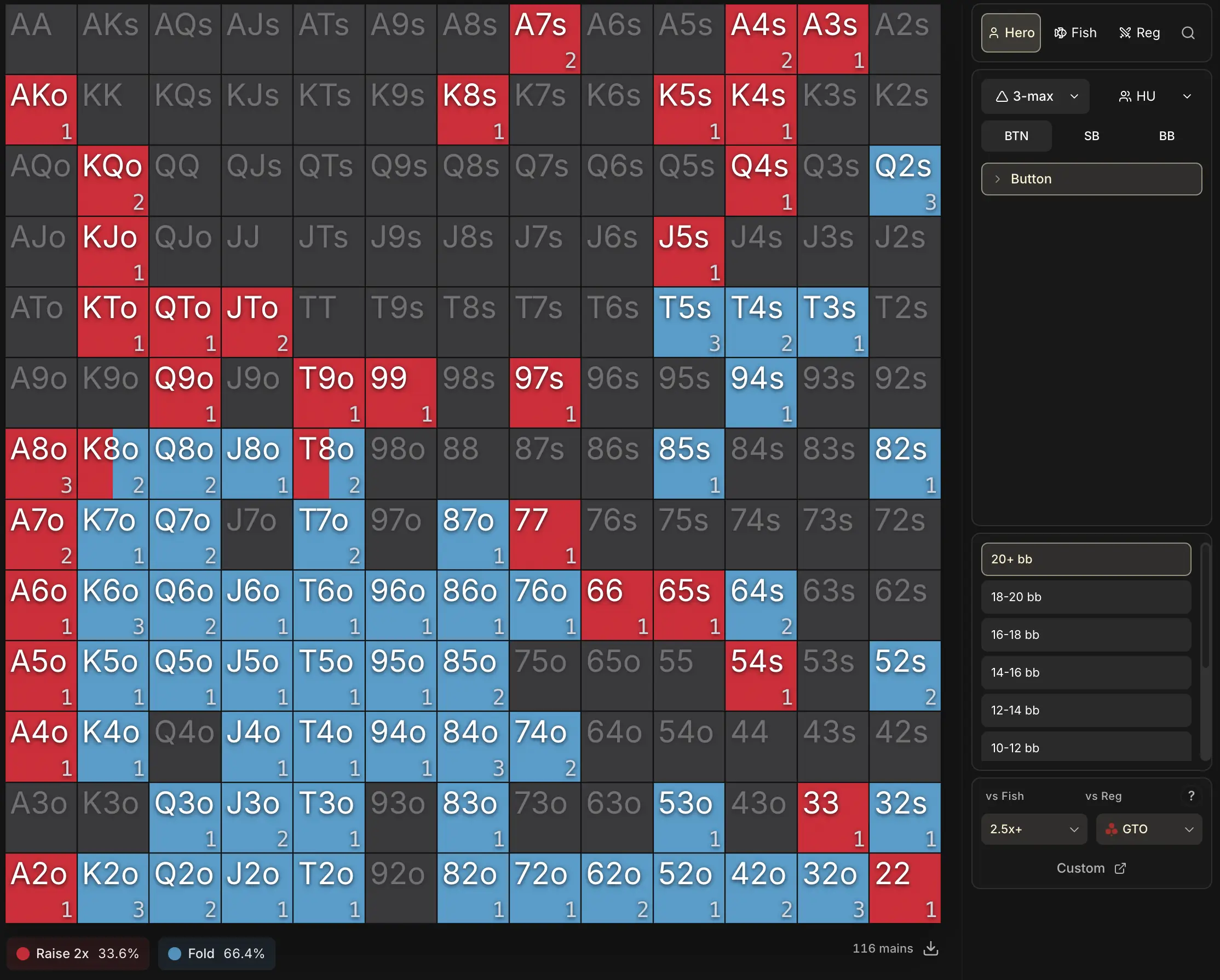
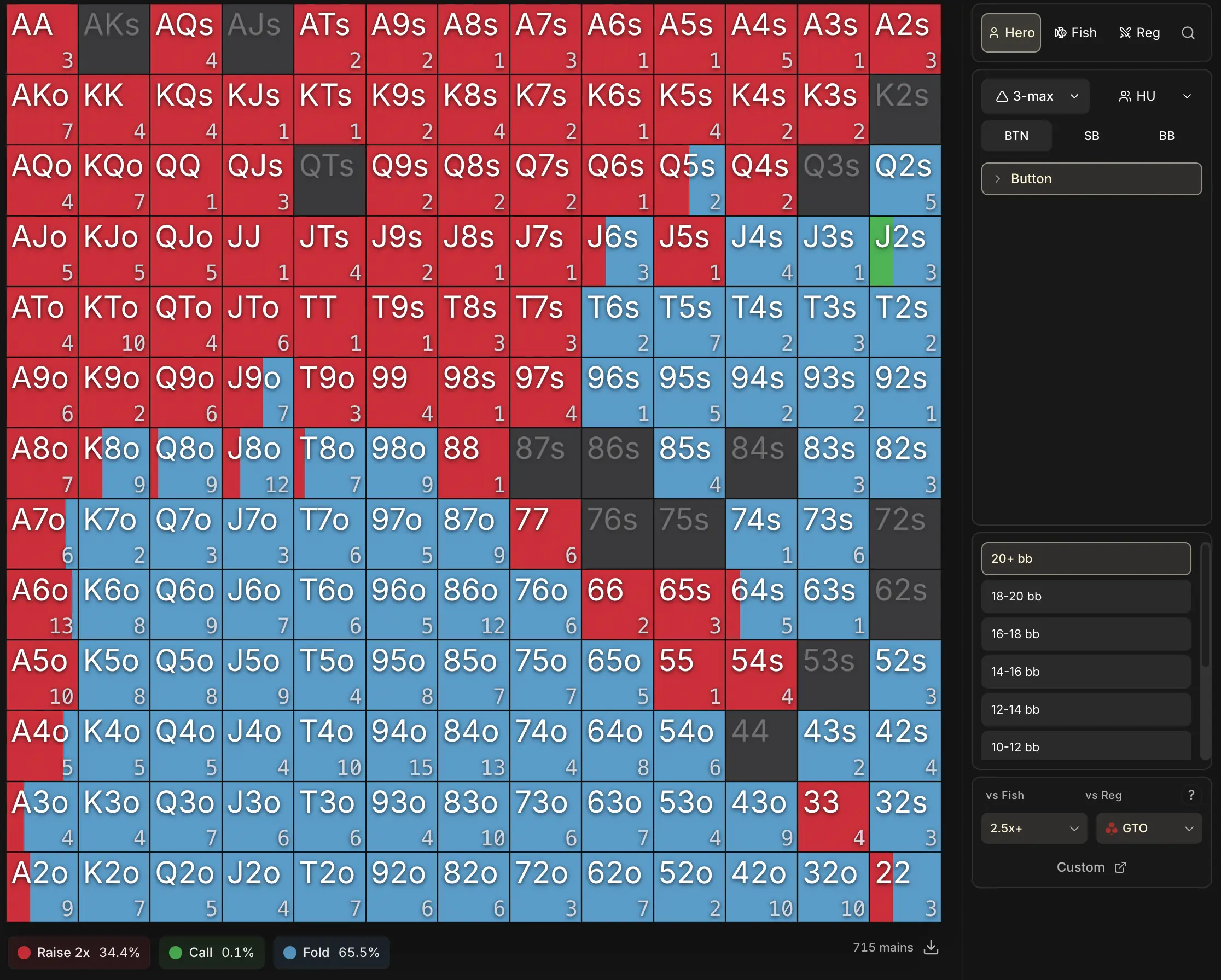
The threshold isn't magic. On a very binary situation (all-in/fold play at 12 bb), 500 hands are plenty. On a mixed situation with four possible actions, it's only a comfortable minimum.
And as you probably guessed, the number at the bottom right of each cell shows the number of occurrences for that hand.
A word on variance.
It isn't the same for every statistic in the tracker. We often tend to think everything converges at the same pace, but that's wrong: each metric has its own stabilization speed.
- Your pool's reg/fish ratio stabilizes after very few spins: variance is low, since each opponent is classified in a binary way (either Reg or Fish).
- A preflop range (yours or the pool's) needs a moderate sample per situation, that's the 500-hand threshold we're talking about here.
- CEV needs far more spins to converge: the variance of EV per tournament is high, and it typically takes several thousand spins before it becomes reliable.
- An EV per situation needs even more volume: the data is split into finer subgroups, so each category gets less signal for the same number of spins.
For preflop ranges, getting to 500 occurrences is fairly quick on the situations that come up in every tournament (BTN 20 bb+, BB facing an SB open, etc.).
On rarer situations, reaching that threshold can take several thousand spins.
5. Navigating between all the situations
There are a lot of stack sizes and a lot of situations. Going through them all to find every one of your leaks is hard. Two concrete approaches to get there.
1. Drop by when you're working on a situation.
Working on BB vs SB open at 25 bb and want to see how you really play it? Open the matching situation in the Preflop tab.
It's concrete feedback on your own game, alongside your theoretical study.
And if a situation is missing, the New situation button, at the bottom of the list, lets you create your own custom preflop situations (action sequence and sizings of your choice). This action line is built like the Review filter of the same name, detailed in the chapter The Filters panel.
2. Let the Summary view do the work for you.
Rather than scanning every situation by hand, open the Summary view: it is the first entry in the sidebar, right above the list of situations.
It shows all your preflop situations in a single table, fed live by your filters. A Total row at the top, then for each situation:
- the number of Hands played;
- your Accuracy and your number of Mistakes, broken down vs Fish and vs Reg .
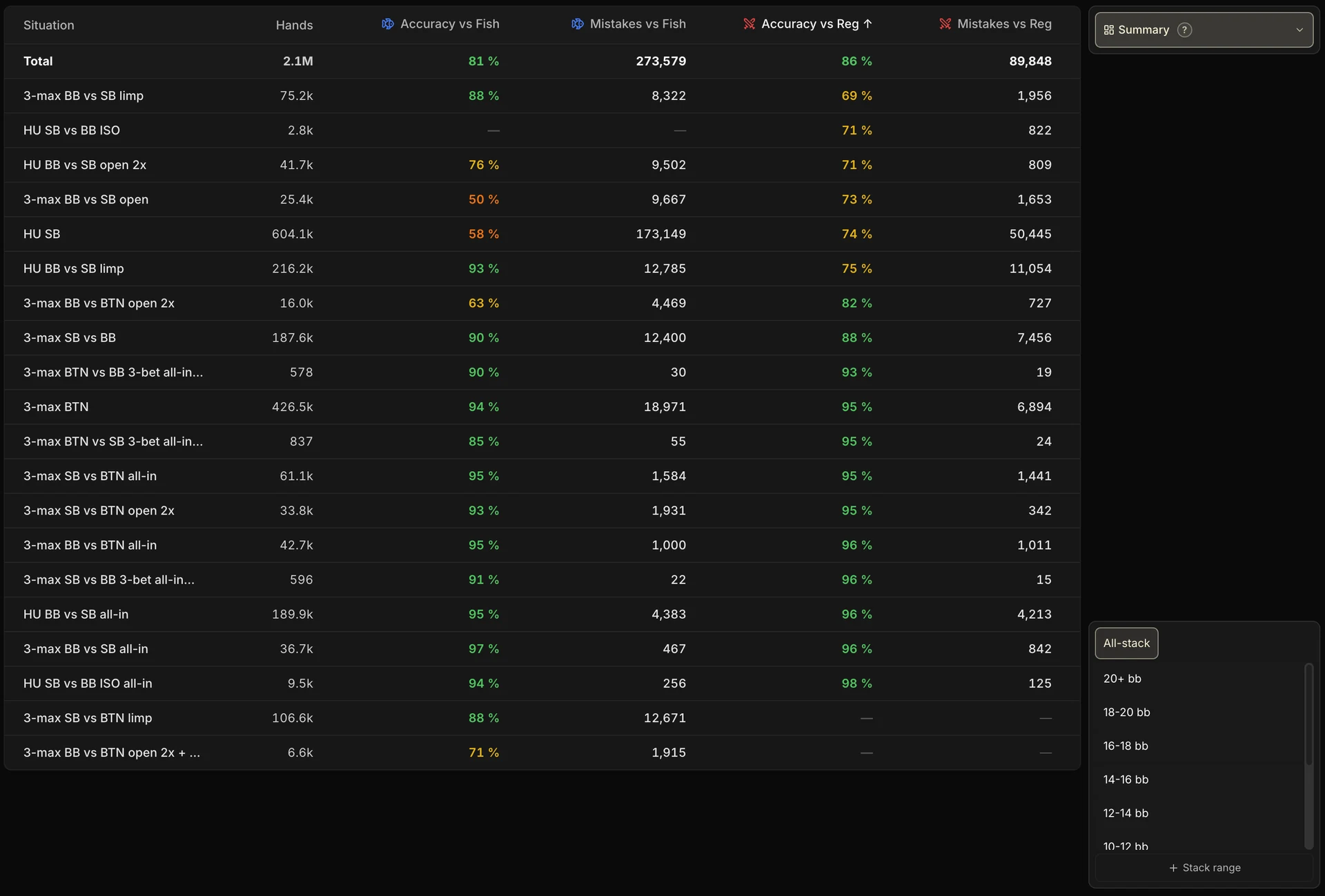
The headers are sortable: sort by accuracy to bring your worst situations to the top, or by hand volume to push aside statistical noise.
Accuracy is measured against your reference charts: the Poker Sciences charts by default, or your custom charts (see the next chapter).
Keep a critical eye: 0% accuracy on 2 occurrences is less worrying than 70% on 1,000 occurrences. Sorting by volume is exactly what filters out that noise.
As explained earlier, aim for 85% accuracy on average. Reaching 100% is an illusion: the system compares your decisions to a fixed reference, so some deviations that are relevant in game will naturally show up as gaps.
By default, every stack depth is aggregated, but the stack ranges card in the sidebar lets you restrict the table to certain depths.
And to dig into a situation, click its row: the tab switches straight to that situation, pre-selected, where you can analyze stack by stack where the mistakes come from.
In practice, the Summary view is there to prioritize your preflop chart reviews: it is where each of your preflop analysis sessions should start.

6. Reading your opponents' ranges
So far we've talked about your range. But the Preflop tab also shows, on the same situation, what the Fish or the Regs do.
The profile bar, at the top of the sidebar, lets you tick up to three profiles at once: Hero, Fish, Reg, any of your tags, or even a specific player. Each ticked profile displays its own grid, side by side with the others.
To read these ranges properly, compare both the action frequencies and the composition of the grids. Here, for instance, is the same BB vs BTN open 2x situation at 20 bb+, on the Hero side, the Regs side and the Fish side:
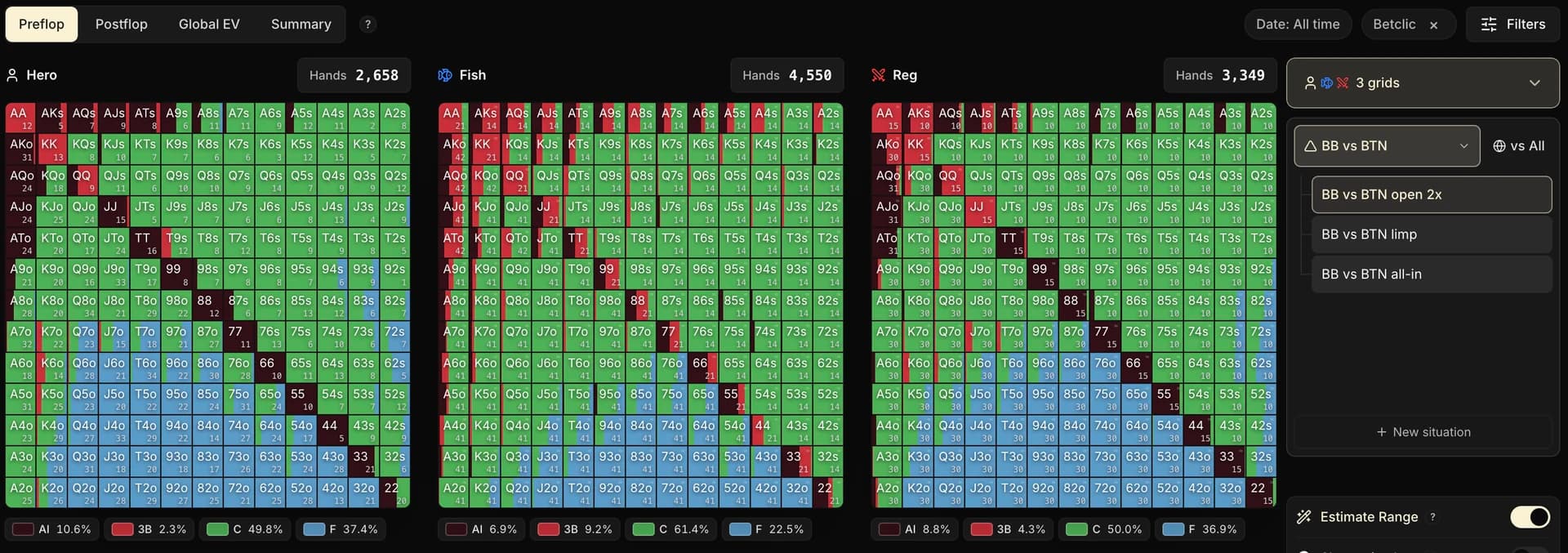
In this particular example, the frequencies already tell you what matters: Fish defend the BB in a much looser way.
But it's by looking at the composition that the read becomes usable: which hands they min 3-bet, which extra hands they call, which hands stay folded.
That second layer is what provides the raw material for exploit strategies.
You should also be thinking that it's surprising to see Folds show up in the Fish's or the Regs' range: by definition, folded hands never go to showdown, so their cards should never be visible.
And yet in Poker Spin Tracker the grid is complete. How is that possible?
That's the job of the Estimate Range toggle, which appears in the middle of the sidebar as soon as an opponent range is displayed.

In practice, Estimate Range fills in the holes in the grid: for the hands that never reached showdown, an algorithm statistically reconstructs how the opponent plays them from the actions observed on the visible hands. You end up with a far more complete grid than showdowns alone.
That said, it's always worth switching it off from time to time to come back to real showdowns: those are the only pieces of information you have truly observed. And even with the estimate left on, keep a critical eye: as its name says, it's an estimate, not absolute truth.
With these opponent ranges in front of you, let's get back to the essentials. Two very concrete uses come out of this read of the pool:
Seeing how they really play
We often carry assumptions about Fish that turn out to be wrong (or not) as soon as we look at the data:
They only 3-bet with QQ+
They only raise 3x for value
It teaches you a lot, independently of any exploit strategy. If you sometimes wonder how the Fish (or the Regs) play a specific situation, this is where you come to check.
Building exploit preflop strategies
From the range the pool actually plays, you can do what's called nodelocking: you force that range onto a solver, and ask it to compute the best possible response. The output is a strategy that directly exploits the pool's gaps.
The tracker measures and it shows. The solver, for its part, computes the answer.
Nodelocking is the bridge between the two: it turns an observation ("Fish raise 38% on the BTN at 20 bb+") into a concrete strategy ("here's how to defend my BB against that").
Careful, nodelocking is an extremely complex exercise.
Copy-pasting the strategy a solver spits out doesn't work: you need to know which range to lock, at which node, with what granularity, anticipate the downstream adjustments, check that the deviation stays robust, and so on.
It's a topic in its own right that requires using a solver, and therefore falls outside the scope of the Academy. We won't detail it here.
What Poker Spin Tracker is preparing next.
In time, you'll be able to compute exploit strategies directly inside Poker Spin Tracker, based on the real data of your pool, without going through an external solver.
And for the players who want to go further, it will be possible to complete these ranges by hand or to edit them to match your read of the pool.
It's a big project that will come after postflop arrives in the Study Pack, but the goal is to bring that observation → strategy journey, which today takes several hours of external work, down to a few clicks inside Poker Spin Tracker.
7. Key takeaways
The Preflop tab is the tracker's tool for visualizing and comparing preflop ranges. It works both ways: your game on one side, the pool's game (Fish and Reg) on the other.
• Visualization: 13×13 grid + frequencies below the grid, on every common preflop situation (and your custom situations).
• Comparison (with the Study Pack): the vs filter picks the reference (GTO vs Reg, Exploit vs Fish), the Reference chart button displays it on hover, and the Show mistakes toggle flags the most deviant hands (orange = error > 40%, red = error > 70%).
• Table format and vs filter: 3-max / HU, and vs Fish / vs Reg / tag / player, with a classification based on the opponent's stats (logic shared by all four Leak Finder tabs).
• Volume: aim for ≈ 500 hands per range as a minimum.
• Summary view: the first entry in the sidebar, it condenses all your situations into one table (Hands, Accuracy, Mistakes, vs Fish / vs Reg) to prioritize your reviews.
• Opponent ranges: display up to 3 grids side by side (Hero, Fish, Reg, a tag or a player) to see how the pool plays. Range estimation fills the holes left by non-showdowns. Combined with nodelocking, it's the foundation for building an exploit strategy.