
Simulating your bankroll future
Use the tracker's Monte Carlo simulation to project your sample into the future and tame short-term variance.

Gandalf
Co-founder of Poker Sciences

The previous chapter, The Bankroll curve, told the story of your past: where the gaps opened up, what your luck and your room did to it. The real question that comes next is far more direct:
What might my future look like?
The next 100 games, the next 5,000, and so on.
The tracker answers that question with a dedicated tool: the bankroll simulation . It takes your current sample, extends it into the future, and draws the curves you could end up with, given your CEV, your rakeback and your room's multiplier distribution.
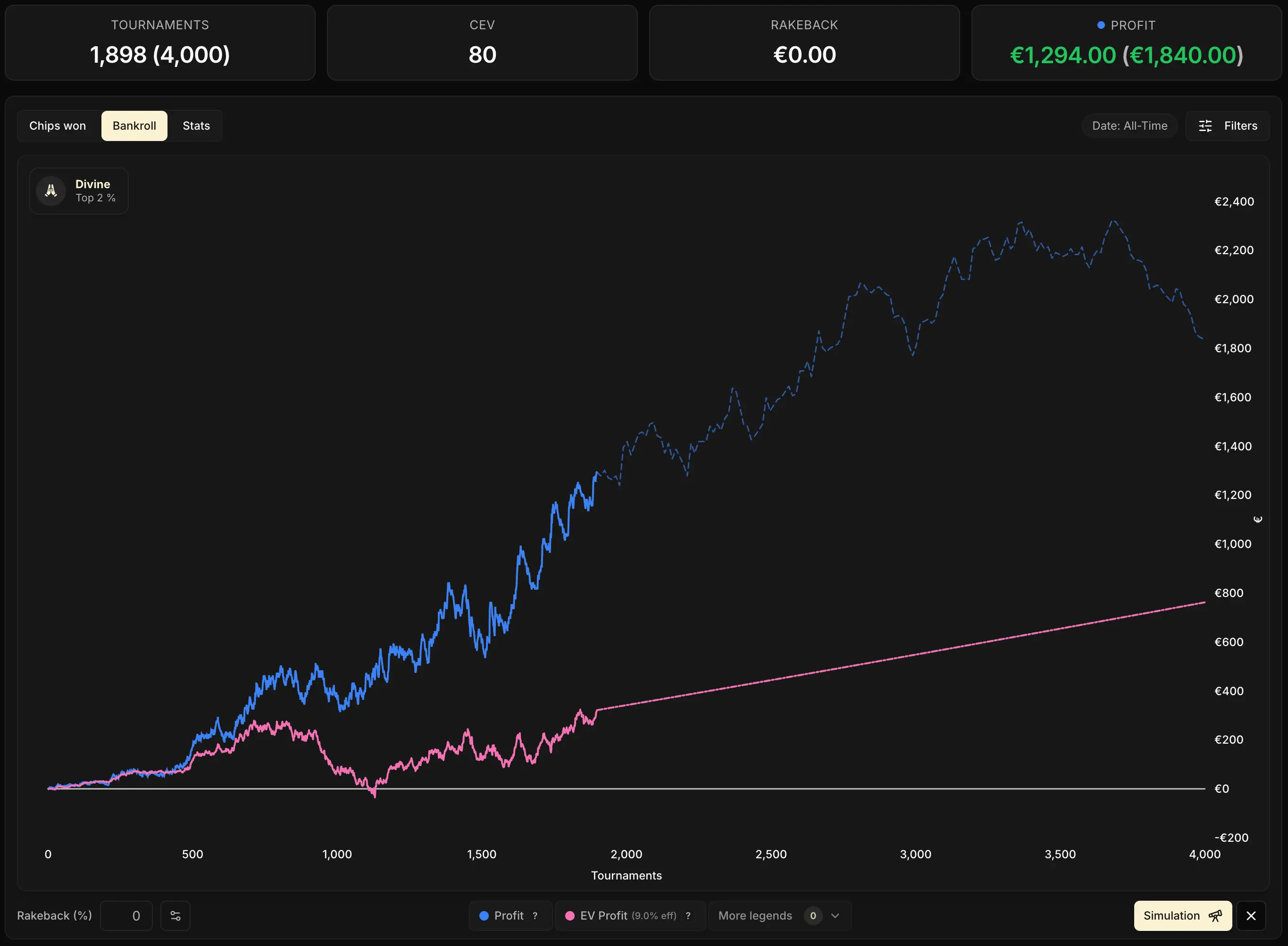
1. The mouse wheel: project in one click
To project your bankroll quickly, you don't need to open any menu: it can all be done straight from the chart.
Scroll the mouse wheel over the curve: with every notch, the tracker adds simulated games at the end of your sample. And like magic... the curves extend to the right.
The wheel uses your current CEV and your room setup as its assumptions. It answers the question:
If I keep playing the way I do today, what does the rest look like?
The wheel is mainly there for a quick projection. If you want finer control over the assumptions (a different CEV, a target date, several draws), use the dedicated tool below instead.
2. The simulation tool: finer control
Next to the Bankroll chart, a telescope icon opens the Bankroll Simulation window. A few parameters to set, a Simulate button.
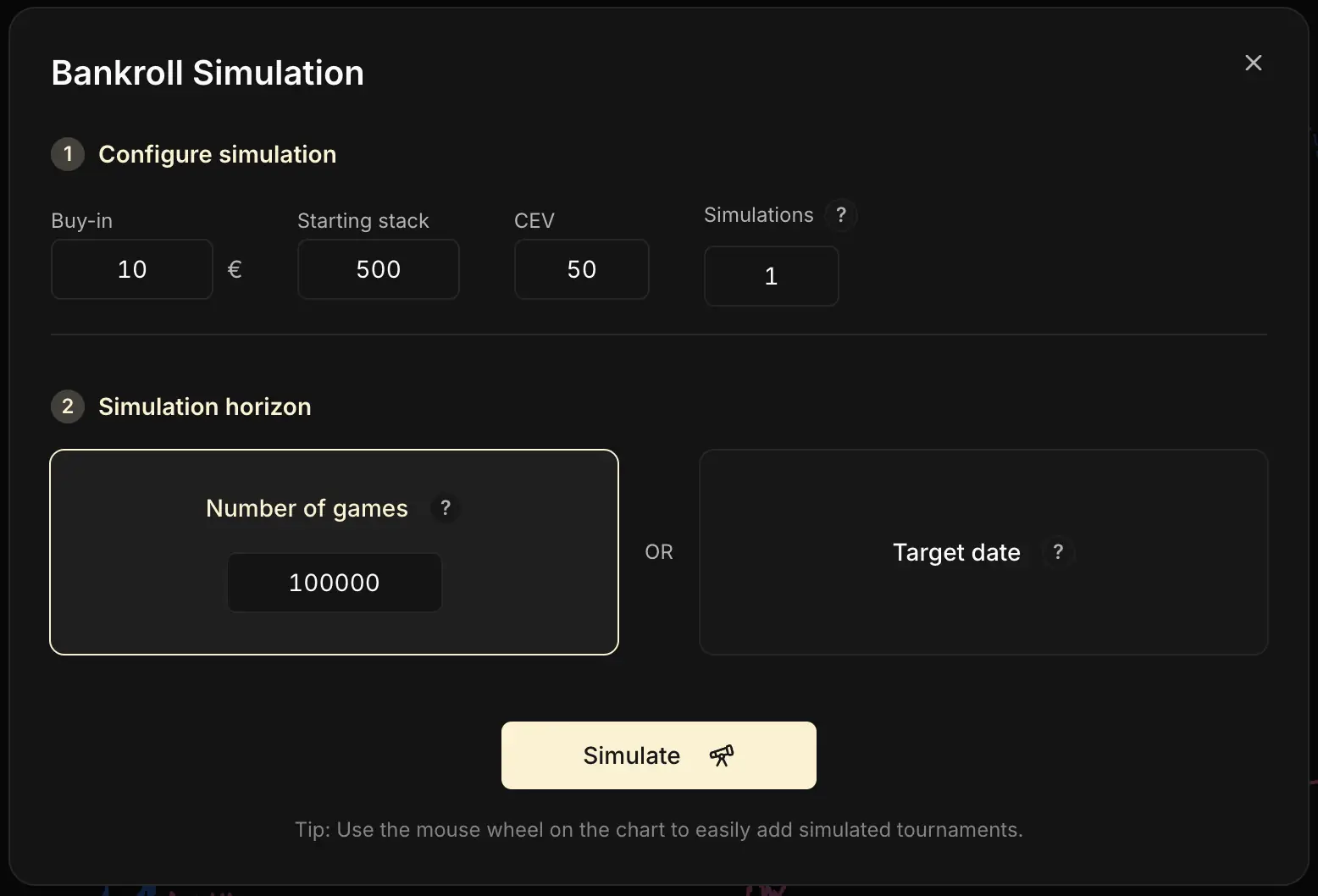
The buy-in and starting stack fields carry over your current settings. Only change them to simulate a change of stakes or a different format.
The projected CEV: your skill assumption
By default, the field is pre-filled with your current CEV. You can change it to test a scenario: "what if I add 10 to my CEV?", "what if I move down in stakes and drop to 50?".
Your current CEV isn't necessarily your "true" long-term CEV. On a small sample, it can sit far above or far below your actual level. Before chaining together ambitious simulations, take a look at the chapter The Chips curve to understand how reliable your CEV is.
The number of simulations: visualizing variance
At 1 simulation, the tracker draws a single future path, picked at random among millions of possible ones. At 10, 50 or 100 simulations, it draws that many at once, all with the same parameters. The curves stack up and form a fan: some end very high, others very low, most in the middle. It's the direct picture of what variance can produce at a constant skill level.
The horizon: where you stop
Take your pick:
- Number of games: you directly pick a volume to add (500, 5,000, 50,000 games)
- Target date: you pick a future date, and the tracker works out the number of games from your recent playing pace. Handy to project to "the end of the month" or "the end of the year"
3. Three concrete uses
So when does this tool really earn its keep? There are plenty of cases. We walk through three of them below as examples, but the simulation lends itself to many other questions: don't hesitate to experiment on your own to dig into whatever interests you.
Preparing your mental game before a session
Before a session, try it right now: run a simulation over 100 or 200 games with your current CEV. Then, at the bottom right of the chart, click several times on the circular Regenerate icon : each click produces a new draw with identical parameters.
You'll watch radically different runs go by: +50 buy-ins in one scenario, −30 buy-ins in the next, a flat run after that. Same player, same skill level, three evenings that look nothing alike.
It's the healthiest exercise there is to really absorb that short-term variance is massive, and that the result of one session says almost nothing about your level.
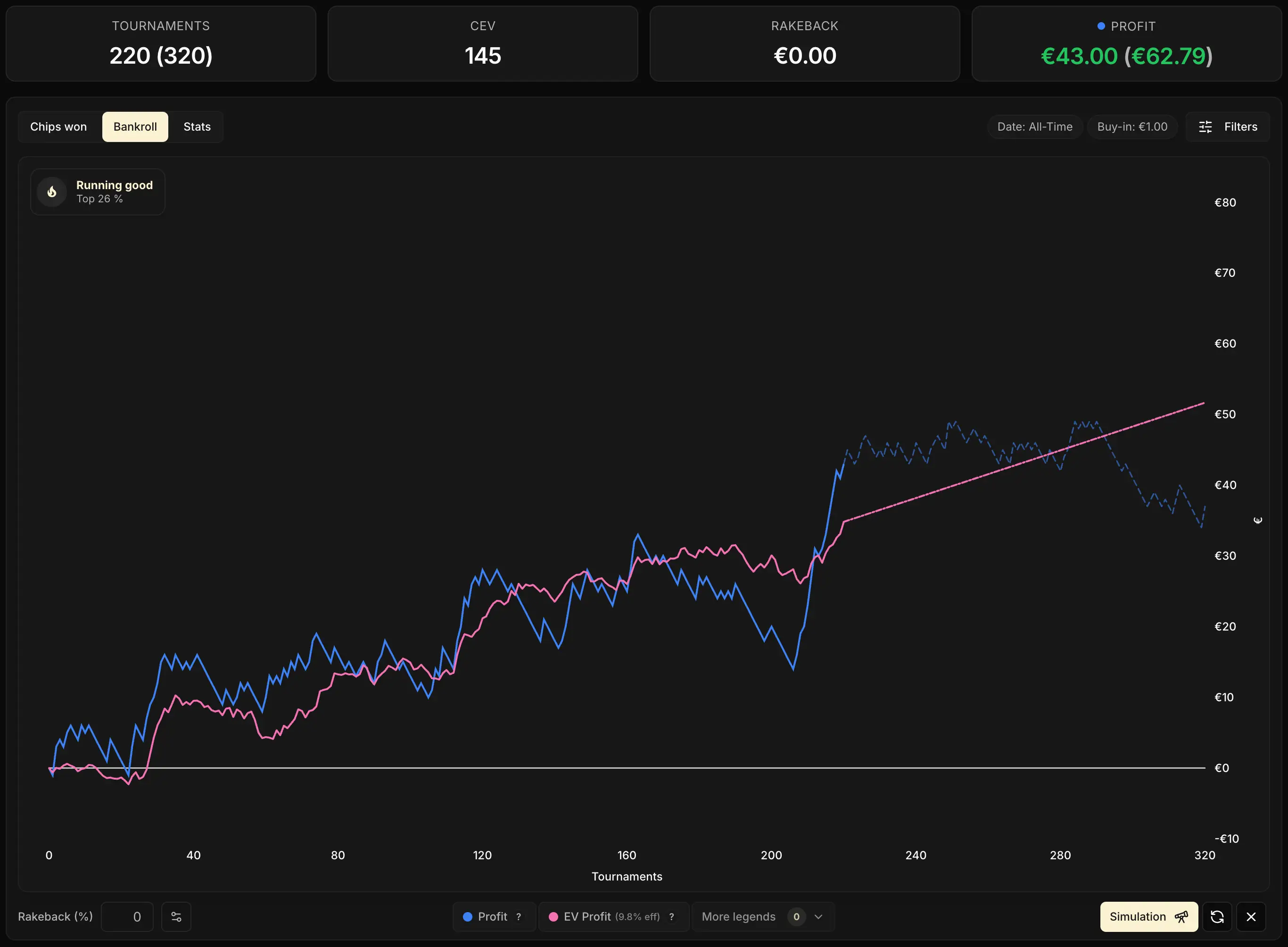
Running a simulation then clicking Regenerate several times in a row is, by far, the most direct way to grasp what variance is really capable of.
The exercise pays off in all sorts of situations: testing a change of stakes, picturing a goal, putting a big downswing in perspective, cooling down a tilt after a bad night. Don't hold back: play with it!

Anticipating the pink / purple convergence
The previous chapter raised the question: at what volume does my pink catch up with my purple? In other words:
How many games before the big multis I'm still owed finally hit, and my profit catches up with what the room promises in the long run?
It's a number genuinely worth knowing: it tells you over what horizon your current shortfall becomes recoverable.
To answer that, the mouse wheel is the ideal tool: put the cursor on the chart, push the simulated volume up little by little, and watch the pink converge (or not) onto the purple live.
No need to open the full tool, no need for several draws, you're only after a rough threshold volume.
On a room like Betclic, a bigger share of the expected money is spread across relatively reachable multipliers. The pink can therefore join the purple within a few tens of thousands of games.
On a room like Winamax, a far bigger share of the expected money is concentrated in very rare multipliers: even at 100,000 simulated games, the gap often stays visible. This is exactly the phenomenon we described in chapter 3 of module 2, made tangible on your own sample.
Planning a numbers-based goal
You set yourself a goal for the end of the month, or the end of the year. The target date simulation answers the question:
If I keep playing at my current pace, how much can I reasonably end up with?
By running several draws, you get a realistic range instead of a round number plucked out of thin air.
4. Reading the simulation fan
This is the most important read in the chapter. When you run several simulations with the same parameters, the tracker layers them all onto the chart. Each faint curve is one possible run of your bankroll, drawn at random from the same statistical universe. To make that fan readable, five benchmark curves are drawn on top: the Top 10%, 25%, 50%, 75% and 90% percentiles.
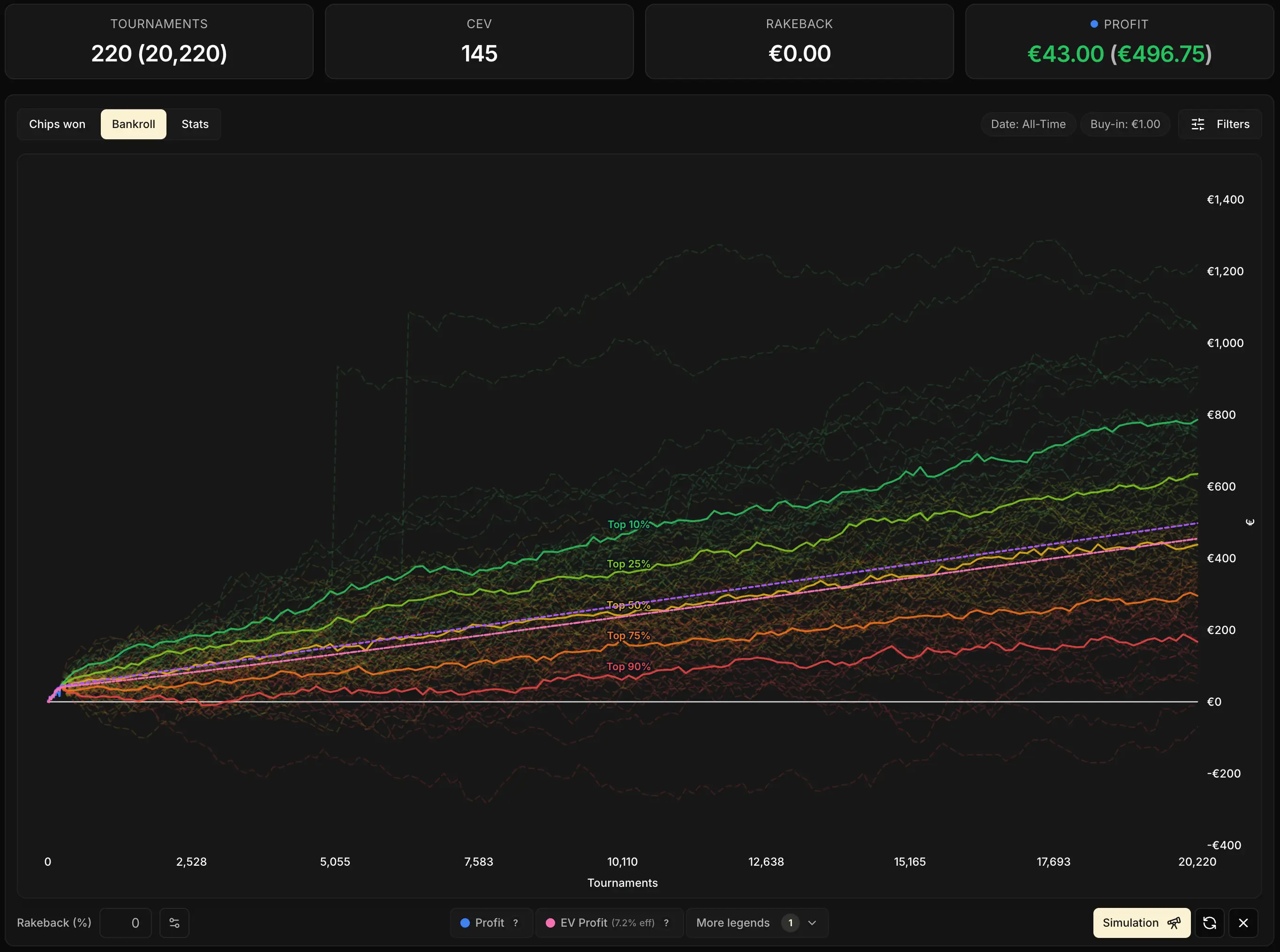
Each percentile reads as "the share of runs that finish above":
- Top 10%: only 10% of runs finish higher. A very lucky scenario
- Top 25%: a quarter finish higher. A favorable scenario
- Top 50%: the median. As many above as below. The "typical" result at this volume
- Top 75%: a quarter finish lower. An unfavorable scenario
- Top 90%: only 10% finish lower. A very unlucky scenario
Concretely, in the image above (100 simulations of 20,000 games at the same CEV):
- 10% of the time, your bankroll ends above ~+€750
- 10% of the time, it ends below ~+€180
- 50% of the time, it lands around ~+€450
Same player, same level, same room, a fourfold spread from bottom to top. Just variance doing its job.
Two reference curves are drawn as well: the dotted purple (EV Profit, the theoretical slope at infinite volume) and the pink (Effective EV Profit, the slope you expect at your volume). The median of the simulations (Top 50%) tracks the pink closely: that makes sense, since the pink is precisely the expectation of what the simulation reproduces.
Here too, the Regenerate icon at the bottom right of the chart does the job: one click, and the tracker regenerates all 100 simulations with exactly the same configuration. The percentiles shift slightly on each pass, but the overall spread stays stable. Useful to check that the gap between the extremes isn't an artifact of one particular draw.

Short term vs long term
Over 500 or 1,000 games, the spread would be even wider in relative terms, with a far shakier median. Over 50,000 or 100,000 games, the percentiles tighten around the purple and pink slopes. But the real long term takes a volume most players never reach.
The fan sums up in a single image the whole of Module 4 to come on variance: poker is a game where the short term lies, and where only the long term tells the truth about your level. The simulation lets you watch that lie play out live, before it hits you for real.
Key takeaways
The simulation takes your real sample and extends it into the future, respecting your CEV, your rakeback and your room's multiplier distribution.
• The mouse wheel on the chart is the shortcut for a quick projection with your current settings.
• The telescope icon opens the full simulation tool: horizon in games or by target date, editable CEV, number of simulations.
• The Regenerate icon at the bottom right of the chart lets you produce a new draw at any time. Don't hesitate to play with it.