The Bankroll curve
Read the gaps between the 4 profit modes and understand what they say about your luck and your room.

Gandalf
Co-founder of Poker Sciences

In the chapter The 4 profit modes, we saw that in Poker Spin Tracker, the 4th KPI, at the very top right of the Dashboard , offers 4 possible options:
Profit: your actual earnings in euros, rakeback included.
Effective EV Profit: what you should have won on your sample, given your CEV and the multipliers you were supposed to hit.
EV Profit: your theoretical long-term profit, at infinite volume.
EV Multi Profit: your profit with the multipliers you actually hit, without the variance of all-ins.
Now we're moving on to analyzing the curves that correspond to these 4 profit modes.
A number is a photo. A curve is a film. The four modes tracked over time and layered on the same chart let you read what the KPI alone can't show: how the gaps between the curves evolve.
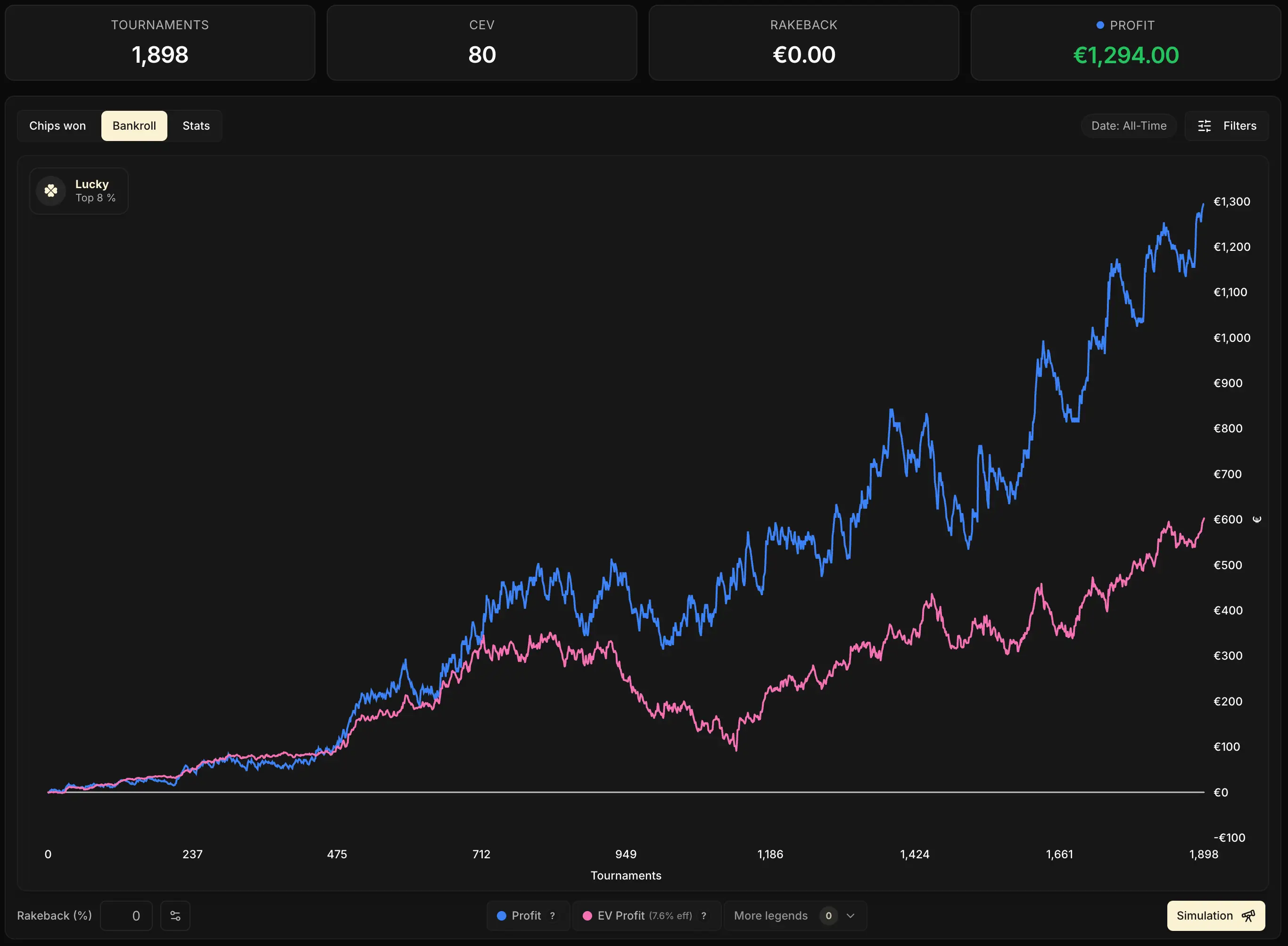
The 4 curves of the Bankroll tab
The Bankroll tab, right after the Chips won tab in the Dashboard , displays two curves by default: the blue one (Profit) and the pink one (Effective EV Profit). The other two curves, purple (EV Profit) and orange (EV Multi Profit), are available under More legends, at the bottom right of the legend.
| Curve | Color | Default | What it measures |
|---|---|---|---|
| Profit | Blue | Yes | Your actual earnings in euros, rakeback included |
| Effective EV Profit | Pink | Yes | What you should have won on your sample, given the multis you were supposed to hit |
| EV Profit | Purple | No | Your theoretical long-term profit, at infinite volume |
| EV Multi Profit | Orange | No | Your profit with the multis you actually hit, without the variance of all-ins |
We already covered the role of each curve in detail in the chapter The 4 profit modes. Go back to it in particular for the notion of effective rake, which explains the pink curve.
Here, we're going to watch how they move over time and read what their gaps reveal.

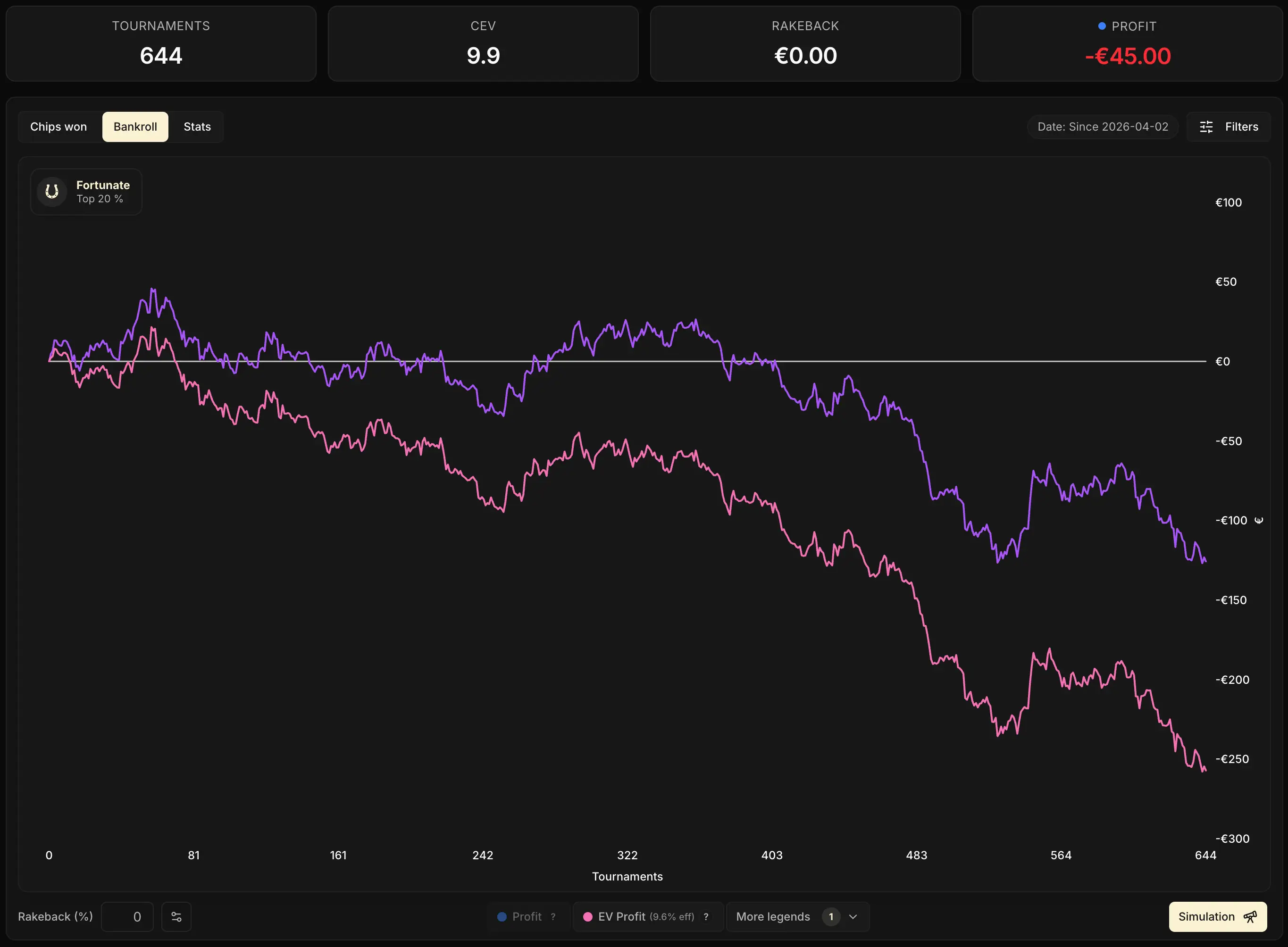
Blue vs pink: luck over time
The pink one (Effective EV Profit) tells you what you should have won. The blue one (Profit) tells you what you did win.
The gap between the two measures your overall luck on the sample: the sum of your luck on all-ins and your luck on multis.
What the chart adds over the KPI is the time dimension. It no longer just tells you:
Are you lucky or unlucky?
It tells you how and when you got there.
Three typical shapes for this gap:
1. A gap that oscillates around zero. The two curves follow each other closely, drift apart a bit, come back together. That's a neutral run, the usual variance noise of a sample in progress.
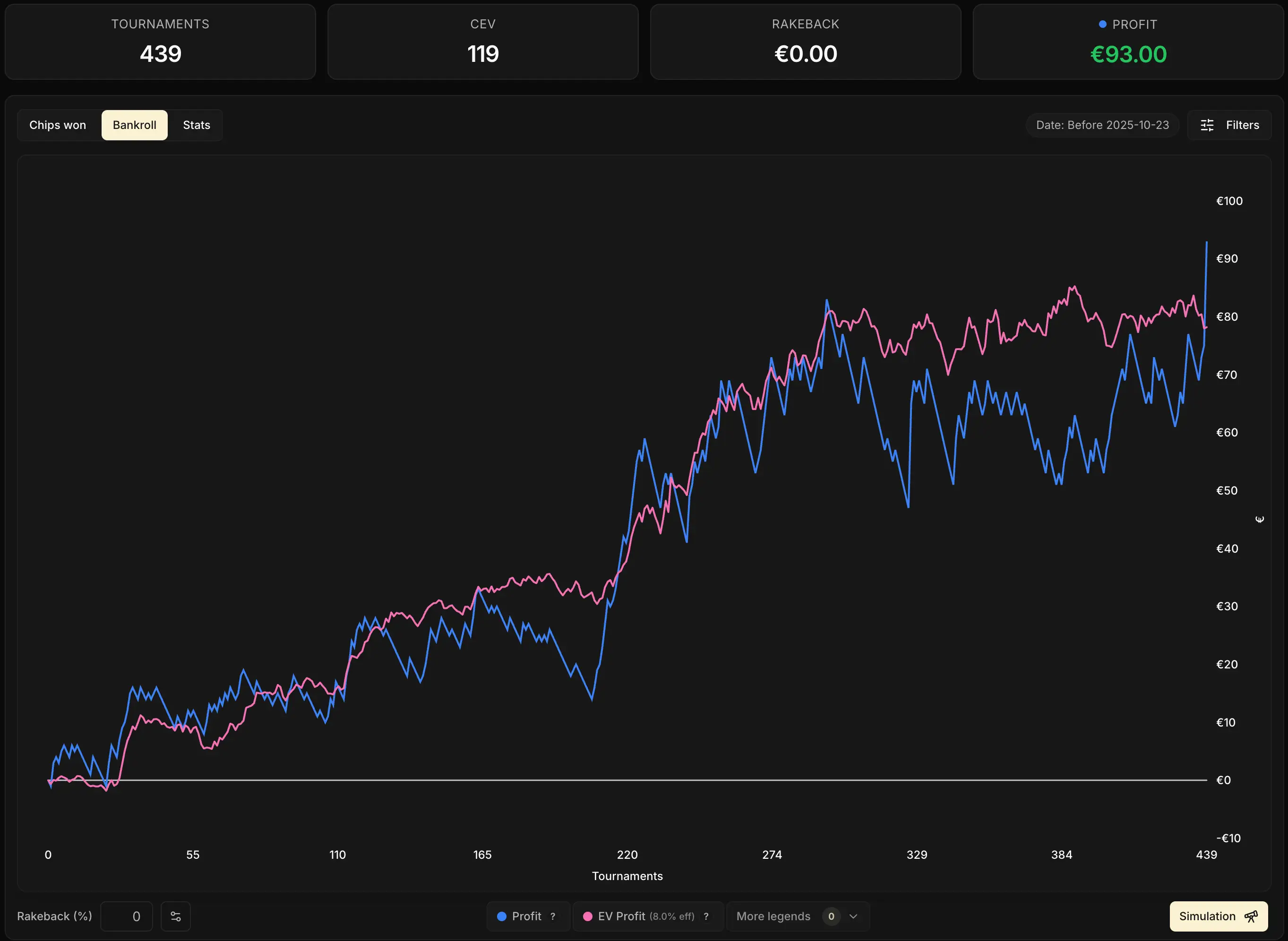
2. Blue lifting off above the pink. The gap widens in favor of the blue. The main cause, by far: luck in all-ins.
You've won more all-ins than your equity predicted, and it's not "normal" to have won that much on your sample.
You can check it directly on the previous tab, by the way: on your Chips curve, the green one should sit above the yellow one.
The other possible cause, rarer but more dramatic to look at: a big jackpot won (x100, x1000, x2500). The pink wasn't expecting that multi on your sample: the gap jumps all at once, on a single Spin.
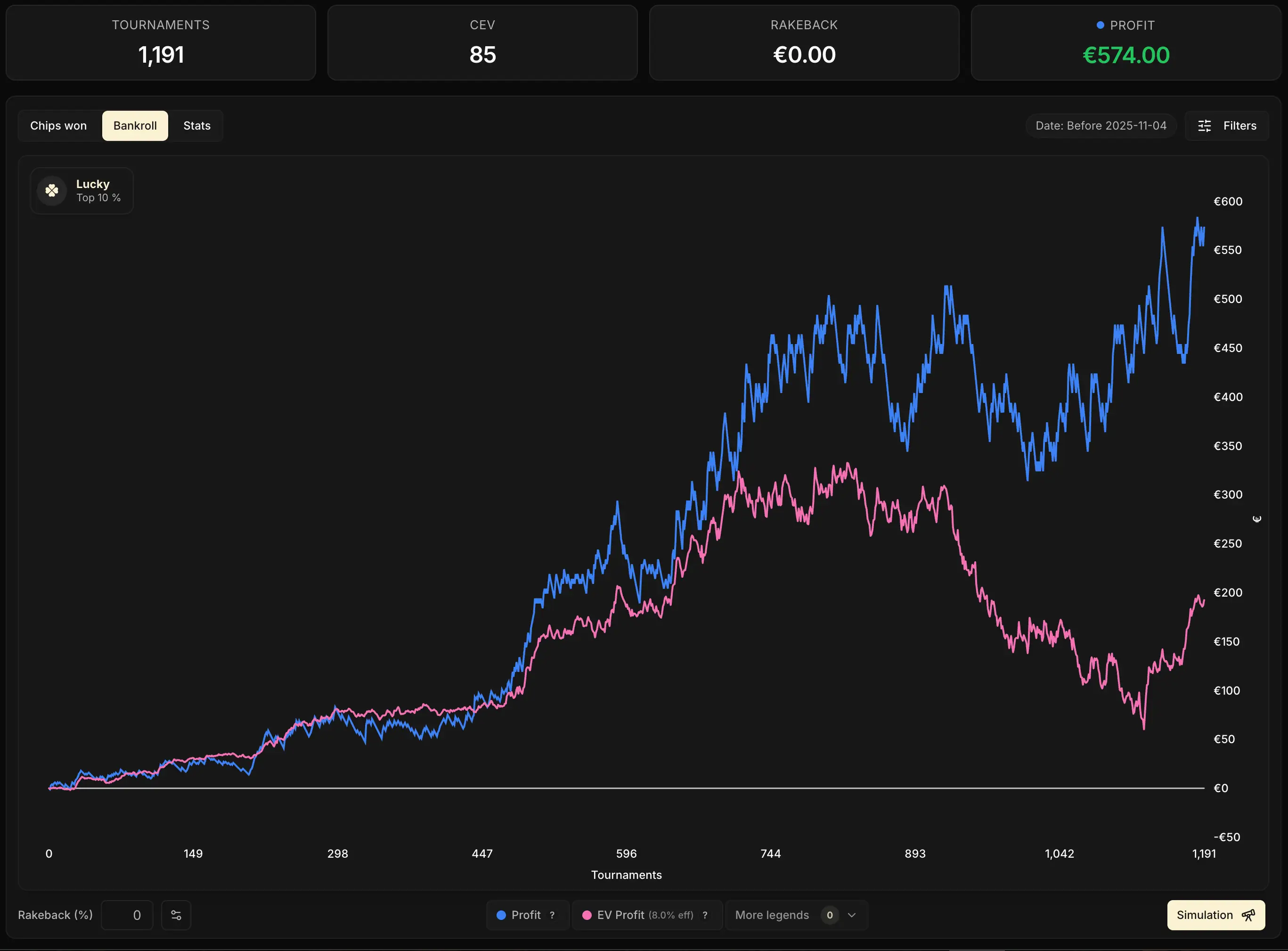

3. Blue sliding gradually below the pink. No break, a steady decline over several sessions. The main cause is a lasting all-in downswing: you keep losing spots where you were the favorite, hand after hand, while the pink stays where your play put it.
On a mid-sized sample (roughly between 5,000 and 60,000 games), this drop can also be a sign that you haven't hit your big jackpots yet compared to what your volume statistically called for. We'll come back to it right below.
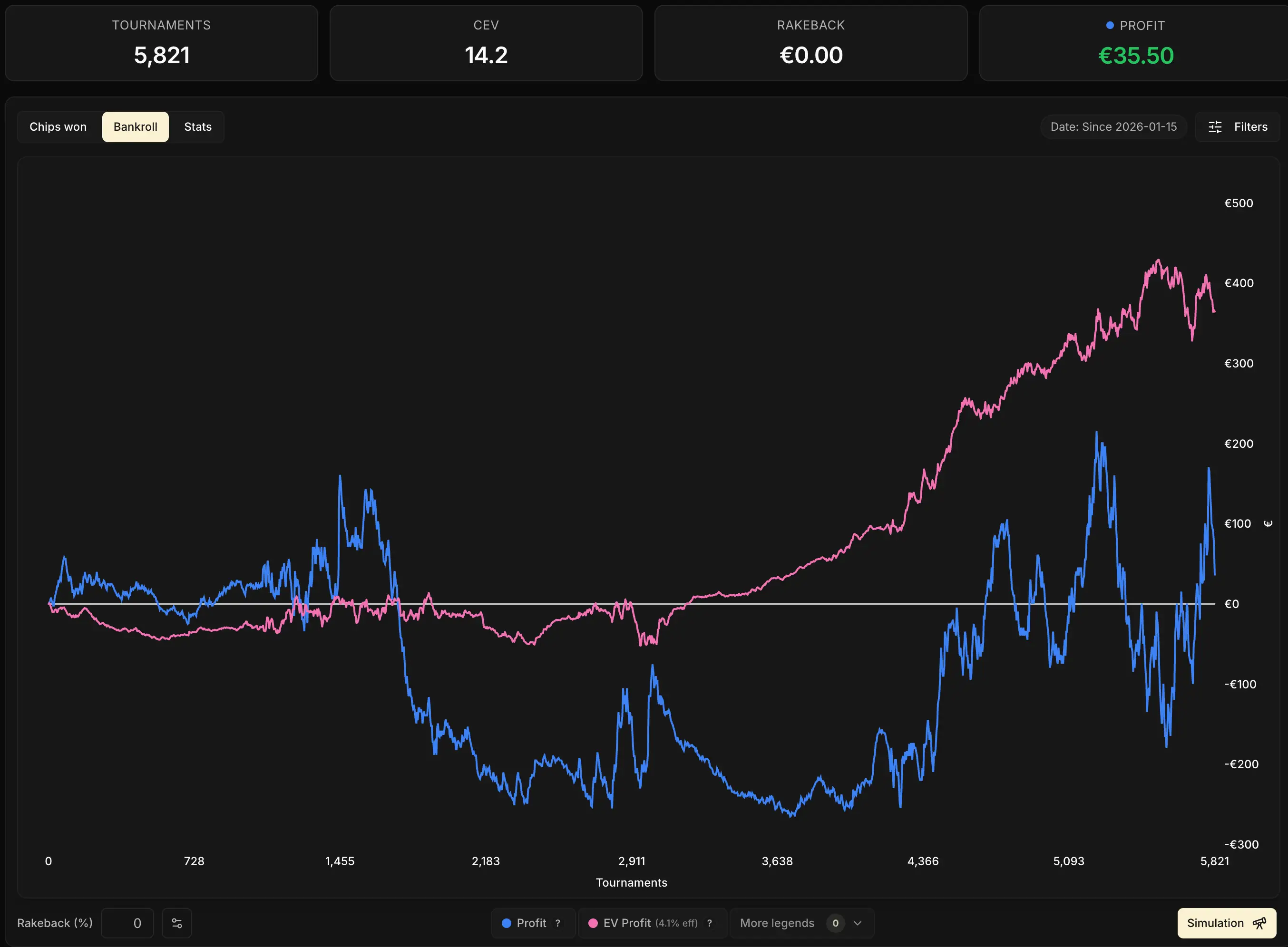
The final value of the blue/pink gap puts a number on the luck (or bad luck) of your sample. Its shape over time tells you where it came from: an isolated event (a break), a stretched-out phenomenon (a gradual spread), or simply the usual variance (an oscillation).
The tracker can also put a precise number on that luck, via the Run Luck badge. We'll come back to it in the chapter The Run Luck Badge.
Pink vs purple: your room's imprint
The gap between the pink and the purple tells a different story from luck: it measures your statistical debt on big multis. The share of your theoretical earnings the room promised you over the long run, but that hasn't been paid out yet as x100, x1000 or x2500 on your sample.
That's the possible reason behind the widening gap between the blue and pink curves we flagged in case 3 just above. The pink vs purple gap lets you see that phenomenon clearly. It shows you what the room promises you in the long run (the purple curve) and how far the volume you've played so far is from letting you claim it (the pink curve).
As a reminder, the purple curve takes into account the multipliers you should be hitting if you played an infinite volume (which is never the case, of course), while the pink curve only takes into account the multipliers you have a reasonable chance of hitting on the volume you've actually played.
This gap isn't the same for every player. It depends very heavily on one thing: your room's multiplier distribution. And the rule is simple:
The more a room packs its value into rare big multis, the further the pink falls behind the purple, and the longer it takes to catch up.
In practice, it all comes down to the room you play on:
- on a room that concentrates its value in rare ultra-big jackpots, the pink/purple gap is wide. That's typically the case with Winamax, with its x1,000,000 jackpot.
As long as your volume doesn't make those ultra-big multis statistically likely, your pink stays far below your purple - on a room with a more spread-out distribution, with more value in the small and medium multis, the gap is tighter. Your pink grinds close to your purple almost from the very first Spins
What it looks like in the long run
To illustrate, here's a simulation over 100,000 Spins at €10, with a player at 50 CEV, in two rooms with opposite distributions:
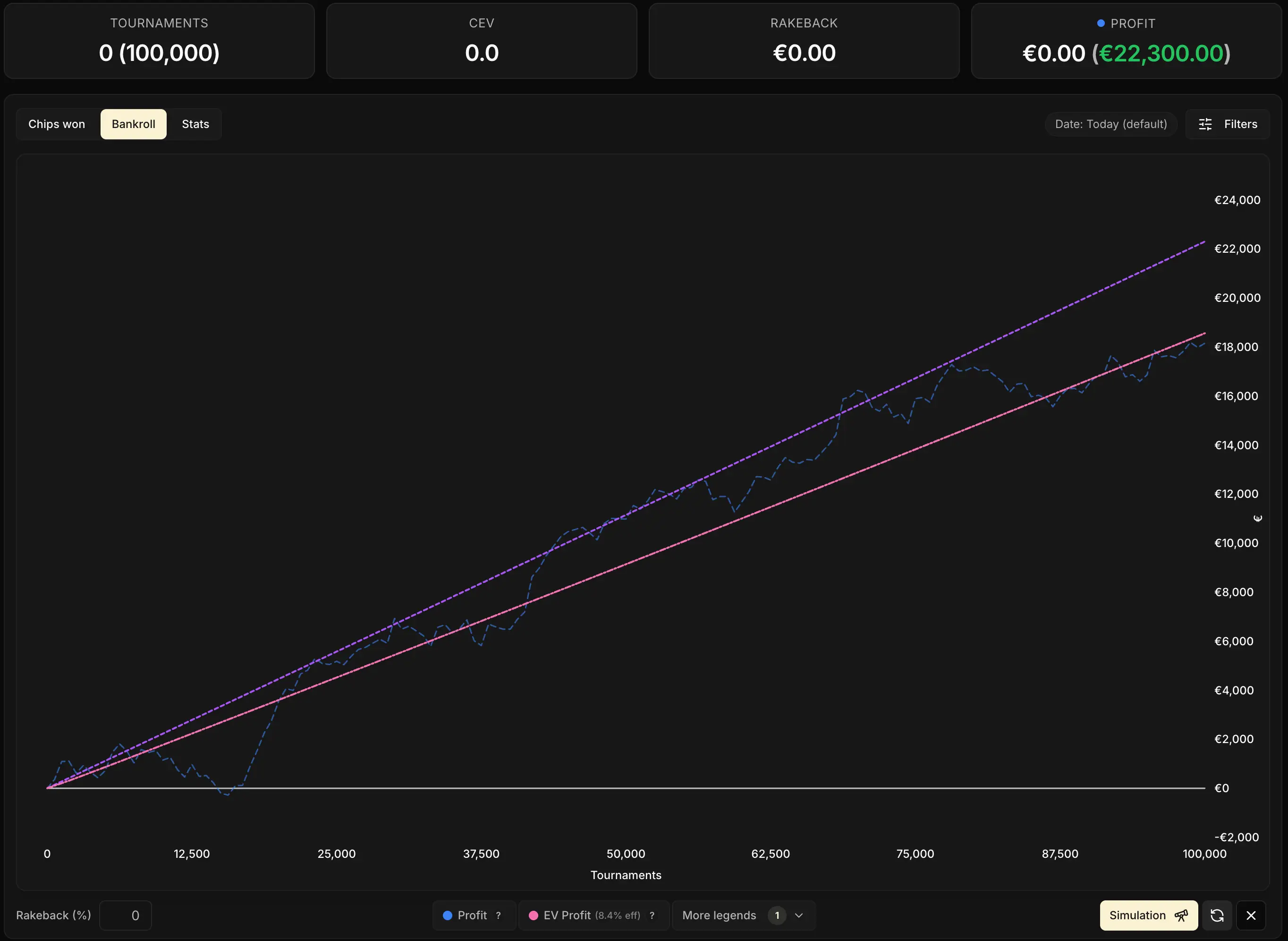
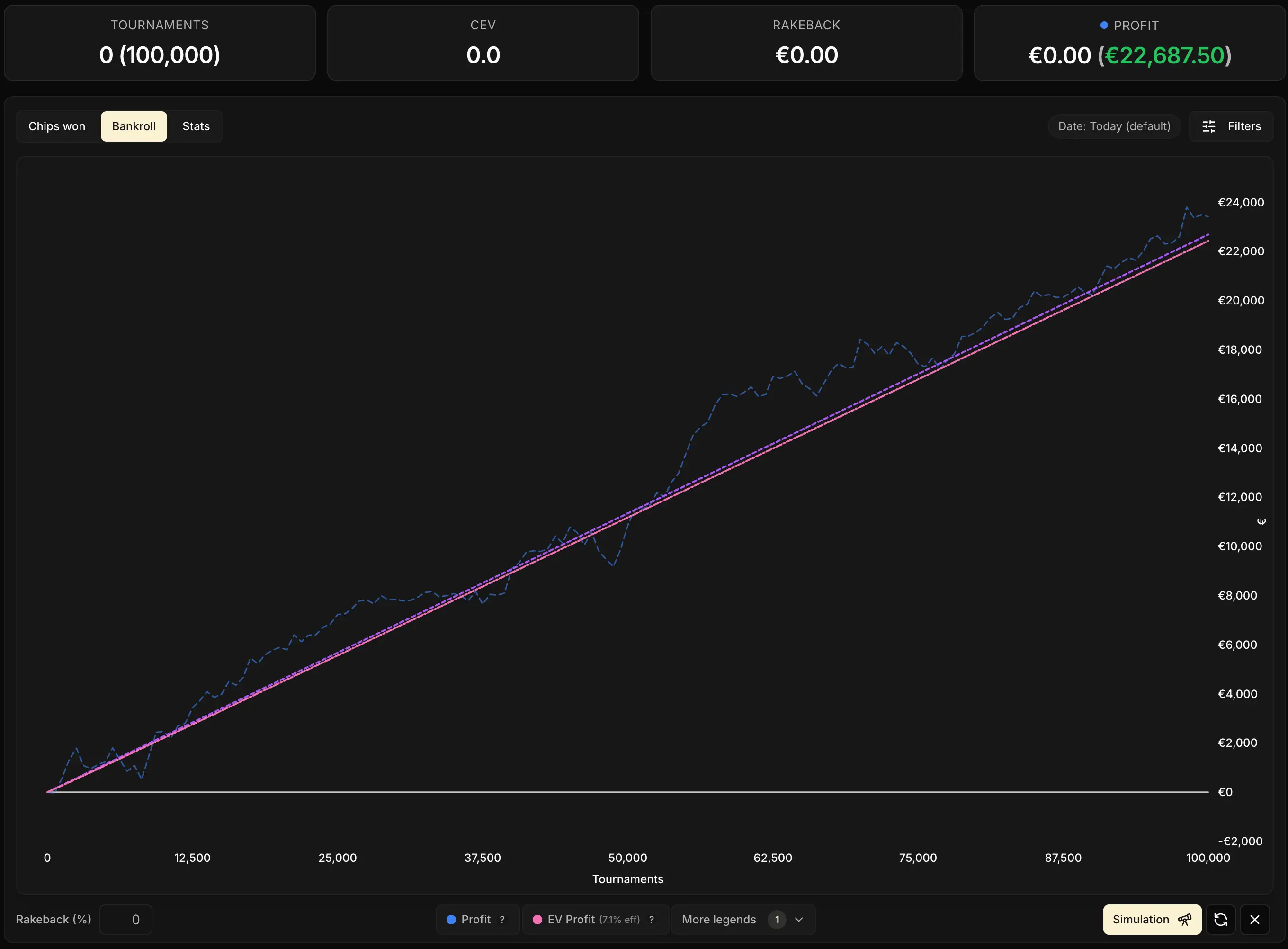
Two images, two stories. On some rooms (like Betclic), the pink/purple gap is almost nonexistent: the pink sticks to the purple from the first few thousand Spins. On other rooms (like Winamax), that gap only keeps widening and almost never closes, unless you play several million Spins.

For players on their way up, with volume still limited, the pink is therefore often the most honest indicator to follow: it tells you where you stand today, not what your room promises you in a "long run" you may or may not ever reach.
Want to go further and project your current sample forward to see at what volume your pink catches up to your purple? That's exactly the subject of the next chapter: Simulating your bankroll future.
EV Multi Profit (orange): when to use it
The orange curve neutralizes only the variance of all-ins, on the multipliers you actually hit. It's not a curve to watch day to day, but it becomes very telling in one specific case: when you had the luck to hit a big multi and you lost the Spin.
Typical example. You land an x400, and you lose the Spin. You weren't necessarily the favorite, but over the long run you'd have won a share of those Spins. That's exactly what the orange puts a number on. Here's what happens on the four curves:
- the blue loses the equivalent of the buy-in
- the pink and the purple barely move (neither was expecting that lucky x400 on your sample)
- the orange shoots up sharply: with the multi you did get, your equity was promising you a fraction of that Spin, and that expectation is what it captures
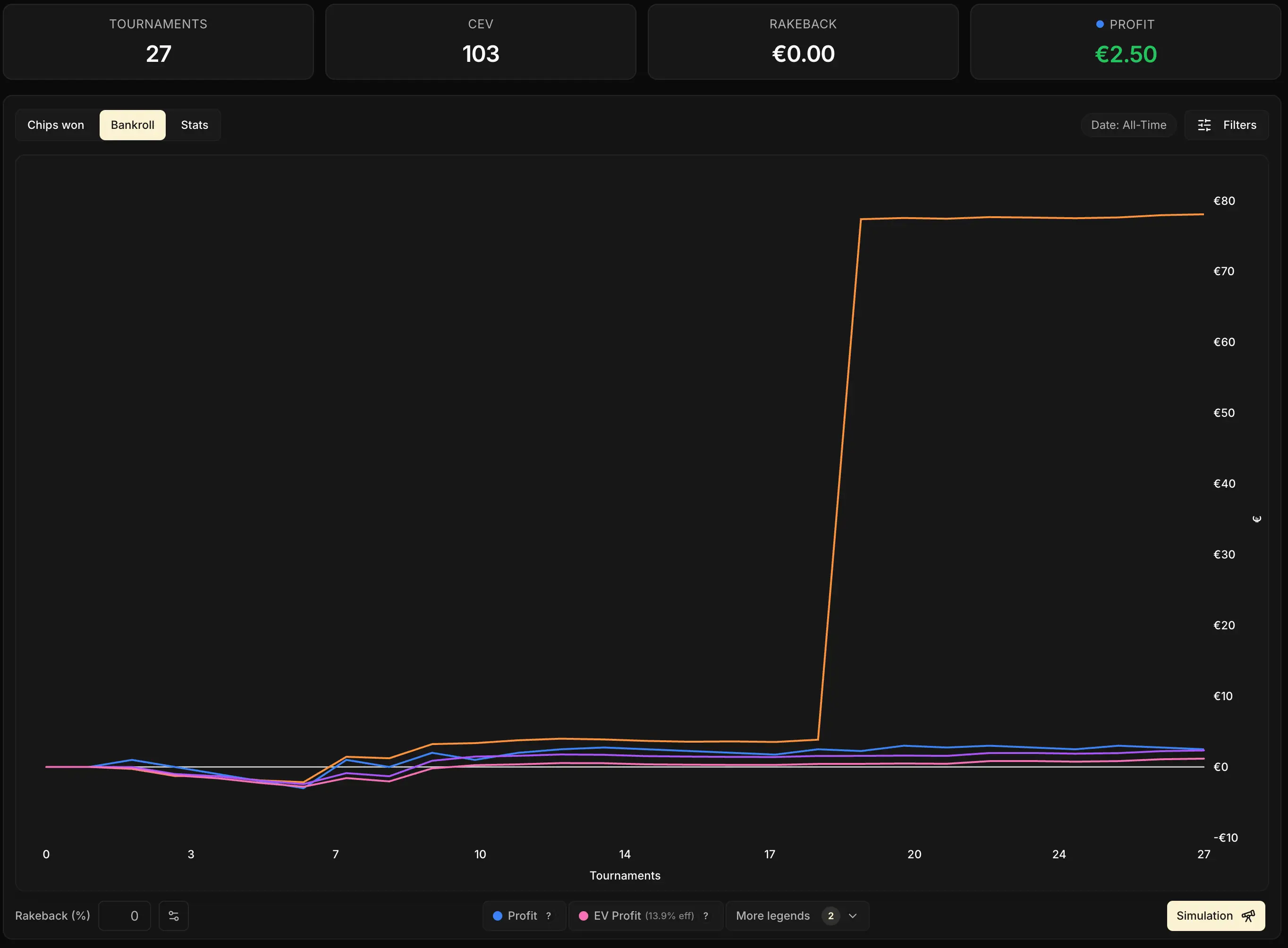
That's exactly the kind of moment the orange exists for. On a long sample with no big multi hit, it stays glued to the other curves and doesn't add much. Turn it on now and then, after a standout spot, to quantify what your equity would have earned you on that specific multi.
Key events: landmarks on the curve
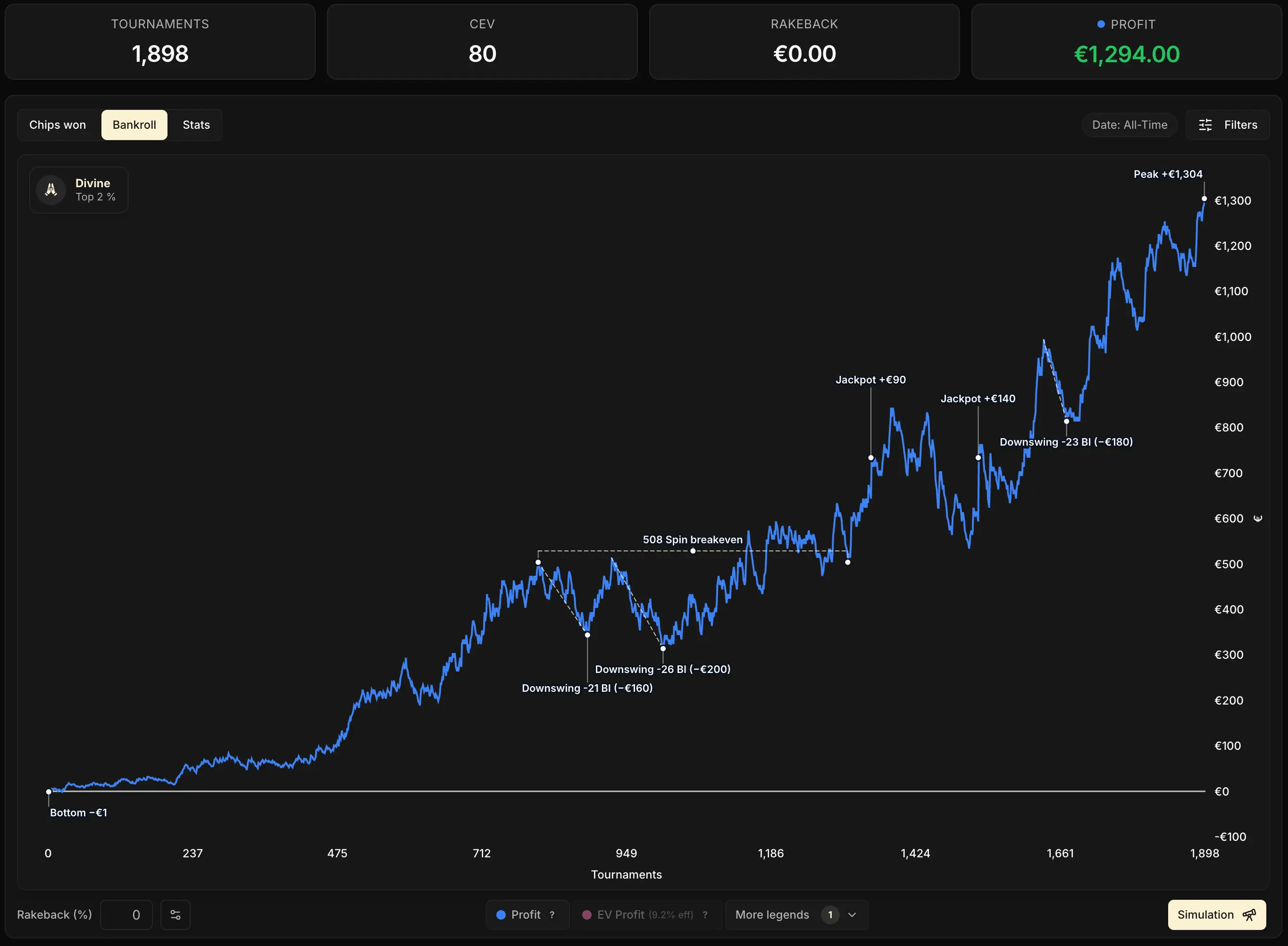
In the legend's More legends menu, one last option lets you display Key events on the chart. These are small markers placed on the curve to flag the moments that stand out in your sample.
Five types of events can show up:
- Highest: your bankroll peak over the filtered period
- Lowest: your low point (displayed only if it's negative)
- Jackpot: an isolated win exceptionally high compared to your usual wins
- Downswing: one of the biggest downswings in the sample
- Breakeven Spins: a long stretch during which your bankroll came back to the same level
Filters: an overview
Above the chart, a few filters let you slice up your Bankroll curve. They're simpler than the ones in the Chips tab, but enough to isolate a period or a subset of games. They apply to the whole tab.
A whole chapter will be devoted to filters later in this module: Filters: zoom in on what matters. For now, just remember that they exist.
Key takeaways
The Bankroll curve takes the 4 modes of the Profit KPI and layers them over time. What the KPI alone can't show, the chart reveals: the gaps between the curves and the way they evolve.
• Day to day, blue + pink are enough. Purple and orange are for occasional use, via the More legends menu.
• Blue vs pink = your overall luck (all-ins + multis). Above all, look at the shape: a break = a big multi, a gradual spread = an all-in downswing.
• Pink vs purple = the effect of your room. The more the money is captured by rare big multis, the further the pink stays below the purple.
• Orange = an occasional tool to gauge your luck on the multipliers you actually got.