Filters: zoom in on what matters
Period, buy-in, room, Spin type: the filters that let you zoom in on what actually matters.

Gandalf
Co-founder of Poker Sciences

So far, we've been reading the curves on your whole sample. Filters are there to zoom in: keep only the games you care about (your current stake, a room, a time period) and read the curves on that subset.
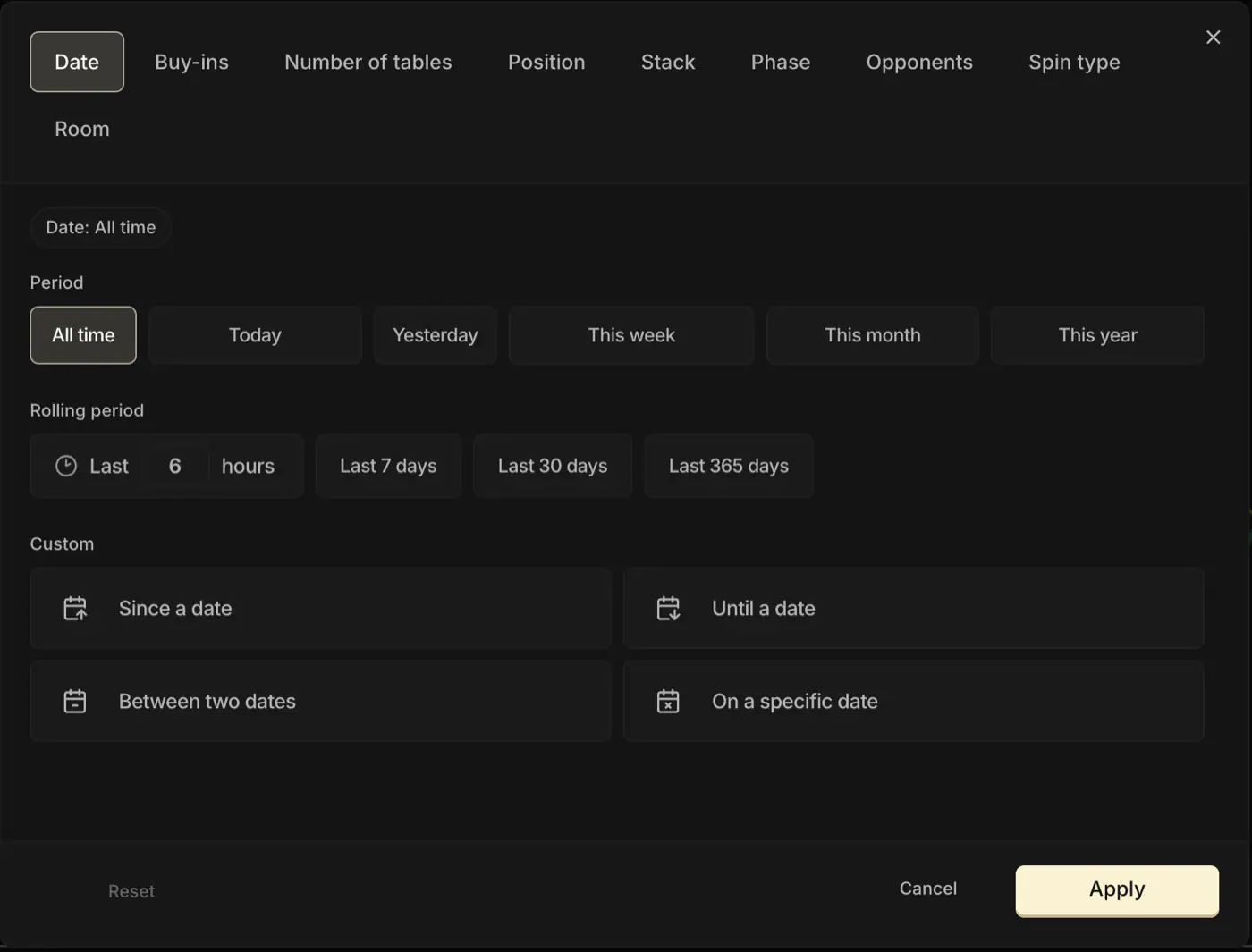
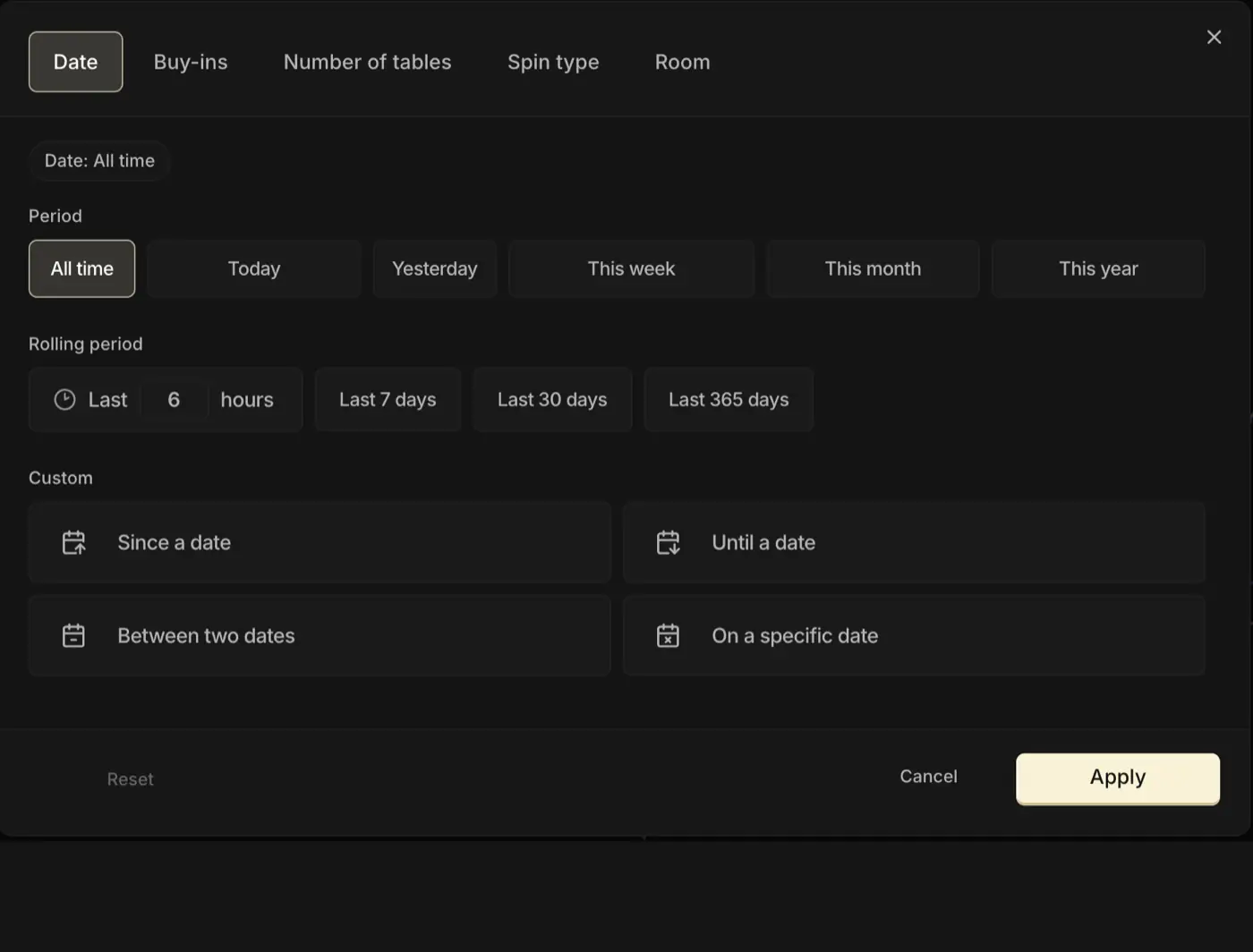
The two panels don't carry the same filters. The Chips tab has more, because that curve is read hand by hand. The Bankroll and Stats tabs are read tournament by tournament: some filters simply don't mean anything there.

1. The filters shared by every tab
Five filters are available on all three tabs of the Dashboard (Chips, Bankroll, Stats):
| Filter | Values | What it's for |
|---|---|---|
| Period | • Today • Yesterday • This week • This month • This year • All time • Custom range | Look at one specific window only: how the week went, the month, or everything since a given date. |
| Buy-in | One or more buy-ins ticked | The most useful filter of all: isolate one stake at a time so you only compare what's comparable. |
| Number of tables | One or more buckets (e.g. 1 to 4 tables at once) | Isolate the Spins played on a given number of tables at once, to read the effect of your multi-tabling. |
| Spin type | • Classic (500) • Nitro (300) • Flash (200) • Spin & Gold • PokerStars | Isolate one Spin type (the starting stack changes from one type to another). |
| Room | • Winamax • Betclic • PokerStars • GGPoker • Others | Read your results on one specific room when you play on several. |
Why does PokerStars also show up in the Spin types? That's normal: on PokerStars, Spins have their own structure. The higher the multiplier, the bigger the starting stack. So the tracker files them as a Spin type of their own, not just as a room.
A reminder about the buy-in filter: mixing €2 and €25 doesn't really make sense. Not the same opponents, not the same expected CEV, not the same variance, not the same hourly rate.
With no filter at all, you still get useful global data (how much you've won in euros overall, for instance). But the moment you move to a finer analysis (CEV, CEV by position, €/h, and so on), a sample that mixes several stakes distorts the reading (see The 4 KPIs).
2. The filters specific to the Chips tab
Four extra filters live on the Chips tab, because that curve is read hand by hand:
- Position: HU SB/BB, 3-max BTN/SB/BB
- Effective stack: keep only the hands played within a given bb range
- Phase: preflop only, or postflop only
- Opponents: keep only the hands played against a given mix of villains (fish/reg, or your own tags)
Treat this as a rough indication. These filters show how your chips move in a specific context, but the CEV they hand you isn't really interpretable, and even less comparable with another player's.
That may come as a surprise: plenty of players lean on them to analyze their game ("my preflop CEV", "my 3-max BB CEV"). It is almost always misleading, though, and here's why.
The usual CEV is measured over a whole Spin type (a buy-in, a format, a room). The Position, Stack, Phase and Opponents filters measure it over a slice of a tournament: preflop alone, the 3-max BB alone, a stack range, or against one particular set of opponents. Those aren't the same numbers anymore, and there's no external benchmark to judge them against.
Only the total really counts: you can be −100 in postflop CEV and have it covered by +500 preflop, and all is well. To dig deeper (see CEV: traps to avoid), you need a tool other than the filters: the Leak Finder, which you'll meet in the coming modules.
3. Filter just enough
Filtering is a trade-off between precision and amount of data: the tighter you squeeze the sample, the more reliable the numbers, but once it gets too small there's nothing left to conclude. The right dose depends above all on one thing: the data you're looking at.
CEV (Chips tab): the most demanding trade-off.
CEV only means something on a single stake: mixing €2 and €25 distorts the reading (see The 4 KPIs). And you need a lot of hands before it settles down.
So a buy-in filter is almost always essential.
Good news: most players already play a single stake on a single room. A simple buy-in filter is then all it takes.
Bankroll (profit in €): no filter is essential.
You're looking at an amount that adds up without bias across stakes: €100 won at €2 + €200 won at €25 really does make €300 of profit. So you can read the curve with no filter at all.
And you're free to add one depending on what you want to see: period ("how much did I win this month"), room ("how much on Winamax"), or buy-in if you want to isolate your winnings at one specific stake.
Stats: somewhere in between.
Most of the numbers on this tab depend on the buy-in. Mixing stakes blurs the reading, just like with CEV. You can still do it if you know what you're reading (to compare your overall activity between two months, say), but filtering by buy-in stays the default rule.
Yes yes, filter by stake, that's it. Hold on, I'm reading, an important letter just came in.
They say they've found the Bible of the Game, up in the North...
Key takeaways
Filters are there to zoom in on a subset of your sample. The tighter you go, the more precision you gain, but the less data you have left.
• Five filters shared by the three Dashboard tabs: period, buy-in, number of tables, Spin type, room.
• On the Chips tab, four more filters: position, stack, phase, opponents. Handy for exploring, but their CEV stays a rough indication.
• The most reliable path is still to put in volume on one stake, on one room.