The Chips curve (CEV)
In particular, we're going to look at two indicators that let you analyze your skill level, whether luck was on your side or not.

Gandalf
Co-founder of Poker Sciences

In the previous module, we introduced the 4 KPIs of the Dashboard and covered the main pitfalls when interpreting CEV. This module moves on to the next step: reading the curves.
Curves let you do what a single number can't: compare several metrics and see how they evolve over time.
In this chapter, we'll take a detailed look at the curves of the Chips won tab, the first tab of the Dashboard .
This tab shows how your chips won evolve game after game. It's the first thing to look at when you open the Dashboard. It answers two simple questions:
- how much of a winning player are you?
- how do you win your pots?
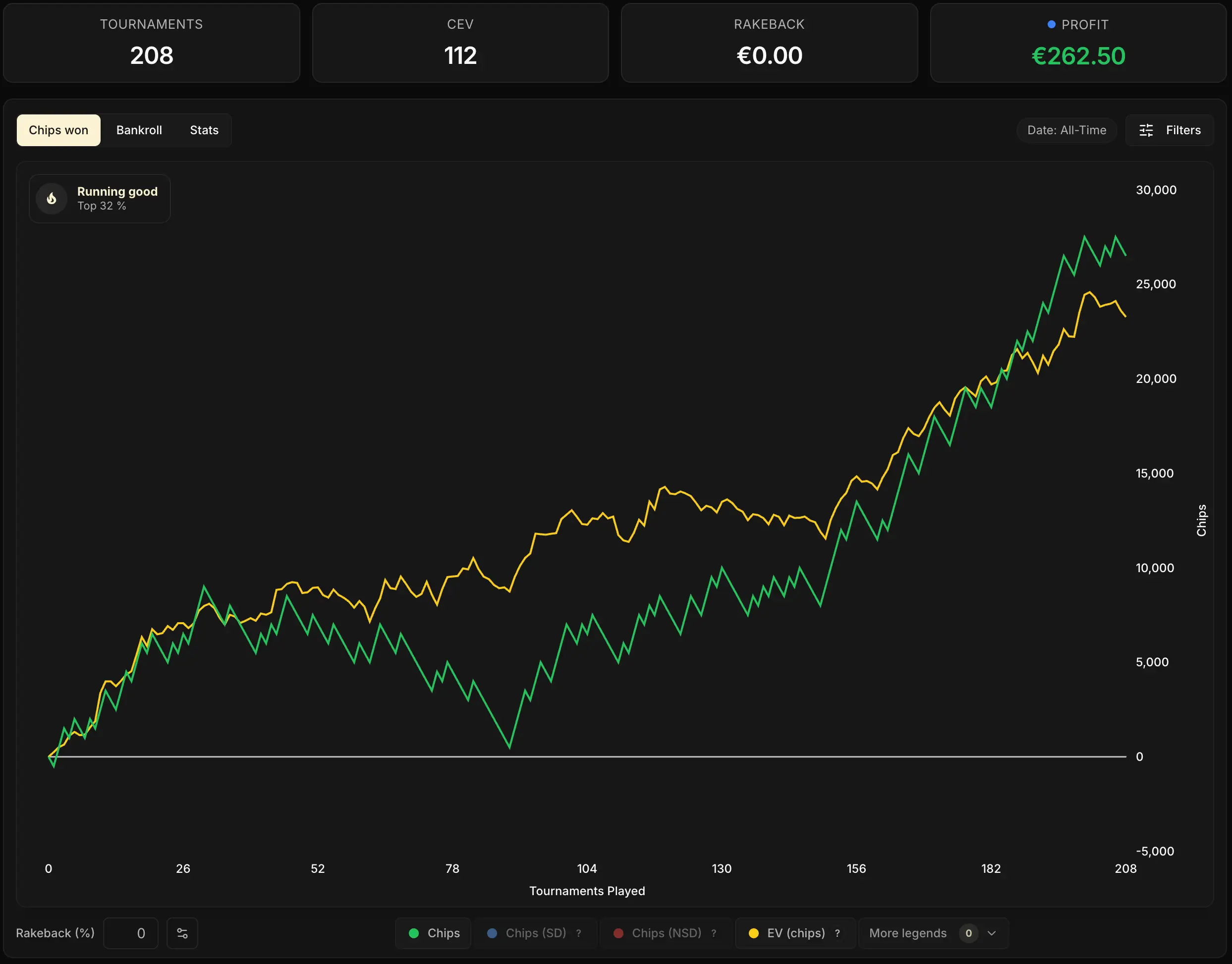
Tip: by default, the horizontal axis shows the number of hands played ("Hands played", under the chart). Click that label to switch the scale to number of tournaments ("Tournaments played"), and back again.
The 4 curves of the Chips tab
As you can see on the screenshot above, the tab displays two curves by default: the green one and the yellow one. In reality, it holds four. The other two (blue and red) are available in the More legends menu, at the bottom right of the legend.
| Curve | Color | Default | What it measures |
|---|---|---|---|
| Chips | Green | Yes | The chips you actually won |
| EV (chips) | Yellow | Yes | Your cumulative EV expressed in chips (performance without variance) |
| Chips (SD) | Blue | No | Chips won in pots that went to showdown |
| Chips (NSD) | Red | No | Chips won in pots taken down without showdown |
A quick sanity check. On the screenshot above, the CEV shown in the KPIs is 112. Take the final value of the yellow curve (~23,300 chips), divide it by the 208 games played, and you land right back on that number.
So the yellow curve EV (chips) tells the story of how your CEV evolved game after game:
Two relationships to keep in mind so you don't get lost:
- the green and yellow curves measure the same thing (your chips won), from two different angles: what actually happened for the green one, the theoretical expected winnings (with all-in luck removed) for the yellow one
- the blue and the red are the two components of the green (we'll look at them in detail right after):
In 95% of cases, the two default curves (green + yellow) are enough to read your performance.
The blue and red curves are more of a visual curiosity than a diagnostic tool, for reasons we'll cover later in this chapter.

The Break-even cEV
Remember the chapter The 4 Dashboard KPIs: we promised back then to give you later the tool that tells you the minimum CEV you need to be a winner at your stake.
Here it is: the Break-even cEV.
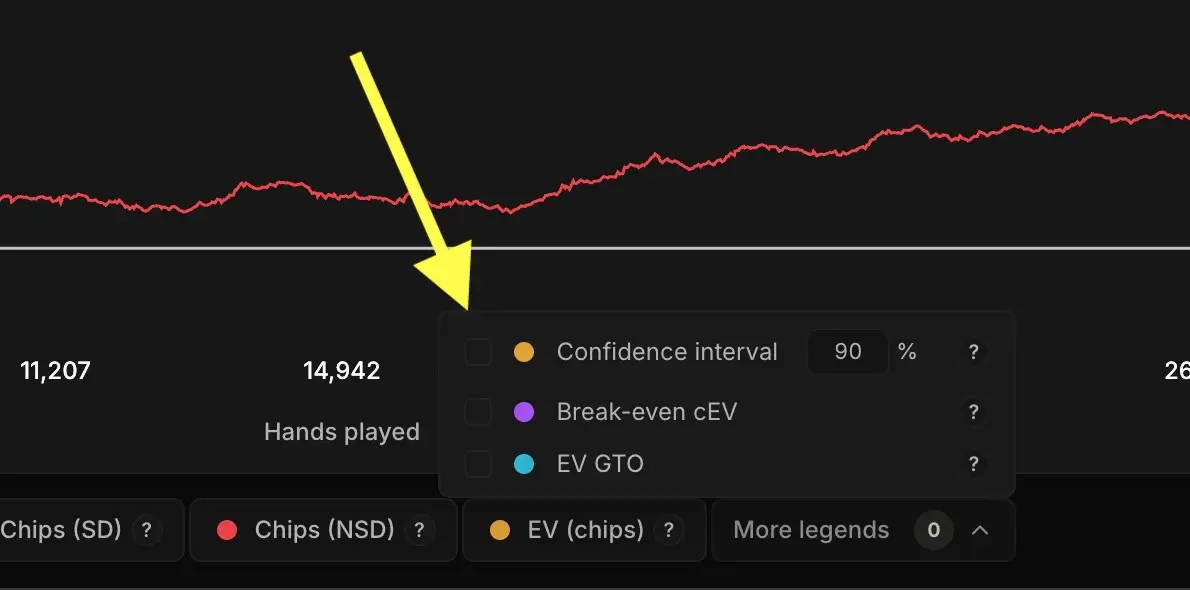
It's one of the tab's three hidden legends (along with the confidence interval, which we'll cover right after, and EV GTO), enabled from the More legends menu at the bottom right.
It shows up as a purple line running diagonally across the tab. That line is the minimum CEV you need to be a winning player for your room and your format. It factors in the room's rake and the structure of your format (starting stack, level duration, multiplier distribution).
It's the net profitability threshold of the stake you're playing.
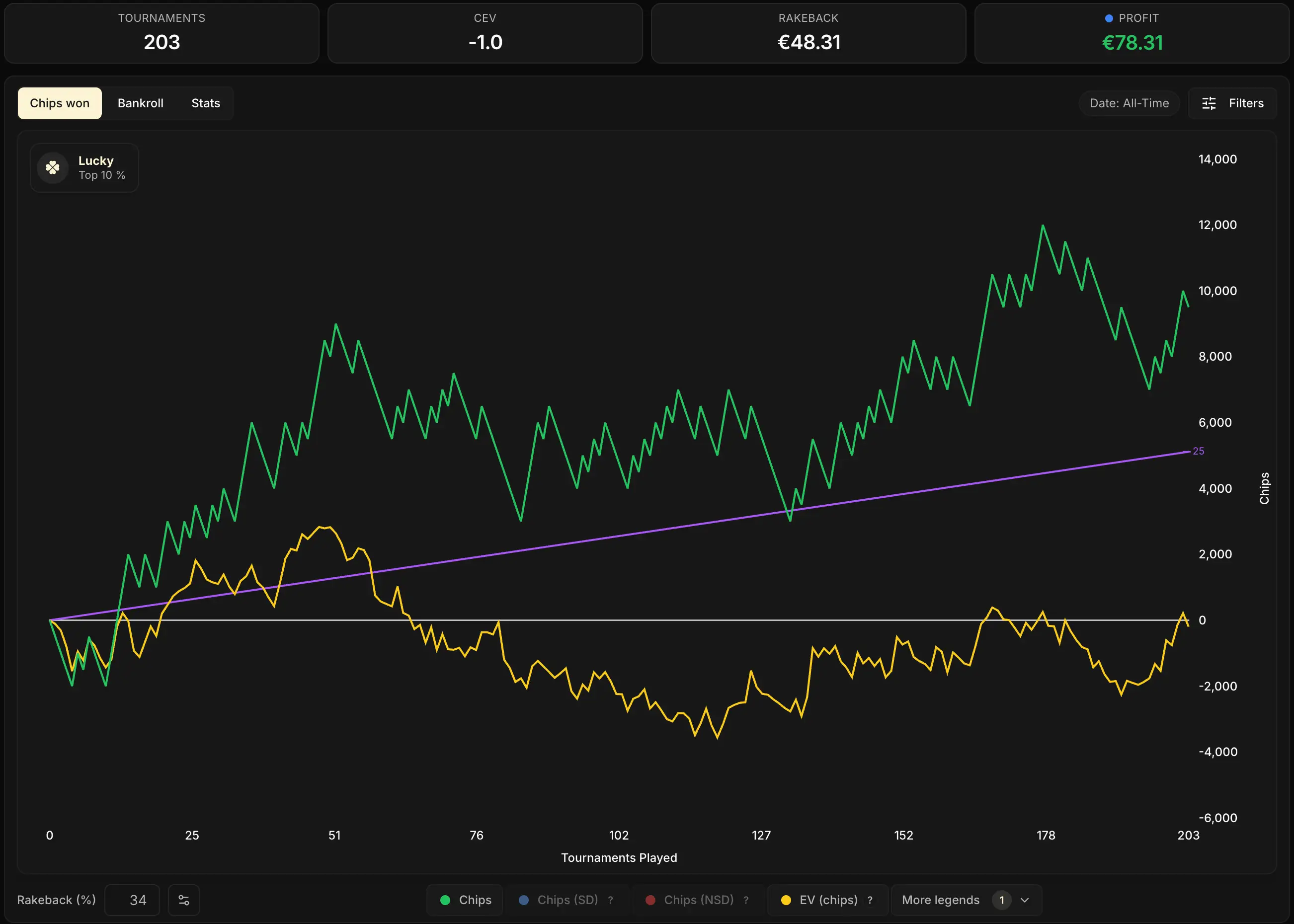
The reading is straightforward:
- your yellow curve above the purple one: on this sample, you're above the profitability threshold
- your yellow curve below the purple one (as on the screenshot above): on this sample, you're below the profitability threshold
For this line to show the right value, your rakeback must be set up correctly.
One last point about rakeback: the higher it is, the lower your Break-even cEV. That makes sense: if part of your earnings comes from rakeback (and not from chips), you need less CEV to come out profitable overall.
You can even adjust the Rakeback (%) field yourself at the bottom left of the tab (see the chapter Setting up your rakeback): the purple line moves in real time, and you'll see exactly how much your rakeback lowers your profitability threshold.
But be careful: the Break-even cEV tells you where you stand on your current sample of Spins. Does that mean you can already conclude you're a winner or a loser in the long run? Not yet. That's exactly where the second hidden legend comes into its own: the confidence interval.
The 90% confidence interval
The second legend to enable is the Confidence interval, found at the bottom right of the tab in the More legends menu. Once enabled, it wraps the final value of your CEV in a range: the zone where your true CEV most likely sits, the one you would have over an infinite volume of play.
Crucial point: this range isn't an arbitrary ± X. The tracker doesn't take your CEV and blindly slap ±20 on it. The interval is computed from two very specific things:
- your personal variance: the actual distribution of your session results, hand by hand, all-in by all-in. Two players with the same CEV but different styles will get different intervals.
- your volume of games: the more you've played, the more precise the estimate. The interval tightens progressively, Spin after Spin.
The more you play, the tighter the theoretical distribution of your true CEV (around your observed CEV) becomes. The diagram below illustrates it:
The more you play, the tighter your confidence interval becomes
Both bells show the probability that your true CEV sits at a given value, around your observed CEV. The more volume you accumulate, the tighter the bell becomes around the true value.
To really understand the confidence interval, you need to separate two notions:
- observed CEV: the CEV computed by Poker Spin Tracker from the tournaments you've imported.
- true CEV: the CEV you would converge to over an infinite volume of play. It represents your actual skill level.
Behind the curtain: this isn't a homemade formula. The tracker applies a Z confidence interval, the classic method of inferential statistics: it measures the dispersion of your CEV from one game to the next (its standard deviation), divides it by √n (your number of games), and multiplies the whole thing by 1.645 (the threshold that covers 90% of a normal distribution).
Practical consequence: the width of the range shrinks as 1/√n, which means it takes 4× more games to cut it in half.
In practice, the 90% range reads like this: there's a 90% chance that your true CEV sits inside this interval. That's why the tracker can give you a reliable estimate of your level well before you've piled up the "magic 10k Spins sample size" people keep talking about on the forums.
This time with the confidence interval enabled:
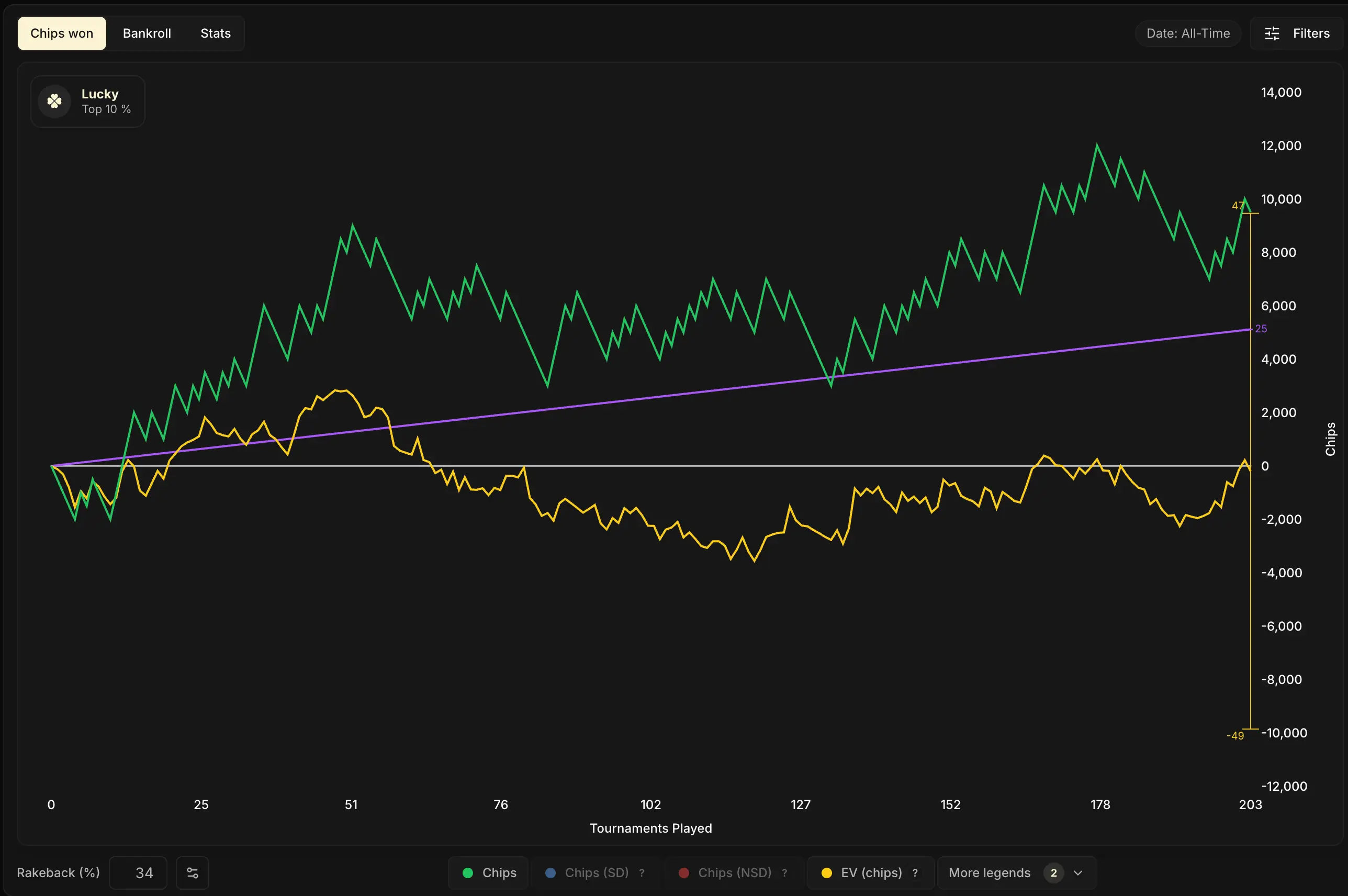
This range is very wide, and that's normal: with only 203 games, the bell curve (see the diagram above) is still very spread out around the observed CEV. Uncertainty is high.
On the screenshot above, your observed CEV (the one Poker Spin Tracker displays) is -1, but your true CEV has a 90% chance of sitting somewhere between -49 and 47...
But take a close look at the upper bound of the range (47): it goes past the purple line of the Break-even cEV (25). In other words, despite an observed CEV below the profitability threshold, it's still statistically possible that our true CEV is in the winning zone in the long run. So we can't conclude yet that this player is a loser.
You have to keep playing to tighten the range and remove the uncertainty.
More generally, combined with the Break-even cEV, the confidence interval gives three possible readings of your curve. Here are the three scenarios, illustrated:
1. Lower bound of the interval above the Break-even cEV. You're statistically a winner even in the pessimistic scenario. You can keep playing this stake with confidence.
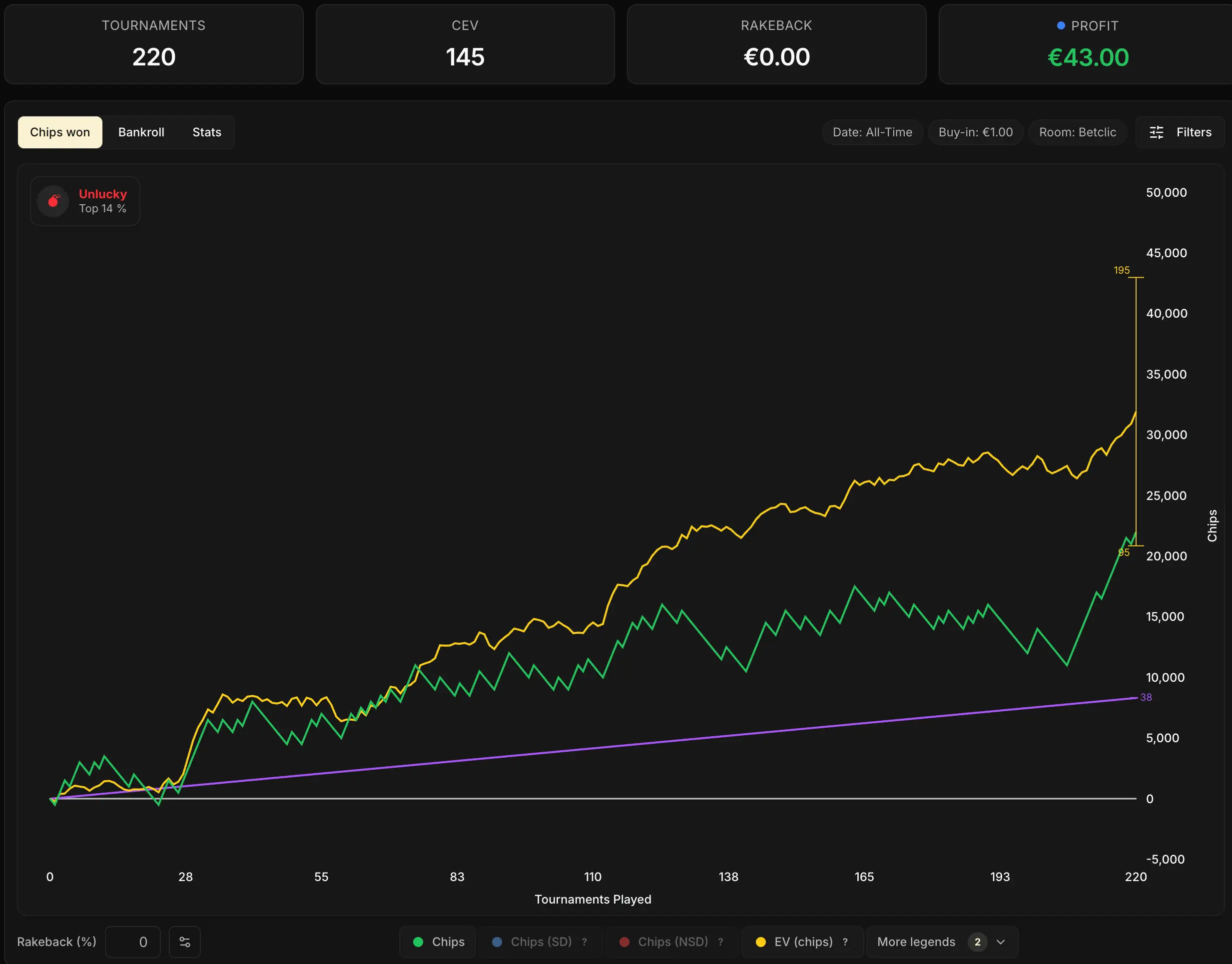
2. Break-even cEV inside the interval. You can't conclude yet. Your true CEV could be winning or losing; keep playing and the interval will tighten.
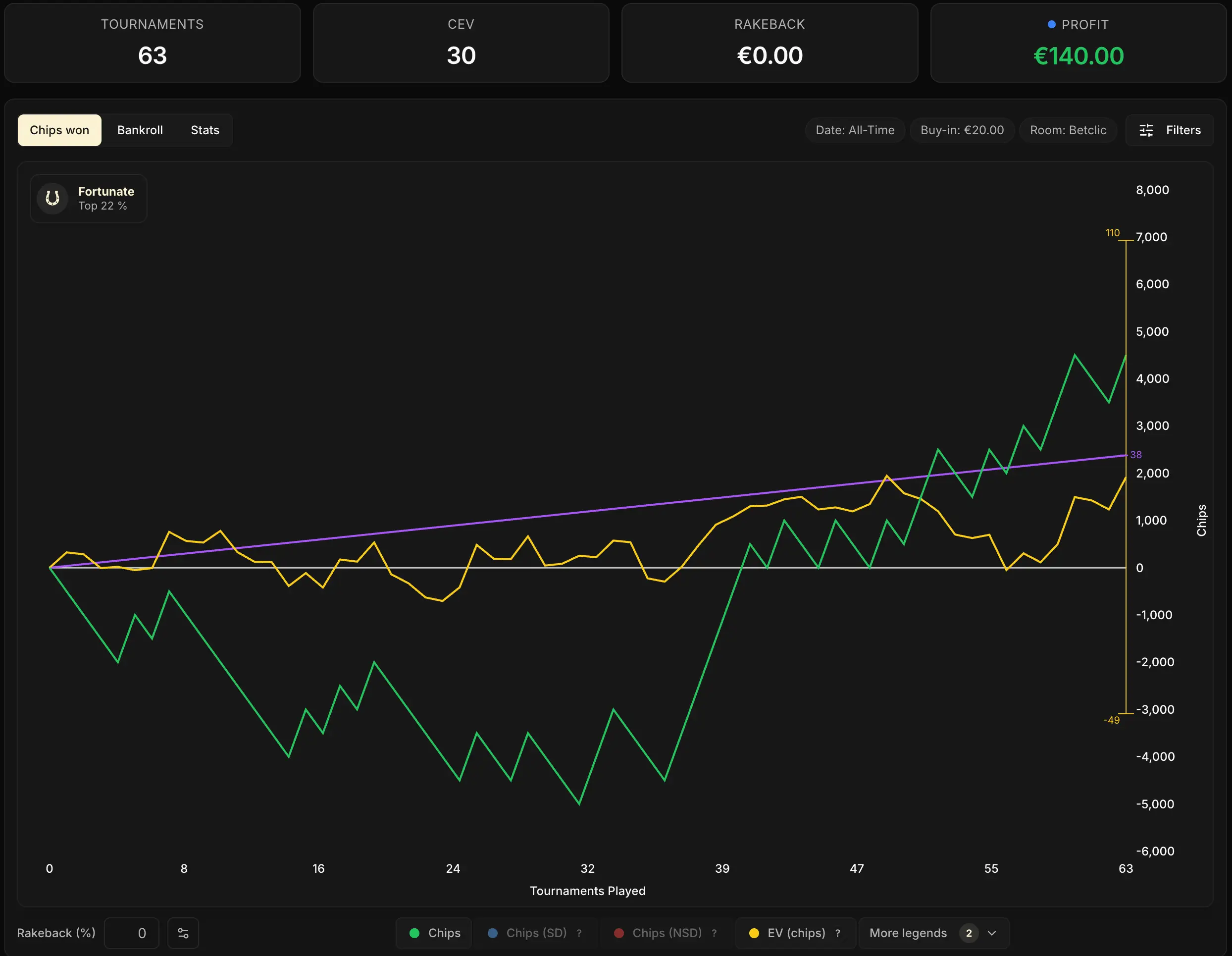
3. Upper bound of the interval below the Break-even cEV. Even in the optimistic scenario, you're not profitable on this sample.
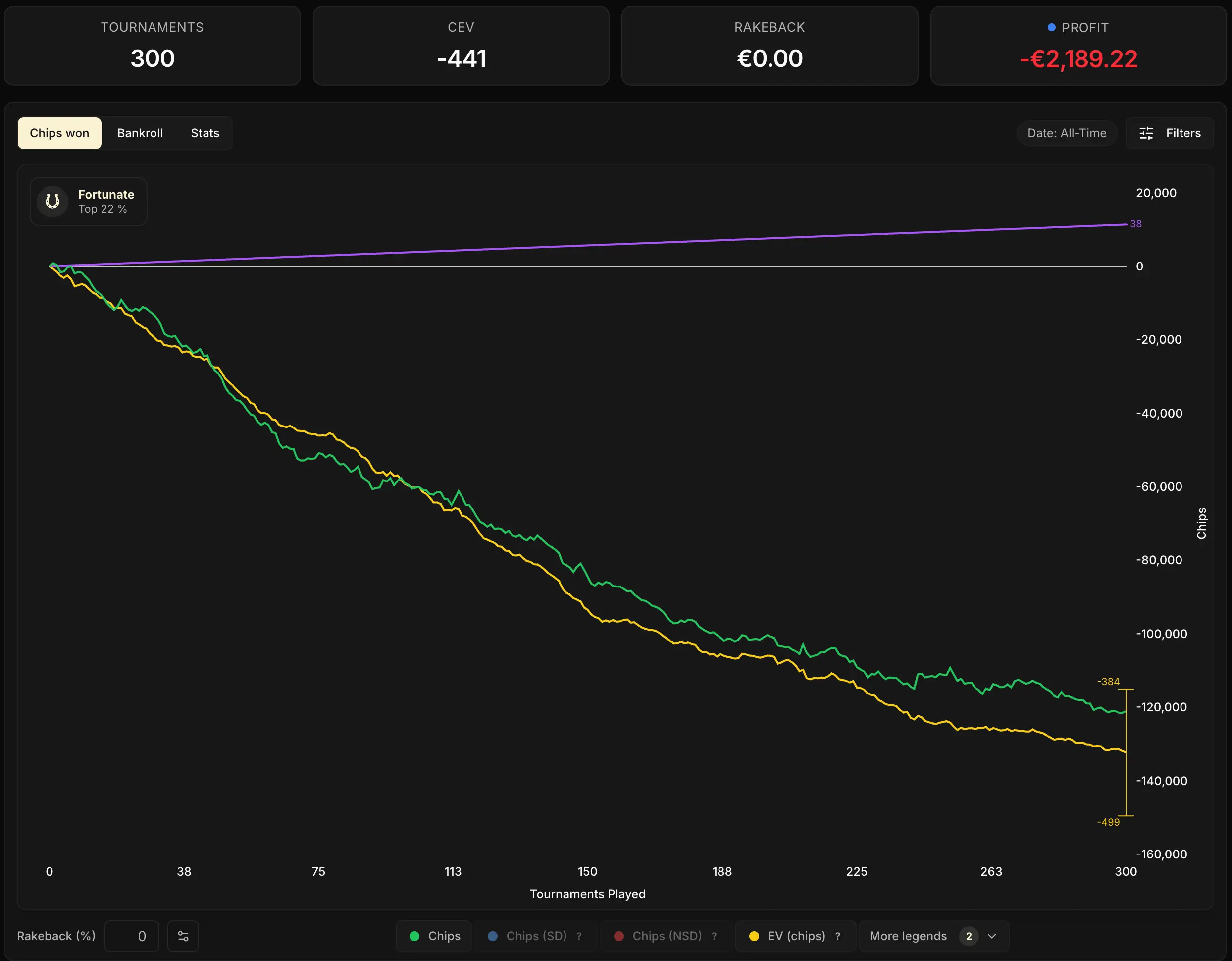

One caveat though: on a small sample, you may also have run into a time slot with an unfavorable fish/reg ratio. You might not be profitable in that particular slot, while you would be in another one (evenings, weekends, etc.).
But if that explanation doesn't hold up in your view, what's left is to move down a stake or work on your game.
The Break-even cEV and the Confidence interval are therefore two extremely powerful tools of the Chips won tab.
They're mostly useful to beginner and intermediate players who still doubt whether they're profitable at their stake. An experienced player, who already knows they're a winner, doesn't need to check them every day.
But as long as the doubt is there, switch them on in the More legends menu and get into the habit of reading them together.
Green curve vs yellow curve: luck or bad luck
Now let's go back to the two default curves to dig into something that's often misread: the gap between the green and the yellow. Both measure your winnings in chips, but with one fundamental difference:
- the green one counts what actually happened (the chips that changed hands),
- the yellow one counts what should have happened if the cards had fallen exactly the way the odds said they would on the all-ins.
The gap between the two is pure variance on the confrontations. If your green curve is above the yellow one, you've banked more chips than your play deserved: you got lucky on the all-ins. If the green is below the yellow, you've won less than expected: you got unlucky.
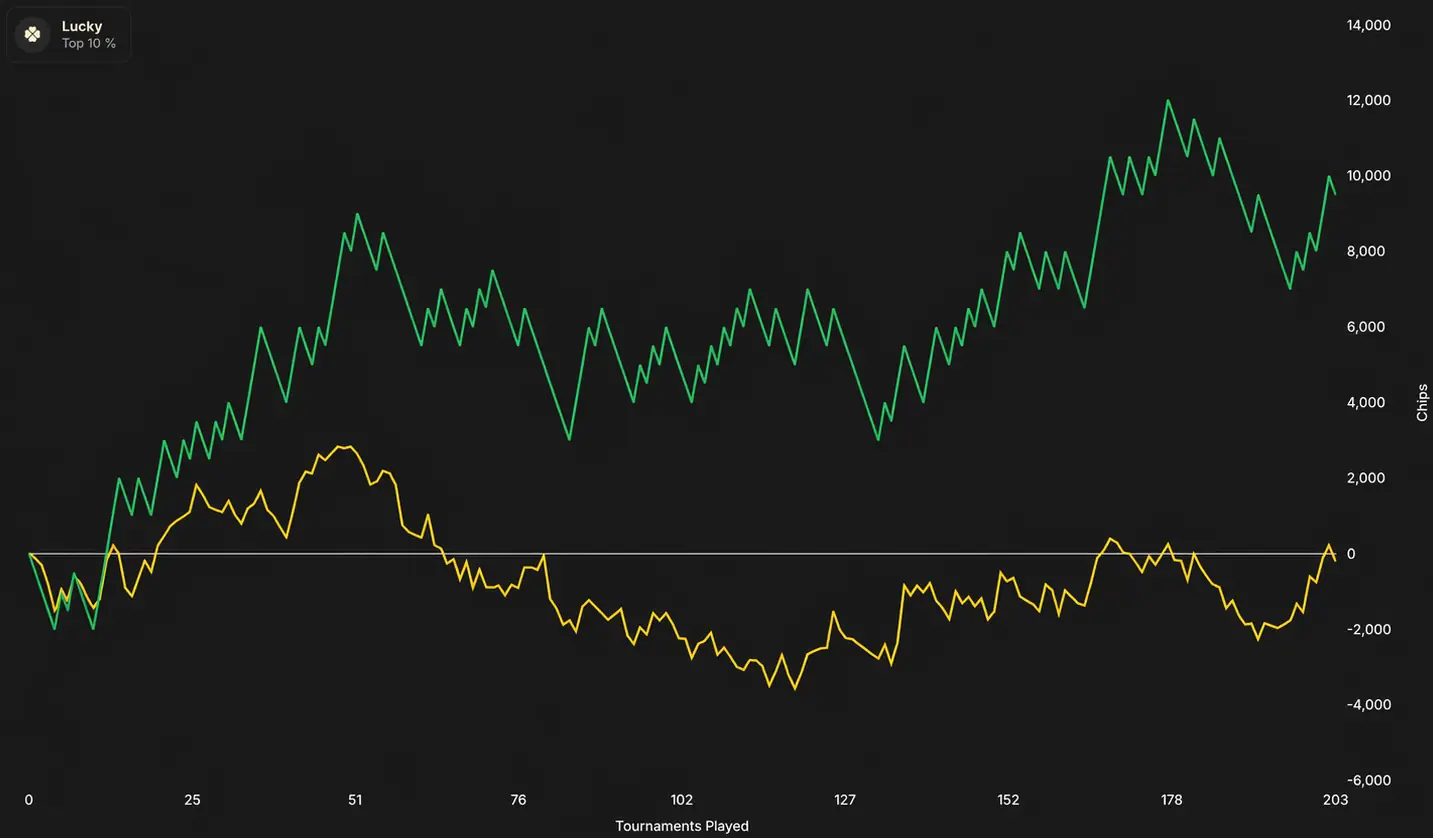
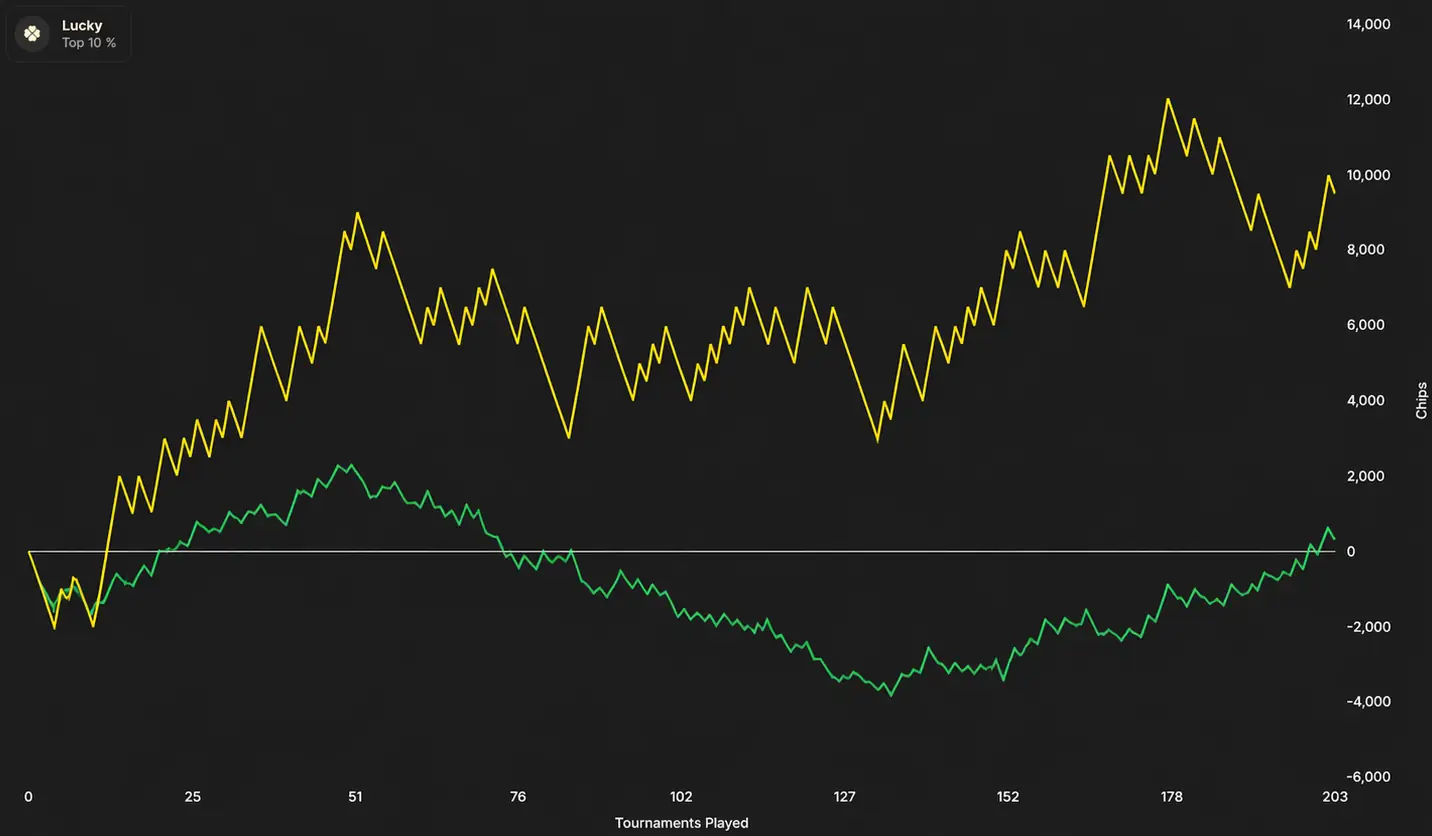
A concrete example:
You get all-in with AA against KK. Your hand gives you ~82% equity in the pot: the yellow curve rises sharply, because that's the expectation of the spot. But if the flop brings a K and neither the turn nor the river improves your hand, you lose all your chips: the green curve plunges.
Your performance (yellow) hasn't changed, only the result (green) has.
In the long run, the two curves end up converging: luck evens out hand after hand. That's why the yellow curve (the CEV) is the real judge of your level, and why the green one is nothing but variance noise around it. We'll come back to the exact mechanisms of variance, and to what the yellow curve can't neutralize, in the chapter The EV curve against variance.
Showdown vs Non-showdown: no actionable signal
Let's move quickly over the blue and red curves.
They often look very different from one player to the next, and from one period to the next. Many people assume there's a strategic signal to be drawn from them:
My red curve is flat, I need to bluff better.
Or:
My blue curve is going down, I need to stop calling at showdown.
In reality, there almost never is.
There are 101 mechanical reasons why your blue and red curves can look completely different, on actions that nonetheless often have identical EV:
- taking a bluff spot more often than passing on it makes the red one rise
- calling the river more often than folding makes the blue one rise
- and so on.
Both can have exactly the same underlying CEV, so the showdown/non-showdown split has no diagnostic value on its own.
To see it for yourself, here are three players who are all winners (positive CEV), with red curves that nonetheless look radically different:
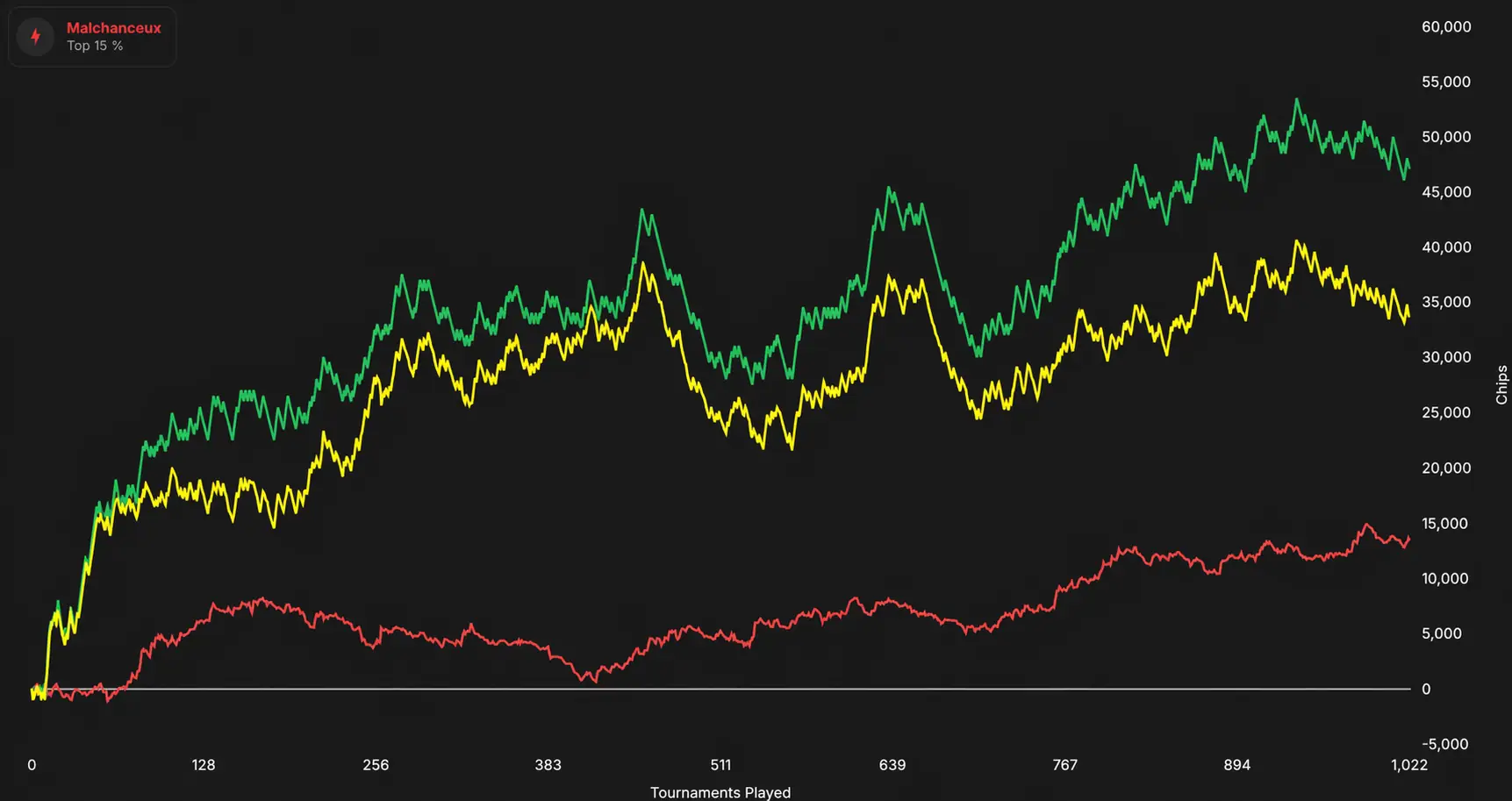
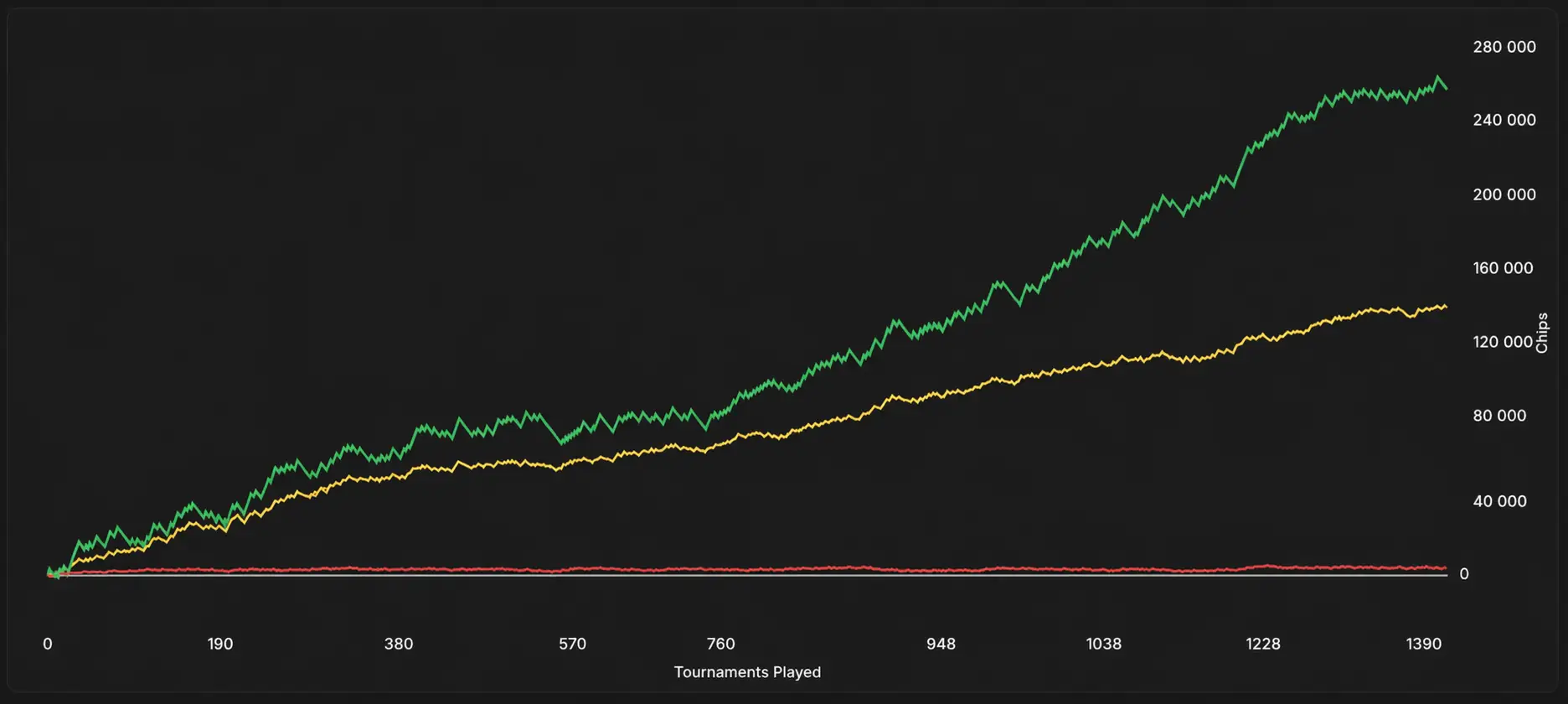
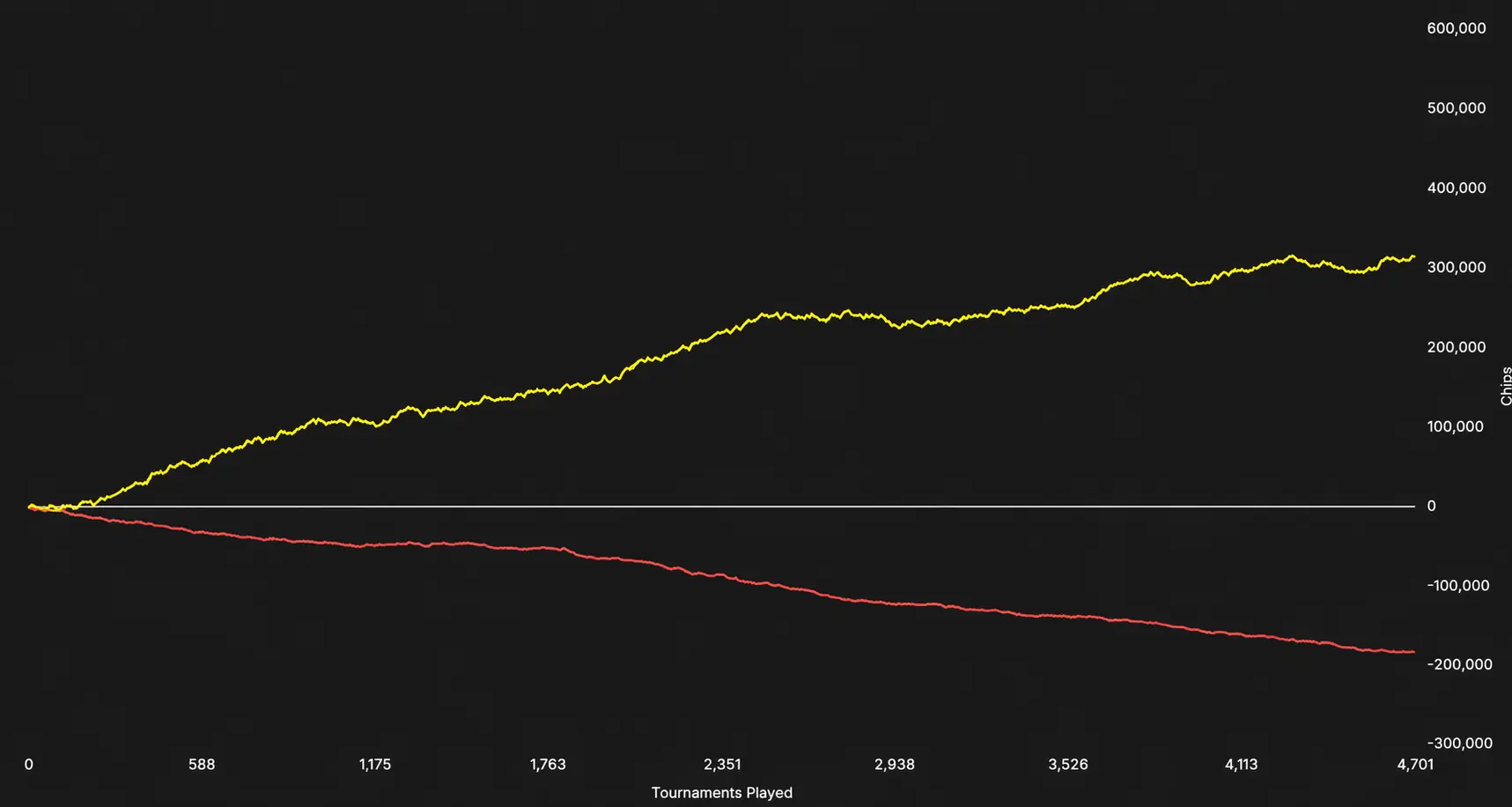
None of these three players has any particular problem with their game. Their red curve simply took the shape the situations they ran into gave it. Don't spend time trying to read something into it: the information that matters (your actual performance and the variance around it) is already fully captured by the green and the yellow. The blue and red curves are a visual curiosity, not a leak-finder tool.
Be wary of any tutorial or video that diagnoses your leaks solely from the showdown / non-showdown curves. Those curves can diverge for purely mechanical reasons that have nothing to do with your level.
The real leak-finder tools are elsewhere (module Finding (and fixing) your leaks).
The filters (overview)
Finally, at the top right of the tab, the Filters button opens a whole panel: Date (period), Buy-ins, Number of tables, Position, Stack, Phase, Opponents (fish/reg and your tags), Spin type and Room.
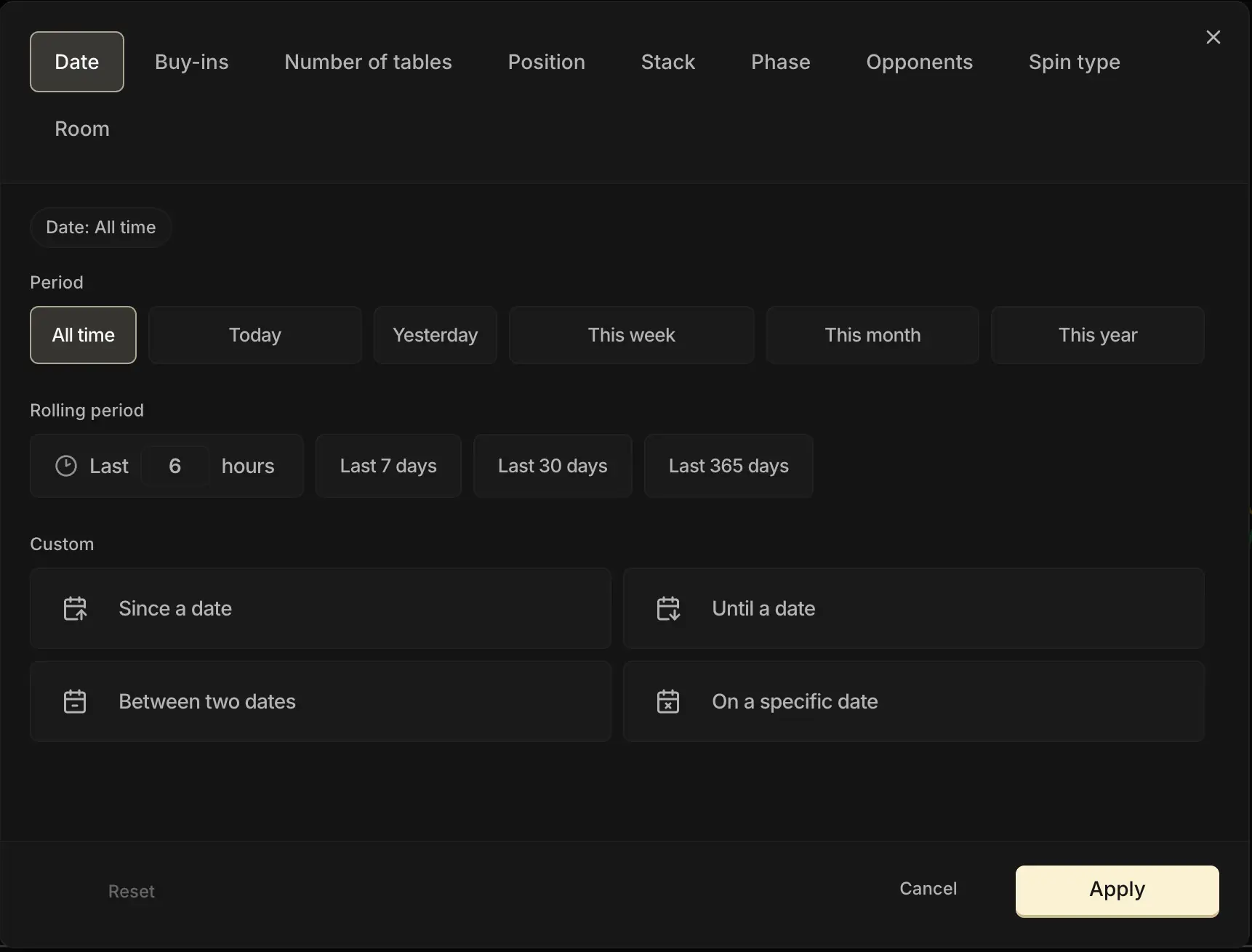
They let you slice up your curve to isolate a specific subset of games and answer more targeted questions:
What's my CEV on the BTN over the last 3 months?
How am I doing at €5?
The filters apply to the whole tab. We devote an entire chapter to them later in this module: Filters: zoom in on what matters.
For now, just remember that they exist and that you don't have to look only at your overall curve.
Key takeaways
The Chips tab is the first tab to read every time you open your Dashboard. Read properly, it tells you in a few seconds where you stand: whether you're improving, whether you're profitable at your stake, and whether your sample is big enough to conclude.
• 4 curves, but the green one (real winnings) and the yellow one (CEV) are enough. Blue and red = curiosities.
• Green / yellow gap = pure luck on the all-ins. In the long run, the two converge.
• The Break-even cEV (purple 🟣) is the profitability threshold of your stake. The yellow one must sit above it.
• The 90% confidence interval (yellow 🟡) depends on your variance and your volume. The more you play, the tighter it gets.