
The Players page
How to get every useful piece of information about your opponents.

Gandalf
Co-founder of Poker Sciences

You now know how the tracker classifies your opponents. That leaves the natural question: where do you find and use everything it knows about them?
The answer fits in a single tab: the Players page, reachable from the Poker Spin Tracker sidebar.
Everything the tracker knows about your opponents is gathered there: the list of every player you've faced, a detailed card for each of them, and the aliases to group them together.
The page is organized into four tabs:
- Players: the list of your opponents and their cards. The heart of this chapter.
- Tags: your custom labels, covered in the chapter Your opponent tags.
- Aliases: grouping several players under a single entity, covered further down in this chapter.
- HUD: your opponents' stats, displayed in real time on your tables. Covered in the chapter The HUD.

The list: all your opponents
The Players tab shows a paginated table of every opponent you've faced for at least one hand, 50 players per page.
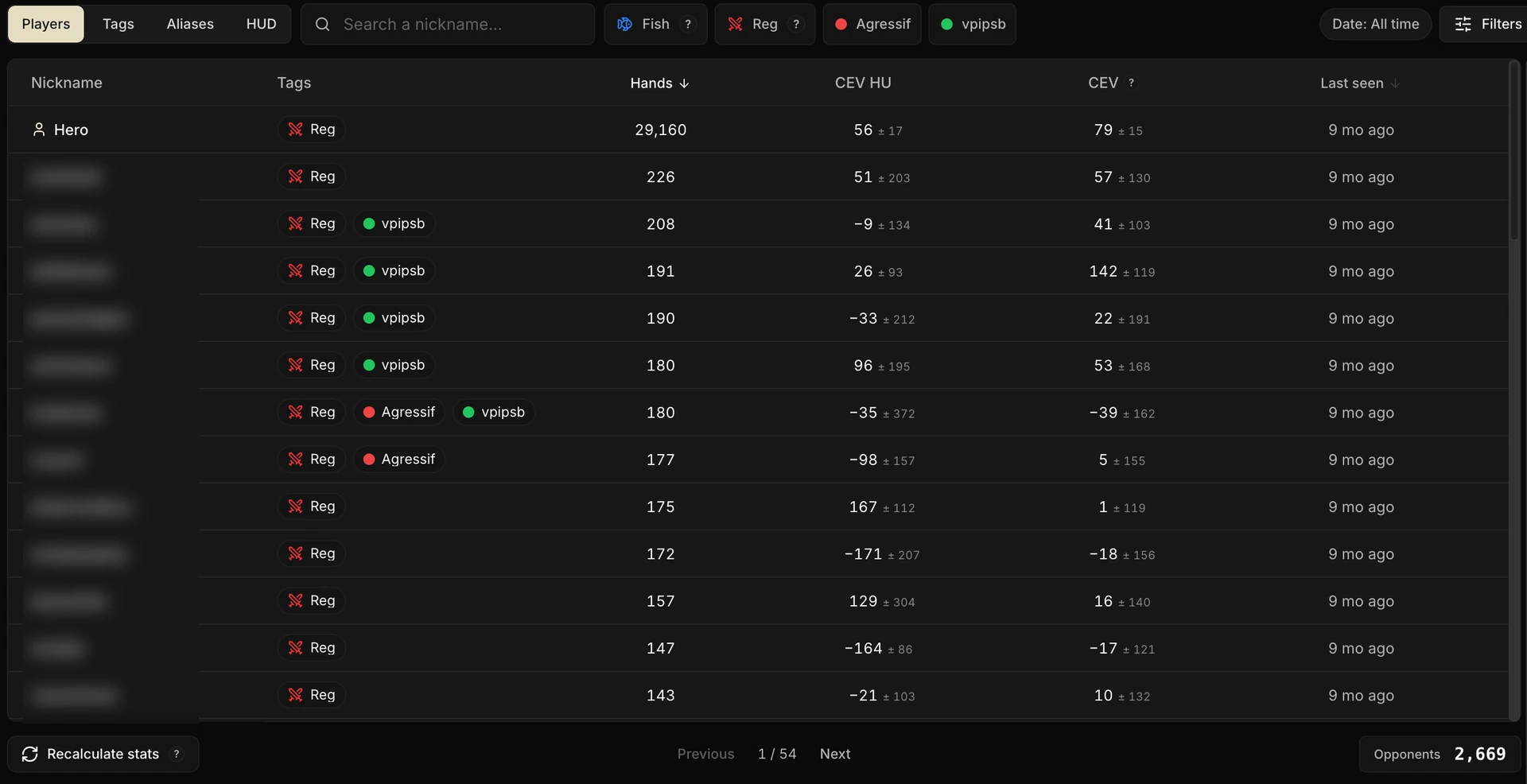
The table fits into six columns:
| Column | Content |
|---|---|
| Nickname | The opponent's nickname (or the name of an alias) |
| Tags | Their Fish / Reg classification and your custom tags, editable in one click |
| Hands | The number of hands played against them over the filtered period |
| CEV HU | Their CEV in heads-up, estimated from your hands against them |
| CEV | Their overall CEV, across every configuration |
| Last seen | Your last encounter, expressed relatively (today, yesterday, X days ago) |
The CEV columns
These two columns display the player's CEV, not yours. It is estimated from the hands you played against them: it's your direct read on their real level, beyond the simple fish / reg badge.
The small gray ± figure next to the average is its 90% confidence interval: the more hands you have against the player, the tighter it gets.
CEV HU isolates heads-up, and it's the most precise read: face to face, you measure the level of the player sitting directly across from you.
In 3-max, on the other hand, their CEV also depends on the table composition: depending on the tournament, they face a fish and a reg (you), or two regs. Their result then reflects their field as much as their level.
One glance at these columns already tells you who you're dealing with: a solid reg hovers around zero, a fish digs into the negative.
But for most players, you won't have enough data: the ± interval stays wide, and the read is only really reliable on the opponents you face most often.
The Hero row
You appear in the list yourself, under the Hero row: your own hands, aggregated exactly like an opponent's.
It puts you through the same scanner as the rest of the pool: same columns, same card, same automatic classification.
Below the table, the page keeps going: the Table quality card, then the Fish / Reg heatmaps. The two of them share a dedicated chapter: Table quality.
GG Poker: the limitation to know about
On GG Poker, nicknames are anonymized at the source: the room hands out generic identifiers that change from one tournament to the next. Following the same player over time is therefore impossible; that is the whole reason for the Unknown category seen in the chapter Fish vs Reg.
For GG Poker hands, the Players page is unusable. That is a constraint of the room itself, not a limitation of the tracker.
Searching and filtering
The search
Type a nickname: the list filters in real time. It also recognizes the names of your aliases and their members.
The filters
To the right of the search, the Filters button opens the tracker's usual filters. They apply to the list, to the Table quality card, and to the cards you open afterwards.
The tag dots
Above the table, each active tag (Fish , Reg and your custom tags) filters the list in one click.
Several ticked tags combine with AND: the list only keeps the players who carry them all. Ticking two mutually exclusive tags (Fish + Reg) therefore legitimately returns an empty list.
The player card
Clicking a row opens the player's card. This is where profiling really begins.
The header carries their nickname, their tags and their counters (hands, CEV HU, CEV, last encounter). The body of the card, meanwhile, is navigated by tabs.
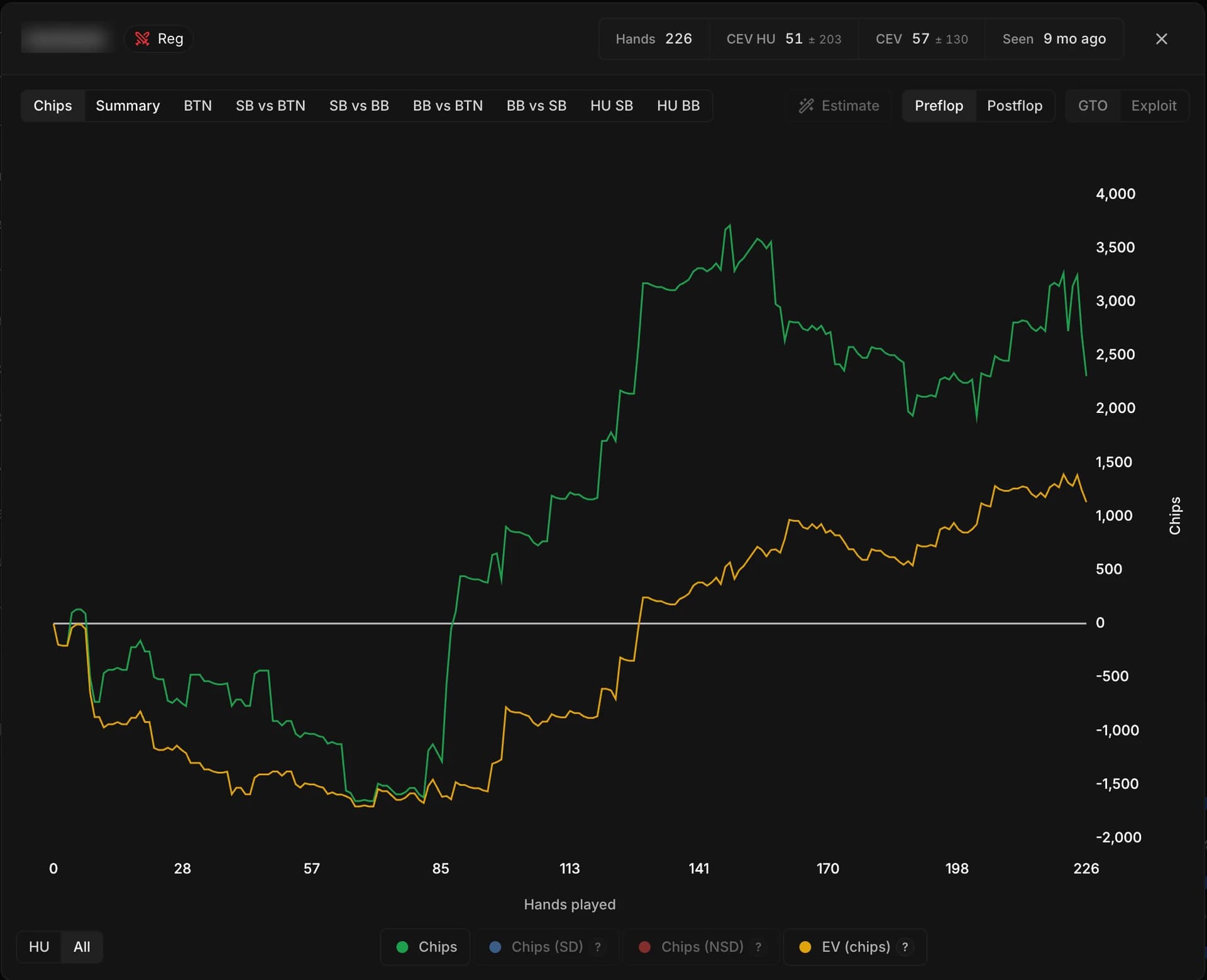
Chips
The player's winnings curve, in chips. By default it isolates heads-up (HU / All toggle), with their EV overlaid and the showdown / non-showdown series switchable from the legend.
It is the fastest snapshot of an opponent: the slope of their curve speaks for itself.
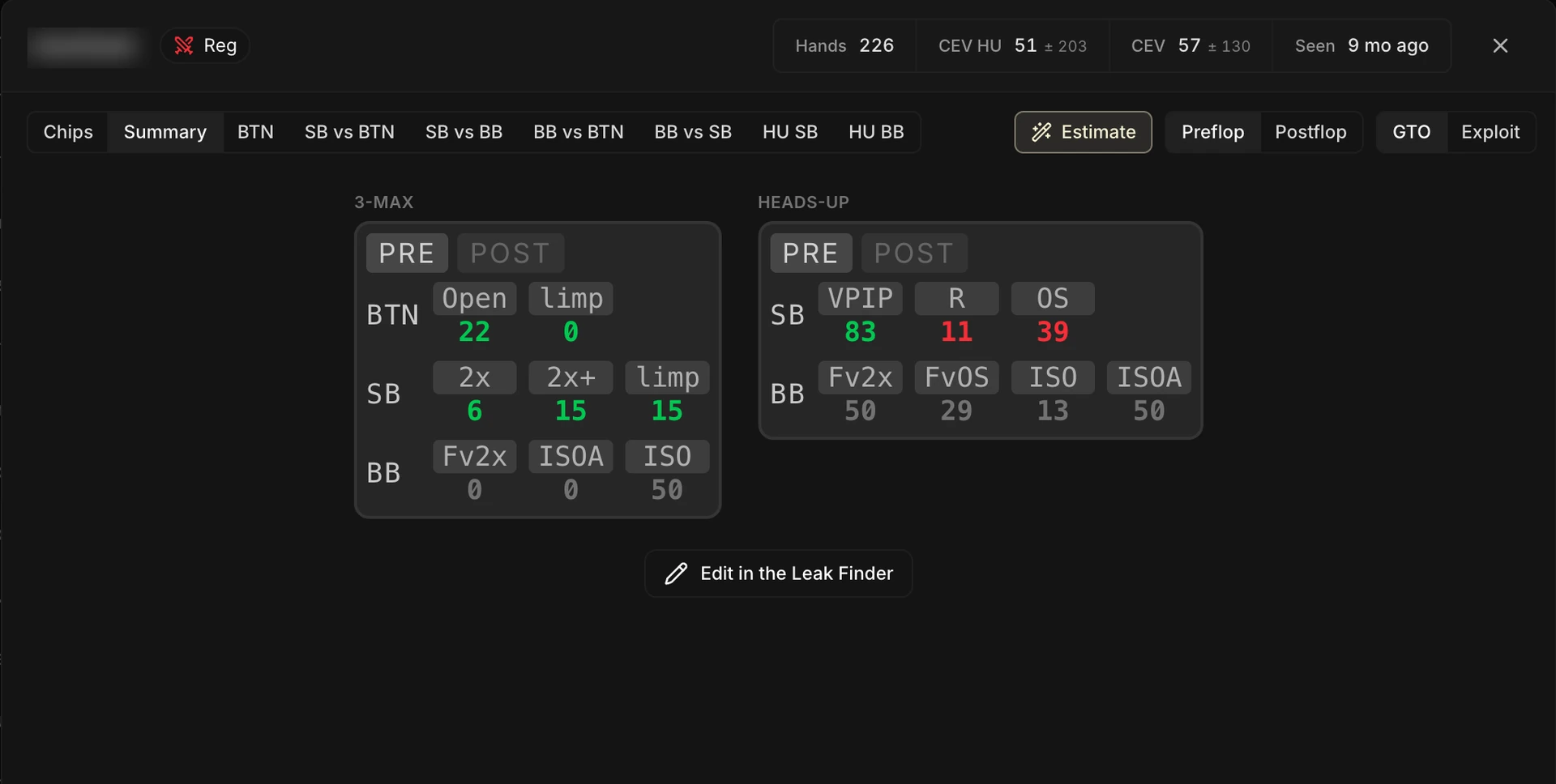
Summary
The HUD-style stat table: the same stats as the Summary of the Overview tab in your Leak Finder, computed here on the player you opened and compared to a reference.
It's read-only: the Edit in the Leak Finder button sends you to the only place where its composition can be changed.
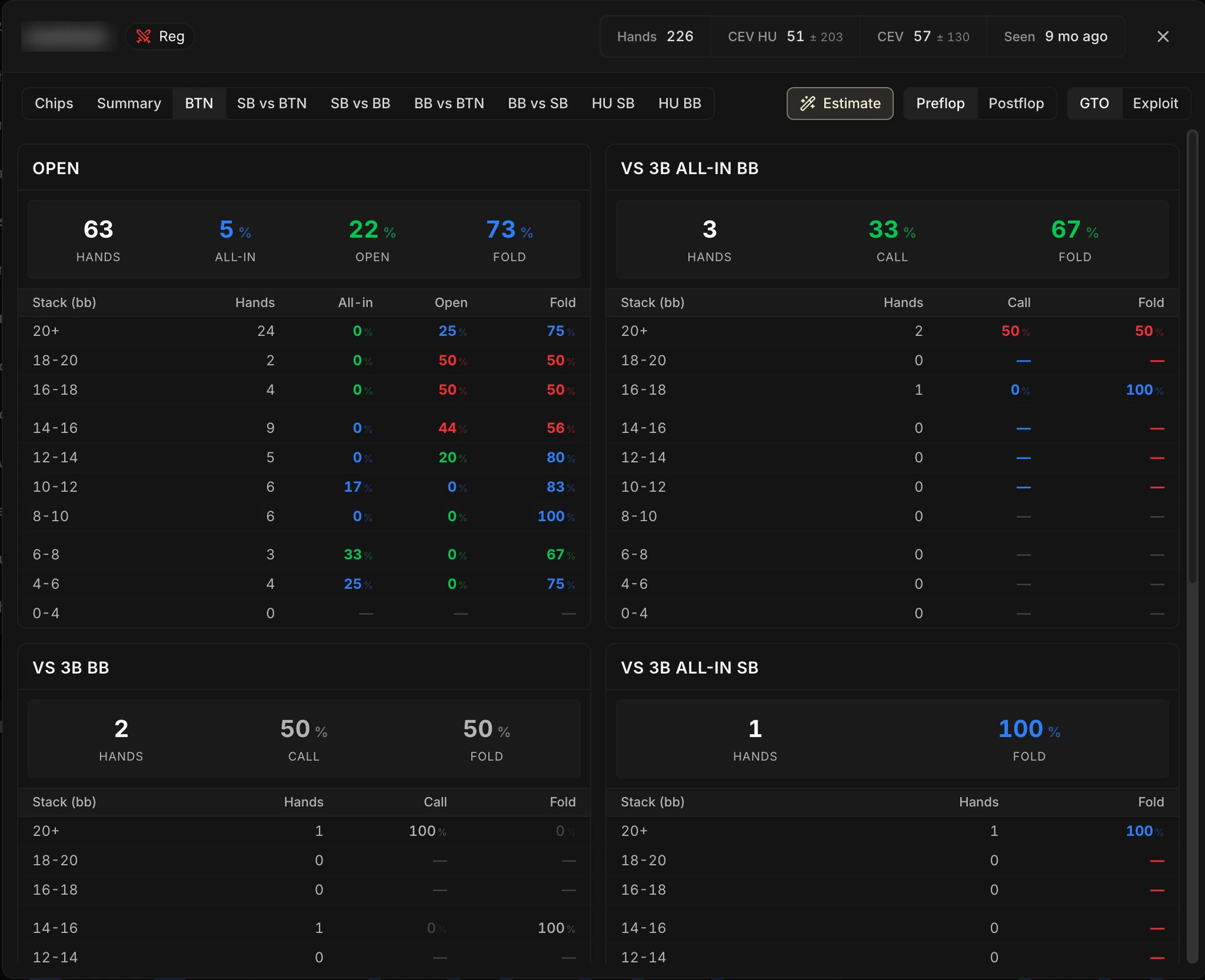
Situations, preflop and postflop
The next tabs break down the player's game situation by situation: BTN, SB vs BTN, BB vs SB, heads-up…
Each position opens the matrix of their preflop frequencies, stack tier by stack tier. Hovering a row displays their usual range, rebuilt by the tracker.
The Preflop / Postflop toggle replaces the positions with the main families of postflop spots.
GTO or Exploit
At the top right, a toggle picks the reference the player's stats are compared to. The default setting follows their profile: a player classified as fish opens on the Exploit reference, a reg on the GTO reference.
Right next to it, Estimate Range refines the ranges shown on hover: since you never get to see the cards an opponent folds, the tracker rebuilds their most likely range.
The filters active on the list also apply to the card: filter the page on the last 30 days, and the card describes the player over those 30 days.
Don't kid yourself about your nemeses
With the CEV columns and the player card, you're going to be tempted to do something very human: check your results against the players you feel, in game, are "crushing" you.
And sure enough, you are down against them. So you tell yourself:
That one, he really does crush me.
Or the other way around, on another nickname: your designated victim.
Careful with that kind of read
Out of 100 regs you run into regularly, variance alone will leave you losing against some, winning against others, and break-even against the rest.
It is not that some players are structurally stronger against you than others (what people sometimes call a bad "skill matchup"): it is simply statistical noise on a small sample.
More important still: between two regs, there is very little EV difference.
There can be big differences in knowledge between two regs: a better theoretical understanding, a better feel for the game, a better postflop game.
But those differences translate poorly into actual EV.
Why? Because EV in poker comes essentially from the sum of your opponents' mistakes, and regs barely make any expensive mistakes anymore, if any at all for the very best of them.
This point is covered in detail in Trap 2 of the chapter CEV: traps to avoid. As a reminder, CEV tends toward a finite limit equal to the sum of your opponents' mistakes minus the sum of your own. Between two regs, those "gifted" mistakes are both close to zero: so is the EV differential.
Keep that in mind every time you open a specific opponent's card, or filter the Review on them (Why (and how) to review your hands), especially on a sample of a few hundred spins.
Fear no one, and underestimate no one. You are going to "crush" some regs and get "crushed" by others, without any of it reflecting a real balance of power.

The Aliases tab: grouping several players
An alias groups several players under a single entity, treated everywhere as one player. Two uses:
- Merging the nicknames of one and the same human: an opponent who plays on two rooms, or who changed nickname (the case mentioned in the chapter Fish vs Reg).
- Building a cohort of profiles to study together: several aggressive regs, the fish you face most often at your stake, and so on.
Once created, the alias appears in the list of the Players tab as a row in its own right: stats aggregated over all its members, and a Fish / Reg classification recomputed as if the group were a single player (the counters of every member are added up).
It also becomes selectable everywhere the tracker filters by player: Review filters, Leak Finder analysis scopes, searches.
Creating an alias
From the Aliases tab, the New alias button opens the creation panel: a name, a color, and the members. You can also start from a specific player: the Add to an alias action appears when you hover their row in the Players tab.
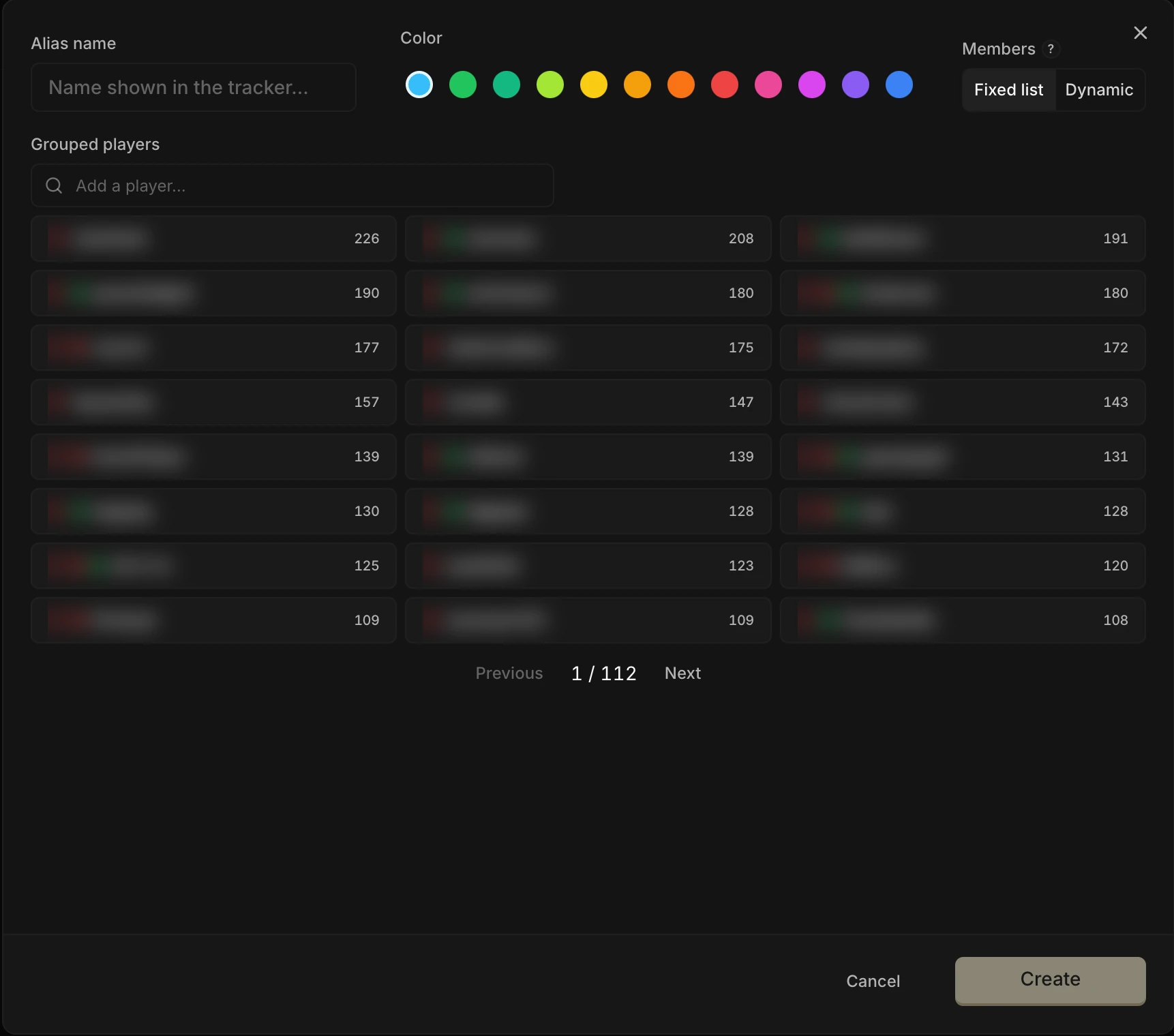
Fixed list
The simplest mode: you pick the players one by one, through the search. The members never change unless you edit them. The same player can belong to several aliases.
Dynamic alias
The most powerful mode: you define criteria, and the members are recomputed automatically after every import.
Four criteria combine: the player's tags, a rolling period (from 7 to 365 days, or all time), a minimum volume (in spins faced or hands played), and a cut-off, "keep only the N faced most".
The preview shows the members live.
The period is there to pick the members, not to truncate their stats: the alias row aggregates your whole history against them, and follows the active filters like the rest of the page.
"The 20 regs I face most over the last 30 days": a Reg tag, a 30-day period, a cut-off at 20. The alias follows your current pool, with no maintenance at all on your side.
In the Aliases tab, a dynamic alias carries the Dynamic badge, the date of its last computation, and a button to recompute it right away (handy just after editing a tag).
Deleting an alias never modifies the grouped players: they stay in the list, with their tags and their stats.