Your opponent tags
Build them well, put them to work, and outsmart the statistical traps they set for you.

Gandalf
Co-founder of Poker Sciences

The previous chapter showed you the only categorization Poker Spin Tracker handles entirely for you: fish or reg. Tags are the next step: your own labels, placed on the opponents of your choice.
Tags are a very powerful tool, but also a very treacherous one. A rule-based tag rests on the individual stats of opponents you have sometimes faced for only ten hands. The grouped analyses that come out of it can then be completely wrong while looking perfectly solid.
So this chapter reads in two parts: first building and using your tags properly, then understanding, numbers in hand, the statistical biases they can manufacture.

Two ways to tag: by hand or by rule
The manual tag
It's the simplest move there is: you spot a player, you stick a label on them. The same tick-box menu is available, for example, from the Players page, the HUD, the Replayer, the player card or the import summary.
There you tick the tags you want, and the New tag entry lets you create one on the fly, immediately assigned to the player.
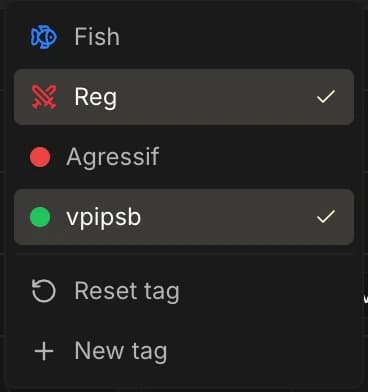
A tag placed by hand is marked "manual" on the Players page, and it takes priority: automatic recalculations never remove it. You decide, the engine yields.
The rule-based tag
This is the automatic version: you define numeric conditions (for example "PFR ≤ 15%"), and the tag applies itself to every opponent who matches them, across your whole database.
Assignments are recomputed at three moments:
- on every import, for the opponents present in the imported hands;
- when a rule is created or edited, for that tag across the whole database;
- when you click Recalculate stats on the Players page, which runs a full pass.
As with the fish / reg classification, anonymized rooms (GG Poker) are out of the picture: it's impossible to follow an opponent from one tournament to the next, so no custom tag can be placed on them. The menu is simply disabled for those players.
The Tags tab
Everything is driven from the Players page, Tags tab (the switcher at the top of the page offers Players, Tags, Aliases and HUD). There you find a table with one row per tag:
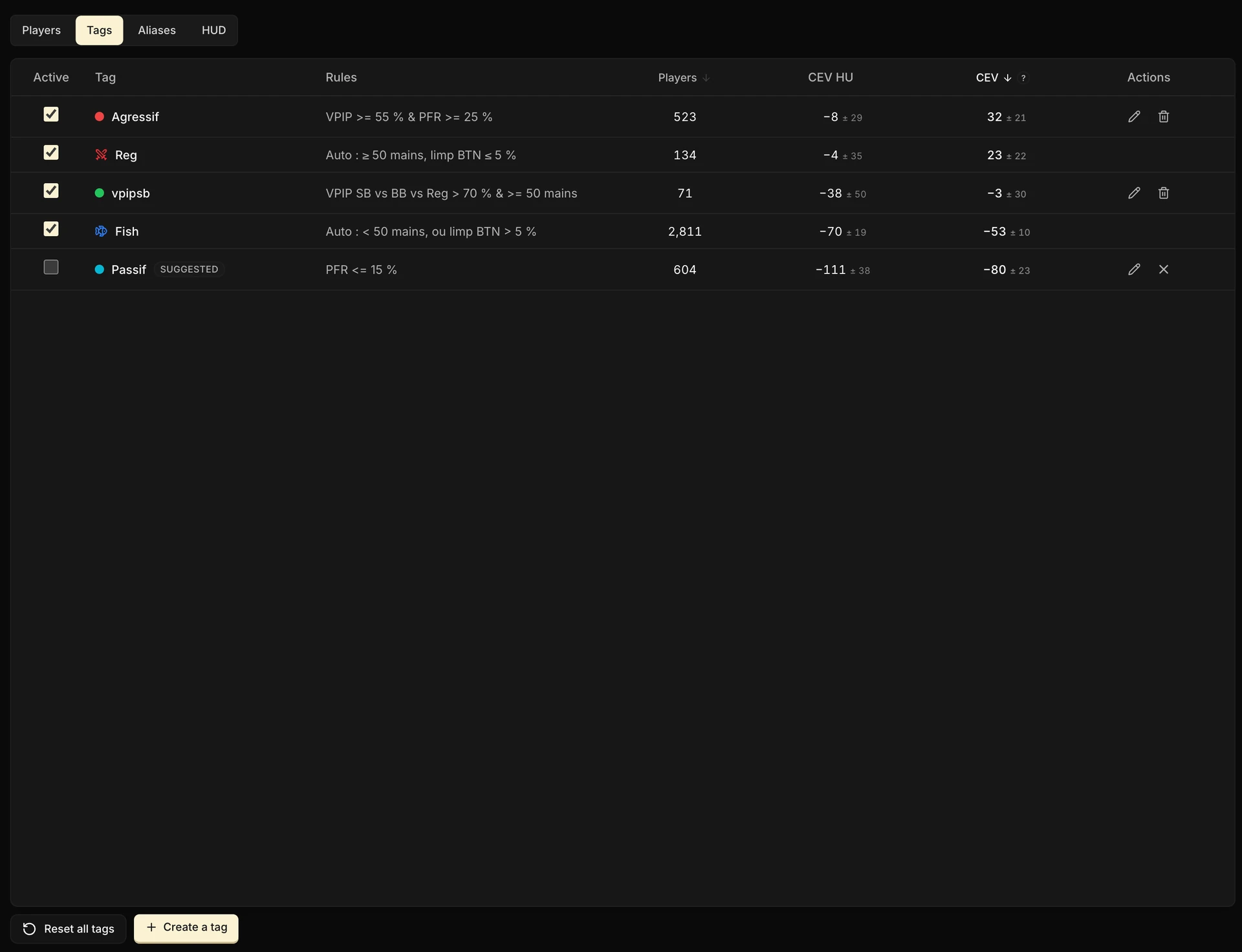
| Column | Content |
|---|---|
| Active | A checkbox to enable or hide the tag |
| Tag | The color dot and the name |
| Rules | The readable summary of the rule, or "Manual (no rule)" |
| Players | The number of opponents carrying the tag |
| CEV HU / CEV | The average CEV of the tagged players themselves, in HU and overall |
The CEV columns deserve a second look: they don't show your results against these players, but the CEV of the tagged players themselves, in chips per tournament, computed on the hands you played against them.
It's your profitability barometer for a cohort: the more negative the tagged players' CEV, the more chips that profile bleeds, and the more profitable it is to face.
Read that number with suspicion all the same: it is measured on your hands against them, so it inherits every flaw of the tag.
A tag built on small samples may keep only the opponents who took chips off you over two or three hands: their CEV will come out excellent, when it says nothing about their real level. And the other way round, a very negative CEV may be nothing more than a run of luck on your side.
The second half of this chapter is devoted to that trap.
Two families of rows live side by side in this table:
- The default tags: Fish, Reg and Unknown, the ones from the previous chapter. They are locked: they can be neither renamed nor deleted, and their classification logic stays that of the automatic algorithm.
- Your custom tags, editable and deletable through the pencil and bin icons on each row.
Building a tag rule
The creation panel asks you for a name, a color, and above all conditions, which you add one by one and which stack up as cards. Five tabs organize the work:
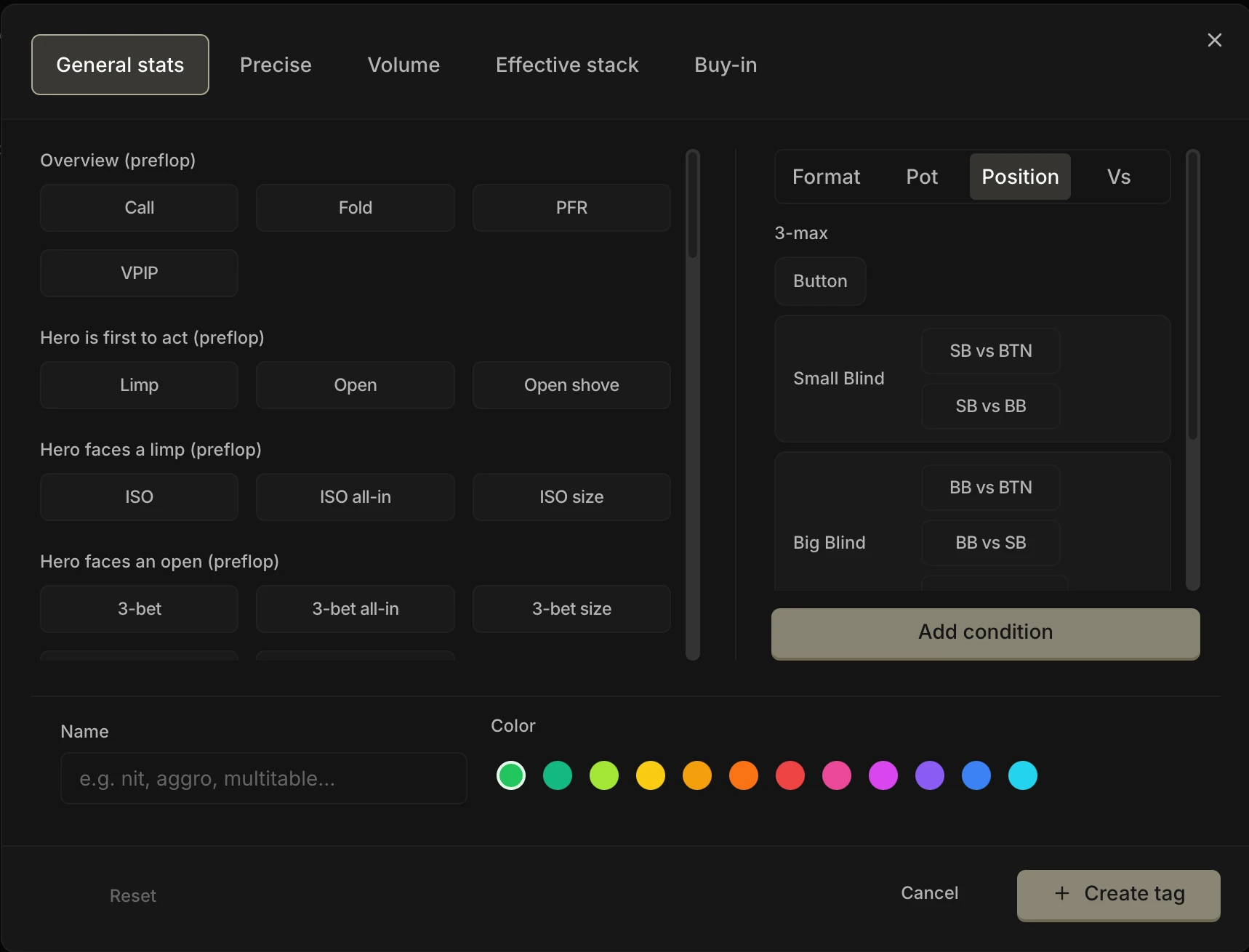
| Tab | What it does |
|---|---|
| General stats | Sets a condition on a stat from the catalog (VPIP, PFR, Limp, Open shove, 3-bet, C-bet…) |
| Precise | Sets a condition on an exact action line that you build street by street |
| Volume | Sets a condition on the number of hands played against the player |
| Effective stack | Restricts the whole rule to a stack range (in bb) |
| Buy-in | Restricts the whole rule to the buy-ins of your choice |
The first three tabs set conditions; the last two set nothing, they narrow the measurement window of every condition at once.
An "Open shove BTN > 10%" rule restricted to 20 bb+ stacks measures that rate only on the hands where the effective stack was above 20 bb.
The General stats tab, your starting point
The catalog gathers close to 70 stats: the whole preflop (VPIP, PFR, Limp, Open shove, ISO, 3-bet, and every Fold vs / Call vs response), postflop aggression (C-bet, 2-barrel, donk, probe, stab…), postflop defense (fold, call or raise against each type of bet) and showdown (WWSF, WTSD, W$SD).
On top of that, each condition carries its own scope, adjustable in the right-hand column:
- Format: 3-max, Heads-up, or both;
- Positions: BTN, SB, BB, and their variants against each opponent;
- Pot type (for postflop stats): raise pot, limp pot, ISO pot, 3-bet pot;
- Vs: measure the stat against everyone, against you only, or against the players carrying another tag.
Once the condition is set, its card lets you adjust three things: the operator (>, ≥, <, ≤ or "between"), the threshold as a percentage, and the sample floor "over ≥ N opportunities". We'll come back to that last setting at length: it is what separates a reliable tag from a misleading one.
The Precise tab, for exact lines
When no stat in the catalog fits, you build the action sequence yourself, street by street, with "?" wildcards for the actions you don't care about. The last action of the line is the one being measured: "limp then fold against an ISO", "check-raise river", and so on.
It's the same builder as the Review's Action line filter, detailed in the chapter The Filters panel: if you know how to use it there, you know how to build a Precise tag.
Combining conditions
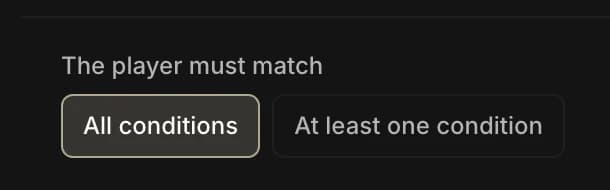
As soon as the rule has two conditions, a "The player must match" selector appears: All conditions (AND) or At least one condition (OR). A rule can stack up to ten of them, but you'll see below that a good rule rarely has more than two or three.
A guided example: the "Over-folder vs shove" tag. General stats tab, Fold vs OS stat (fold against an open shove), condition > 60% over ≥ 8 opportunities. Add a Volume ≥ 50 hands condition with AND, pick a name and a color, confirm.
You get the list of the regulars who fold too much against shoves: against them, open-shove wider, especially from the SB.
Where your tags go to work
Creating a tag isn't enough: it only becomes truly useful once you use it to group players together and filter your analyses.
| Surface | What the tag lets you do there |
|---|---|
| Players page | Filter the list by tags (several tags ticked = intersection) |
| HUD | Color dots before the nickname, tag editable in one click, and stats measurable "vs tag" |
| Replayer | Badges on every opponent, clickable to retag on the fly |
| Review | Three opponent filters, detailed below |
| Dashboard | Describe the table composition (who sits on your left, on your right, in HU) and keep only the tournaments that match it |
| Leak Finder | Study the ranges and stats of a whole cohort of tagged players |
| Dynamic aliases | Build a group automatically from a tag |
Watch out for the vs a Tag filter
Everywhere the tracker offers a "vs" filter ("vs Fish", "vs Reg" or "vs [your tag]"), it does not mean "a player carrying the tag was sitting at the table". It only keeps the hands where the active opponent carries that tag: the player the tracker singles out for the situation, based on the positions and the action.
Example: you're in the BB facing a BTN open, Villain123 in the SB has folded. "Vs Fish" keeps this hand only if the BTN is a fish. Whether Villain123 is a fish or a reg doesn't matter, they're out of the hand.
A detail that catches people out: in these filters, "vs Reg" includes you. When the tracker measures how an opponent plays "against the regs", you count as one of them: you are a reg of your own pool.
Handy: describing the players at the table
In the dashboard's filter panel, the Opponents tab holds the Players at the table block: there you describe a composition, slot by slot. The opponent left of hero, the one on the right, and the HU opponent. The Review offers the same block, under the name Spin opponent.
In each slot, you tick one or more tags, or even a specific player.
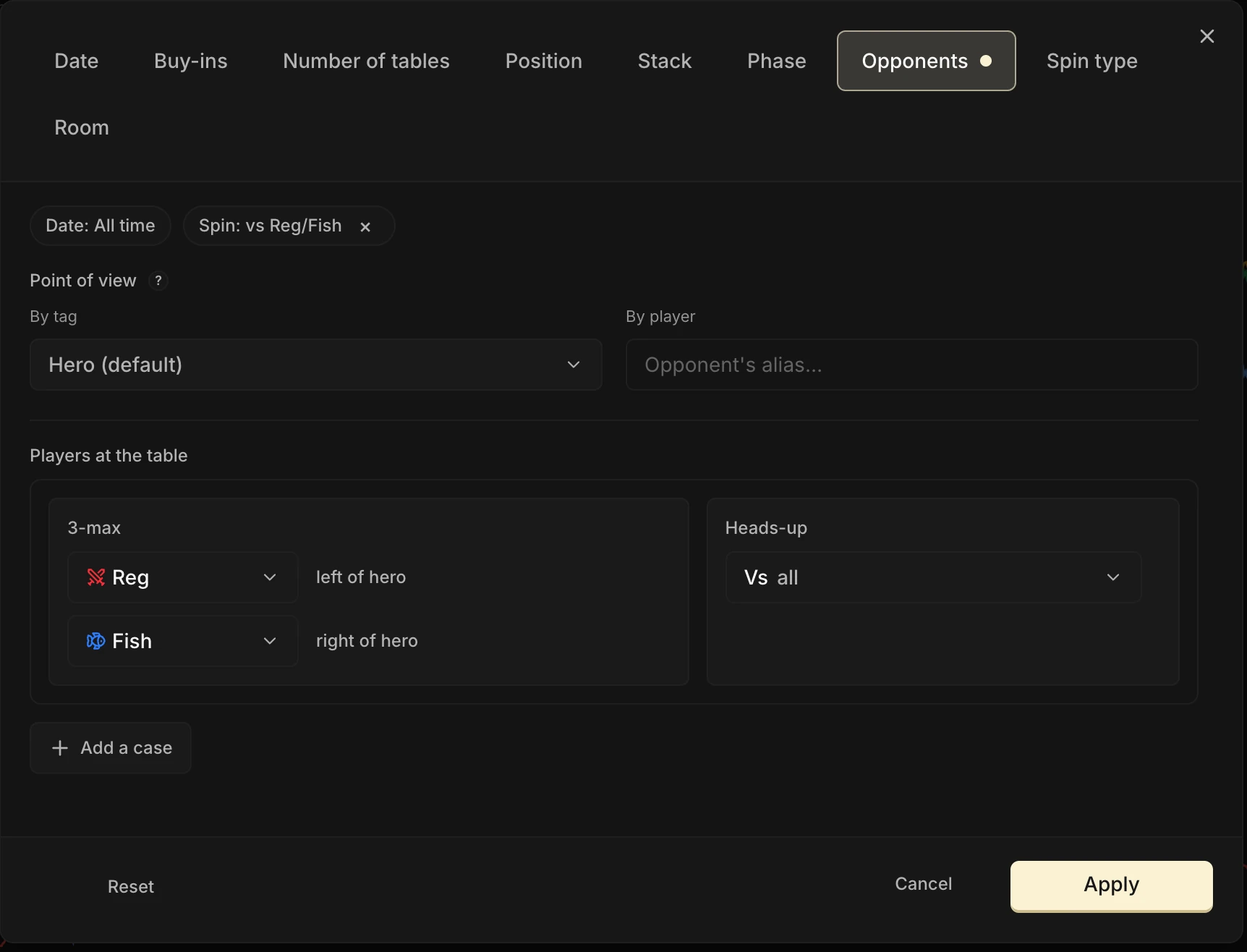
This is the filter that answers composition questions:
My results when both opponents are fish
Or again:
When a reg is on my left
The dashboard's CEV by profile view rests on the same logic, and we'll come back to it in its own chapter.
The special case of the Review
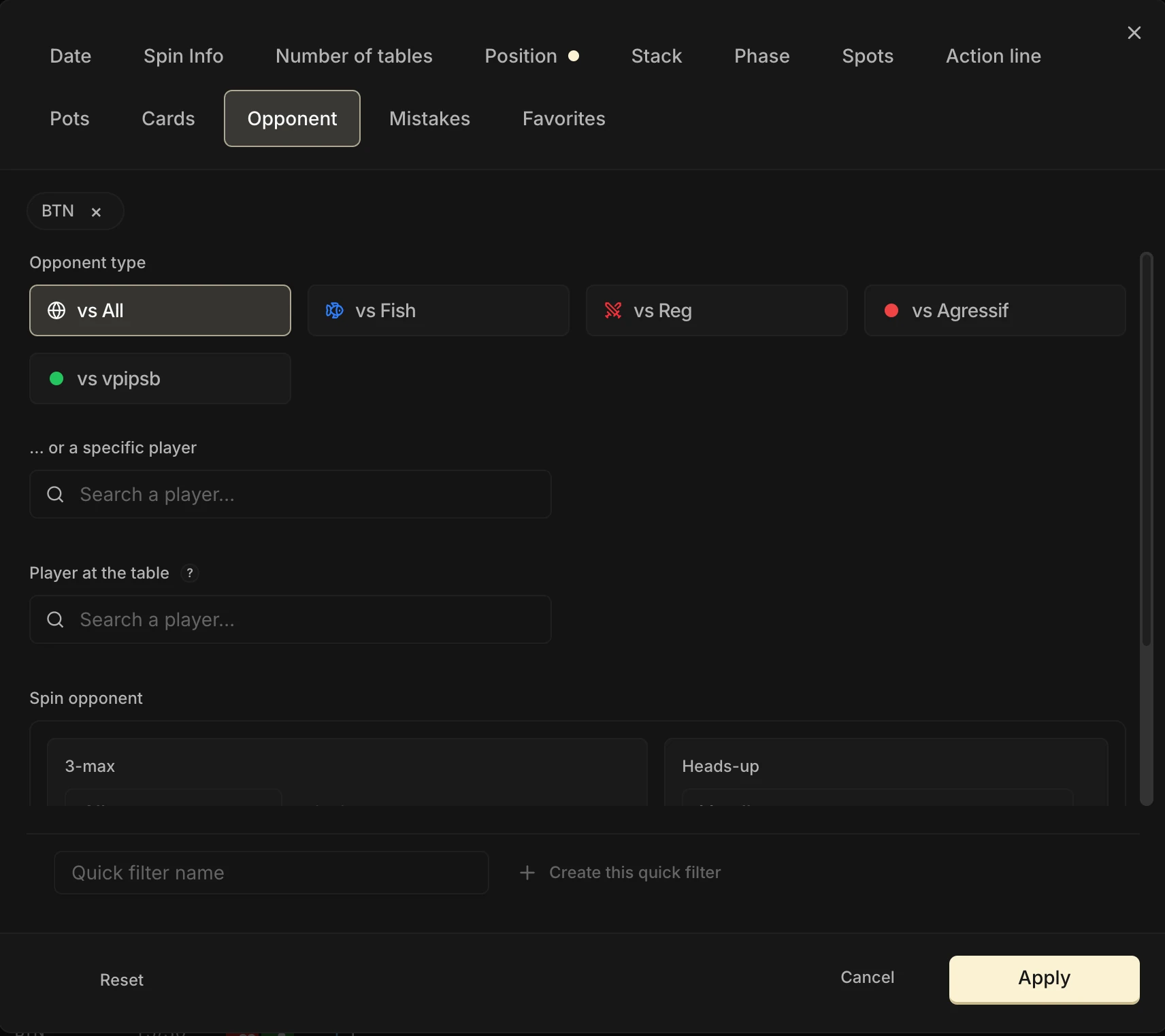
The Review offers three possible filters. Here is what each of them lets you do:
- Opponent type: the smart "vs" filter, which targets the relevant opponent of each hand.
- Player at the table: raw presence, with no notion of position or of role in the hand.
- Spin opponent: searches for a precise composition, for example a reg to hero's left and a fish to hero's right.

The fundamental trap: opponents you have faced for ten hands
Computed tags rest on the individual stats of each opponent, measured only on the hands you played against them. In Spin, that sample is often tiny: about ten hands for most players.
At that volume, a VPIP or a 3-bet rate mostly reflects chance. With the "over ≥ N opportunities" setting left at 1, a player who 3-bets their one and only opportunity can already be classified aggressive. Raise that floor before you trust the tag.
And there is something nastier: regression to the mean
Take a "VPIP ≥ 55%" tag computed over about ten hands. Who falls into it?
The genuinely loose players, of course. But also every ordinary player who simply got good cards during those ten hands. And since ordinary players are far more numerous in the pool, they end up in the majority inside your cohort.
The other way round, the truly loose player who was dealt ten unplayable hands slips through the filter and never makes it in.
The result: your "VPIP ≥ 55%" cohort actually plays clearly fewer than 55% of hands. The threshold you set is not the group's real level, it is the crest of a wave of chance.
An adjustment calibrated on the displayed number will therefore overshoot by a long way compared with what these players really do.
A rule-based tag is only reliable if you demand the sample: raise the "over ≥ N opportunities", add a Volume condition. Without a floor, you are tagging noise.

The bias that manufactures fake luck
Here now is the most insidious trap of tags, the one that on its own justifies this second half of the chapter. Picture it: you enable the Aggressive tag, then you filter your dashboard on the spins where an opponent carries that tag. And you discover:
My chips curve is way above my CEV, and the Run Luck badge tells me I have run very hot. I win my flips against the aggressive players!
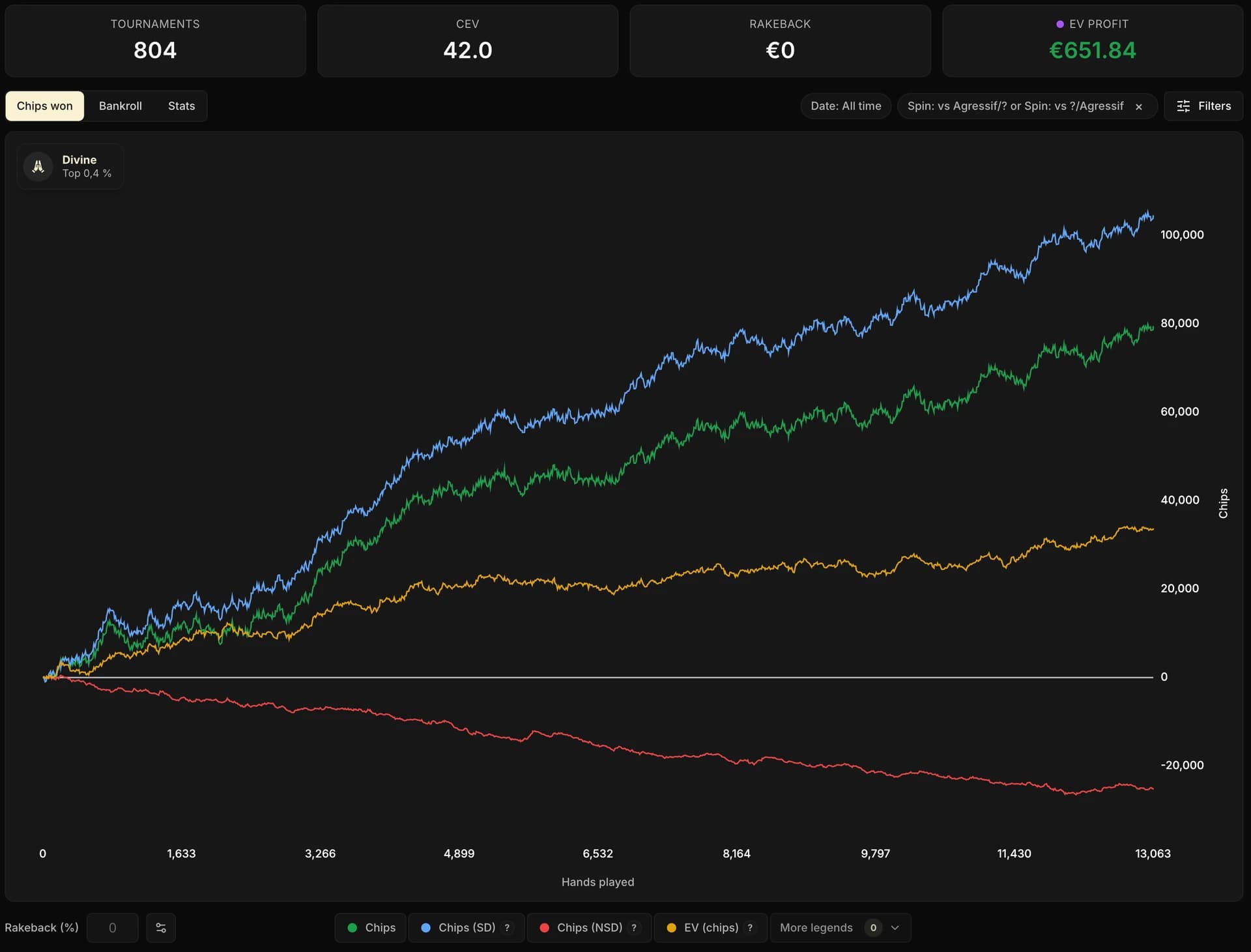
No. Every tracker user sees the same thing with this filter, whatever their real luck. It is neither a CEV bug nor a filter problem: both curves come out of exactly the same hands. It is a selection bias, and it is worth understanding step by step.
The mechanism, in three steps
- When does an opponent show a high VPIP, PFR or open shove % before your eyes? Mostly in heads-up, where everyone plays far wider, and when stacks are short, in push/fold mode. Their observed stats explode during those phases.
- But you only reach the HU of a Spin if you survived the 3-max, very often by winning your flip. The long HU phases, the ones that inflate your opponents' aggressive stats, belong to the tournaments where you have already piled up chips.
- Since the tag is computed on those very hands, filtering "vs players observed as aggressive" largely amounts to selecting the tournaments where you won your all-ins. The chips curve lifts off from CEV by construction.
We measured this gap between chips won and CEV, tournament by tournament, on a test database of several tens of thousands of spins:
| Filtered composition | Average gap between chips won and CEV |
|---|---|
| No filter (whole database) | ≈ 0: CEV is healthy |
| Both opponents tagged Fish | ≈ 0: no bias |
| Both opponents tagged Aggressive | ≈ +5 chips of phantom "luck" |
And here is the proof that the culprit really is the small sample: the bias is massive when the tag rests on few hands, and it disappears completely when the tagged opponents have a real history.
| History of the tagged opponents | Gap between chips won and CEV |
|---|---|
| Fewer than 20 hands | ≈ +13 chips |
| From 20 to 49 hands | ≈ +11 chips |
| From 50 to 199 hands | ≈ +4 chips |
| 200 hands and more | ≈ 0: the bias disappears |
The same mechanism plays out the other way round for passive profiles. An opponent looks passive to you mostly when you see them play little, so during the deep-stacked phases of the 3-max: the ones where the three stacks are still close and nobody has taken the lead.
Filtering "vs passives" therefore amounts to selecting the tournaments where you never took control of the chips, often the ones where you busted early. This time the chips curve runs below CEV: fake bad luck.
This bias is not fixed by "adjusting" CEV, and it does not go away with a tag placed by hand either: if you tag as "aggressive" the players you have seen raising non-stop, your eye performs exactly the same selection as the rule. The Run Luck badge itself will be fooled: it honestly measures a dishonestly chosen sample.
This trap is only one example. The mechanism that produces it (stats measured player by player on few hands, then read at the scale of a group) manufactures several others, subtler ones. Here they are.
The other biases of tags computed player by player
Three more traps, worth knowing before any cohort analysis.
The observation context changes everything
By default, a condition aggregates every format and every position. Two players with the same measured VPIP can be very different: a tight player you only ever met in HU, and a genuinely loose player seen in 3-max. The first one is not aggressive, they were simply observed in a context where everybody is.
That is exactly why the per-condition scope exists: bound the format, the position and the effective stack whenever the stat depends on them.
The current tag applies to the whole history
A tag is not recorded hand by hand. It is attached to the player from the information available today, then applied to all your hands against them, even the ones from a time when they played differently.
Your analysis therefore covers the players currently classified in that profile. If new imports change their tag, the old hands included in the filter will change too.
Volume selects regs
Demanding 200 hands of history removes the selection bias, but creates another effect: all that is left are the regulars at your stakes, structurally more reg-like than the field. A high-volume cohort no longer represents your average pool: it represents its most dedicated players.
None of these biases is a flaw in the tracker: they are the mathematical limits of individual stats on a small sample. The tracker gives you the safeguards. It is up to you, when you build the tag, to use them.
Best practices for creating a tag
Everything above condenses into a short list of reflexes:
- Demand a sample, on both fronts. The two settings do not measure the same thing (see just below): raise the "over ≥ N opportunities" of every condition to 8 at the very least, and add a Volume ≥ 50 hands condition as soon as the tag is going to serve a fine-grained read.
- Prefer stable stats to game-phase stats. Limp and PFR describe a player. The open shove or all-in % mostly describes their stack at that moment. If you use a phase stat, bound the effective stack and the position so you compare like with like.
- Keep it lean: two or three conditions at most. A simple rule can be understood, checked and corrected. A rule with eight conditions is a tag you will no longer be able to read back in a month.
- Start with a single tag, and watch it live. Set the rule, come back the following week to see how many players it caught and what their CEV is worth. A tag that classifies half your pool distinguishes nothing; a tag that classifies three will never teach you anything either.
Opportunities and volume are not the same thing
The "over ≥ N opportunities" counts the chances to measure that specific stat. A player can have 300 hands of history against you and still have almost never had to answer an open shove: their "Fold vs OS" then rests on two or three occasions, and the condition no longer means much.
The Volume condition, for its part, counts the hands played against you, all spots combined. It is the general depth of your history on that player.
Both floors are therefore necessary: the first guarantees that the stat was really measured, the second that the player is genuinely known to your database.
The best test of a tag: could you say in one sentence what you will do differently against the players carrying it? If the answer is fuzzy, the tag is useless.
Key takeaways
• Two ways to tag: by hand, or with a numeric rule that applies itself.
• Everything is managed on the Players page, Tags tab: the default tags and your own.
• A rule is a condition (a stat, a threshold) and a scope (format, position, stack…).
• Always demand a sample. In Spin, you only face most of your opponents for about ten hands: without a floor, a tag measures nothing but chance.
• A fragile tag manufactures biases, and there are many of them. Be suspicious of everything you read on a tagged cohort.
• The golden rule: tags to play, Fish / Reg profiles to judge your results.